
TV Cast: HD Screen Mirroring
PEGAS Tools Contains ads
Cast to TV, screen mirror phone to Smart TV. Enjoy HD video stream & TV remote!
- Downloads
- 1.9K+
- on Google Play
- Price
- Free
- No in-app purchases
- Updated
- Aug 8
- 2026 · v1.1.0
Screenshots
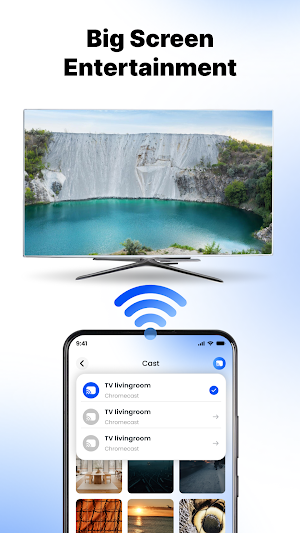

About TV Cast: HD Screen Mirroring
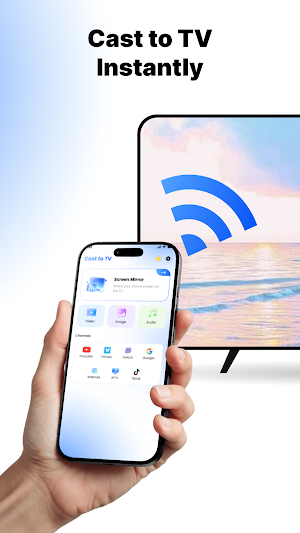
Stop huddling around a small screen! TV Cast: HD Screen Mirroring is the ultimate all-in-one solution to screen share your phone's display, cast web video to TV, and control your smart TV with a built-in universal TV remote.
Whether you want to stream movies, play mobile games on a bigger stage, or share photos with your family, TV Cast: HD Screen Mirroring delivers an instant, cable-free connection with low latency.
✨ KEY FEATURES YOU'LL LOVE ✨
✅ Flawless HD Screen Mirroring
Experience wireless screen share with near-zero latency. Easily screen mirror your entire phone to TV for lag-free gaming, office presentations, browsing photos, or displaying apps in real-time HD quality with TV Cast: HD Screen Mirroring.
✅ Smart TV Cast - Stream Anything, Anywhere
- Web Video Cast: Built-in browser lets you find and stream online movies, TV shows, live news, and sports directly onto the big screen.
- Media Cast: Effortlessly cast local videos, music, and photo slideshows from your phone’s storage.
- High Compatibility: Supports HTML5 videos, MP4, and HLS live streams in M3U8 format.
✅ Universal Smart TV Remote Control
Lost your physical remote? No problem! Your phone doubles as a powerful TV controller. Easily adjust volume, change channels, pause, play, and navigate menus via Wi-Fi display connection.
📺 UNIVERSAL DEVICE SUPPORT
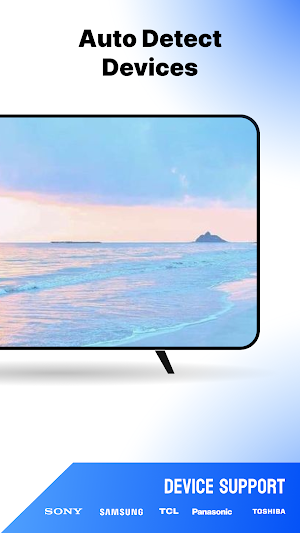
TV Cast: HD Screen Mirroring automatically detects nearby devices on your Wi-Fi network. Connect effortlessly to:
- Google Chromecast, Chromecast Ultra & Google Cast devices.
- Roku Streaming Sticks & Roku TVs.
- Amazon Fire TV & Fire Stick.
- Smart TVs: Samsung, LG (WebOS & Netcast), Sony, TCL, Hisense, Vizio, Panasonic, etc.
- DLNA receivers & UPnP receivers.
- Xbox One, Xbox 360, and PlayStation 4 (via web browser).
🚀 EASY 3-STEP SETUP
Step 1: Ensure your phone and Smart TV (or casting device) are connected to the same Wi-Fi network.
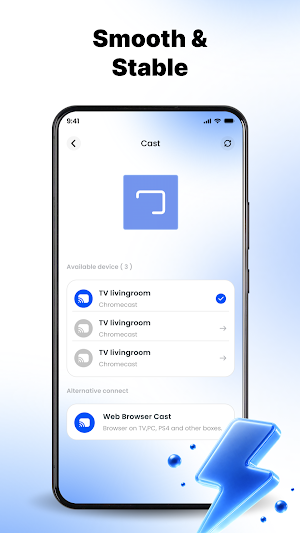
Step 2: Open TV Cast: HD Screen Mirroring. It will automatically scan and discover connectable devices.
Step 3: Select your TV, tap to connect, and enjoy instant screen casting or phone mirror!
💡 WHY CHOOSE OUR APP?
- Fast, stable, and secure wireless screen mirroring.
- Smooth video stream performance for all media types.
- Multi-functional: Cast to TV + Screen Mirror + TV Remote Control.
- Simple, user-friendly interface designed for everyone.
📩 WE VALUE YOUR FEEDBACK
Your experience is our top priority! If you have any questions, encounters any bugs, or want to suggest new features, please feel free to contact us at: [email protected]. Our support team is always ready to assist you.
⚠️ DISCLAIMER:
This app is an independent product developed by a third-party publisher. It is not officially affiliated with or endorsed by Google Chromecast, Roku, Amazon Fire TV, Samsung, LG, Sony, TCL, Hisense, or any other trademarks mentioned above.
👉 Download TV Cast: HD Screen Mirroring now to unlock the full potential of your Smart TV and upgrade your home entertainment center today!
Whether you want to stream movies, play mobile games on a bigger stage, or share photos with your family, TV Cast: HD Screen Mirroring delivers an instant, cable-free connection with low latency.
✨ KEY FEATURES YOU'LL LOVE ✨
✅ Flawless HD Screen Mirroring
Experience wireless screen share with near-zero latency. Easily screen mirror your entire phone to TV for lag-free gaming, office presentations, browsing photos, or displaying apps in real-time HD quality with TV Cast: HD Screen Mirroring.
✅ Smart TV Cast - Stream Anything, Anywhere
- Web Video Cast: Built-in browser lets you find and stream online movies, TV shows, live news, and sports directly onto the big screen.
- Media Cast: Effortlessly cast local videos, music, and photo slideshows from your phone’s storage.
- High Compatibility: Supports HTML5 videos, MP4, and HLS live streams in M3U8 format.
✅ Universal Smart TV Remote Control
Lost your physical remote? No problem! Your phone doubles as a powerful TV controller. Easily adjust volume, change channels, pause, play, and navigate menus via Wi-Fi display connection.
📺 UNIVERSAL DEVICE SUPPORT
TV Cast: HD Screen Mirroring automatically detects nearby devices on your Wi-Fi network. Connect effortlessly to:
- Google Chromecast, Chromecast Ultra & Google Cast devices.
- Roku Streaming Sticks & Roku TVs.
- Amazon Fire TV & Fire Stick.
- Smart TVs: Samsung, LG (WebOS & Netcast), Sony, TCL, Hisense, Vizio, Panasonic, etc.
- DLNA receivers & UPnP receivers.
- Xbox One, Xbox 360, and PlayStation 4 (via web browser).
🚀 EASY 3-STEP SETUP
Step 1: Ensure your phone and Smart TV (or casting device) are connected to the same Wi-Fi network.
Step 2: Open TV Cast: HD Screen Mirroring. It will automatically scan and discover connectable devices.
Step 3: Select your TV, tap to connect, and enjoy instant screen casting or phone mirror!
💡 WHY CHOOSE OUR APP?
- Fast, stable, and secure wireless screen mirroring.
- Smooth video stream performance for all media types.
- Multi-functional: Cast to TV + Screen Mirror + TV Remote Control.
- Simple, user-friendly interface designed for everyone.
📩 WE VALUE YOUR FEEDBACK
Your experience is our top priority! If you have any questions, encounters any bugs, or want to suggest new features, please feel free to contact us at: [email protected]. Our support team is always ready to assist you.
⚠️ DISCLAIMER:
This app is an independent product developed by a third-party publisher. It is not officially affiliated with or endorsed by Google Chromecast, Roku, Amazon Fire TV, Samsung, LG, Sony, TCL, Hisense, or any other trademarks mentioned above.
👉 Download TV Cast: HD Screen Mirroring now to unlock the full potential of your Smart TV and upgrade your home entertainment center today!
Alternatives to TV Cast: HD Screen Mirroring
Looking for apps like TV Cast: HD Screen Mirroring? Here are 5 similar Android apps on Google Play. The highest rated is Coolina (4.8/5), and all 5 are free to download.




| App | Rating | Price | Installs | Last updated | Compare |
|---|---|---|---|---|---|
| TV Cast: HD Screen Mirroring | – | Free | 1,000+ | Aug 8, 2026 | |
| Roku Smart Home | 4.4 / 5 | Free | 1,000,000+ | Sep 30, 2026 | Compare |
| HealthJoy | 4.0 / 5 | Free | 100,000+ | Oct 26, 2026 | Compare |
| Reveri: Relief in Minutes | 4.1 / 5 | Free | 100,000+ | Oct 25, 2026 | Compare |
| Coolina | 4.8 / 5 | Free | 1,000+ | Oct 13, 2026 | Compare |
| Jostle | 3.2 / 5 | Free | 50,000+ | Mar 24, 2026 | Compare |