
Parental Control NetEchoAPP
Pearl Software Apps Parenting
Manage family screen time, block apps, and ensure digital safety.
- Rating
- 4.8
- 107 ratings
- Downloads
- 1.9K+
- on Google Play
- Price
- Free
- No in-app purchases
- Updated
- Apr 29
- 2026 · v15.0
Screenshots
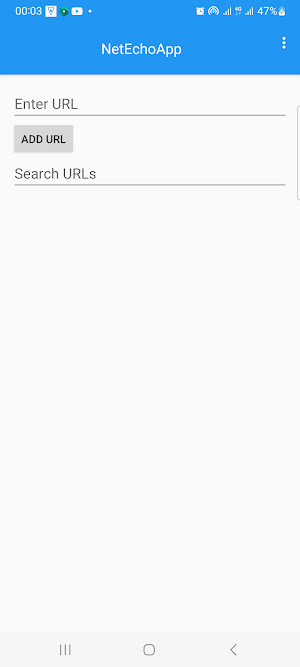


About Parental Control NetEchoAPP
Parental Control NetEchoAPP helps parents guide their children’s digital habits with ease. Set screen time limits, block unwanted apps or websites, track device activity, and monitor calls ,sms and location. Keep your family safe, balanced, and connected with NetEchoAPP.
⭐ Key Features
• App & Website Blocking — Instantly block apps, games, or websites you don’t want your child to access.
• Calls & Messages Monitoring — View call logs and message activity so you know who your child is communicating with.
• Location Tracking — See your child’s real-time location, set safe zones, and get alerts when they arrive or leave.
• Full Storage Access (Read/Write) — With your permission, NetEchoAPP can access storage to scan for content and maintain logs securely.
• Uninstall Protection — Prevent the app from being removed or disabled without your knowledge, ensuring continuous protection.
• Sensitive Content Detection — Detect risky keywords and inappropriate images (e.g. drugs, depression, suicide, etc.) and receive instant alerts.
• Screen Time Limits — Set daily device usage limits, schedule downtime for homework, sleep, or family time.
• Notification Service & VPN Filter — Monitor device notifications and use a built-in VPN service to filter unsafe web traffic and ensure safe browsing.
✅ Permissions & Why They’re Used
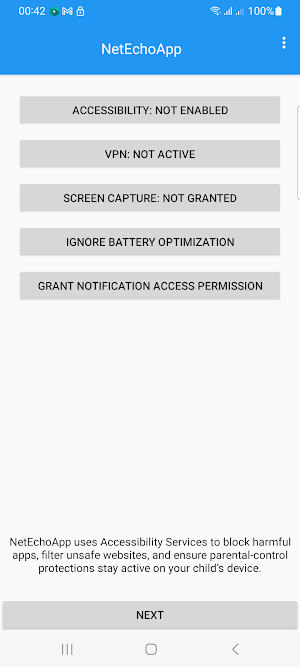
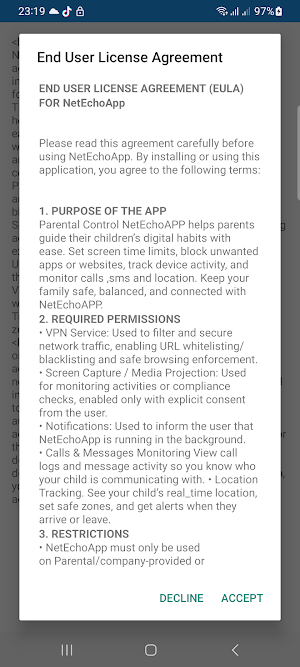
🌐 VPN SERVICE – Used to filter web traffic and enforce safe browsing on the device.
💾 STORAGE (READ/WRITE) – Needed to scan for sensitive images or keywords and to securely maintain logs of activity.
📍 LOCATION, CALL & SMS ACCESS – Allows tracking of your child’s location, call history, and message activity for full-spectrum protection.
🔔 NOTIFICATION ACCESS – Lets the app monitor and optionally manage notifications to support screen time limits and app usage control.
🖥️ MEDIA PROJECTION (SCREEN CAPTURE) – Used only with explicit user consent to help parents or administrators review device activity for compliance or safety purposes.
Why NetEchoApp Needs Device Administrator Permission?
🔒 Device Administrator – Prevents unauthorized uninstall. This prevents a user from uninstalling NetEchoApp without the parent or administrator’s knowledge. No remote wipe, reset, or lock functions are used.
⚠️**NOTES**
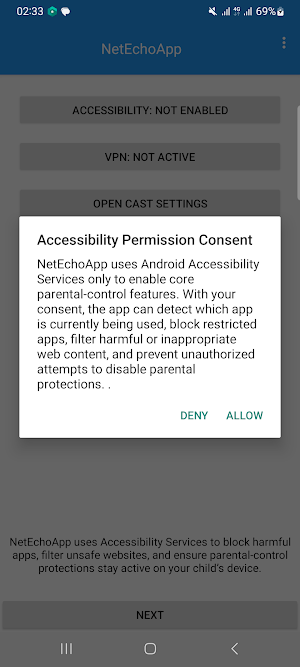
Why Accessibility Service Permission?
Enables deeper app usage tracking, blocking and screen time enforcement for a better experience and enhanced safety. Accessibility is used strictly for child-safety and device-management purposes.
This information is processed securely on the device and is never shared with third parties. Only the parent or authorized administrator can review this safety data.
🔒 Privacy
Your privacy matters to us. At NetEchoAPP, we work continuously to safeguard your personal information and ensure your family’s safety online.
We never sell, rent, or share your personal or location data with advertisers, insurance companies, or data brokers.
NetEchoAPP is built to give parents confidence and control — not hidden tracking. You always have clear visibility into what data is collected, how it’s used, and why it’s needed.
All permissions are explained clearly before use, so you can make informed choices that suit your family’s privacy preferences.
⚠️ Disclaimers
NetEchoAPP is intended for use only on devices that are under parental supervision or with the user’s full consent.
By installing and using NetEchoAPP, you agree to the End User License Agreement (EULA) and the Terms & Conditions provided within the app.
⭐ Key Features
• App & Website Blocking — Instantly block apps, games, or websites you don’t want your child to access.
• Calls & Messages Monitoring — View call logs and message activity so you know who your child is communicating with.
• Location Tracking — See your child’s real-time location, set safe zones, and get alerts when they arrive or leave.
• Full Storage Access (Read/Write) — With your permission, NetEchoAPP can access storage to scan for content and maintain logs securely.
• Uninstall Protection — Prevent the app from being removed or disabled without your knowledge, ensuring continuous protection.
• Sensitive Content Detection — Detect risky keywords and inappropriate images (e.g. drugs, depression, suicide, etc.) and receive instant alerts.
• Screen Time Limits — Set daily device usage limits, schedule downtime for homework, sleep, or family time.
• Notification Service & VPN Filter — Monitor device notifications and use a built-in VPN service to filter unsafe web traffic and ensure safe browsing.
✅ Permissions & Why They’re Used
🌐 VPN SERVICE – Used to filter web traffic and enforce safe browsing on the device.
💾 STORAGE (READ/WRITE) – Needed to scan for sensitive images or keywords and to securely maintain logs of activity.
📍 LOCATION, CALL & SMS ACCESS – Allows tracking of your child’s location, call history, and message activity for full-spectrum protection.
🔔 NOTIFICATION ACCESS – Lets the app monitor and optionally manage notifications to support screen time limits and app usage control.
🖥️ MEDIA PROJECTION (SCREEN CAPTURE) – Used only with explicit user consent to help parents or administrators review device activity for compliance or safety purposes.
Why NetEchoApp Needs Device Administrator Permission?
🔒 Device Administrator – Prevents unauthorized uninstall. This prevents a user from uninstalling NetEchoApp without the parent or administrator’s knowledge. No remote wipe, reset, or lock functions are used.
⚠️**NOTES**
Why Accessibility Service Permission?
Enables deeper app usage tracking, blocking and screen time enforcement for a better experience and enhanced safety. Accessibility is used strictly for child-safety and device-management purposes.
This information is processed securely on the device and is never shared with third parties. Only the parent or authorized administrator can review this safety data.
🔒 Privacy
Your privacy matters to us. At NetEchoAPP, we work continuously to safeguard your personal information and ensure your family’s safety online.
We never sell, rent, or share your personal or location data with advertisers, insurance companies, or data brokers.
NetEchoAPP is built to give parents confidence and control — not hidden tracking. You always have clear visibility into what data is collected, how it’s used, and why it’s needed.
All permissions are explained clearly before use, so you can make informed choices that suit your family’s privacy preferences.
⚠️ Disclaimers
NetEchoAPP is intended for use only on devices that are under parental supervision or with the user’s full consent.
By installing and using NetEchoAPP, you agree to the End User License Agreement (EULA) and the Terms & Conditions provided within the app.
User reviews

Great app for parental control and monitoring, very easy to use and reliable features✅

"NetEcho is perfect for monitoring network activity with clear, real-time insights on all devices! Setup was fast and the alerts help me keep our connection secure✅

"NetEcho is 🌐! Powerful network monitoring that’s simple to set up and use"✅

Great experience with this app ✅

NetEcho is a powerful parental control tool with useful features like app blocking and activity monitoring. It works well and gives peace of mind.✅️

Full Storage Access (Read/Write) — With your permission, NetEchoAPP can access storage to scan for content and maintain logs securely✅
Alternatives to Parental Control NetEchoAPP
Looking for apps like Parental Control NetEchoAPP? Here are 6 similar Android apps on Google Play. All of them are free to download.
-
Village Childcare Experts
-
St. Dominics A.I. Girls School
-
Floruit
-
MamaNest – Pregnancy Tracker
-
Kid Sentry Parent
-
Stichting Pleegwijzer
| App | Rating | Price | Installs | Last updated | Compare |
|---|---|---|---|---|---|
| Parental Control NetEchoAPP | 4.8 / 5 | Free | 1,000+ | Apr 29, 2026 | |
| Village Childcare Experts | – | Free | 10+ | Jul 28, 2023 | Compare |
| St. Dominics A.I. Girls School | – | Free | 1,000+ | Jul 1, 2026 | Compare |
| Floruit | – | Free | 10+ | May 7, 2026 | Compare |
| MamaNest – Pregnancy Tracker | – | Free | 10,000+ | Aug 22, 2026 | Compare |
| Kid Sentry Parent | – | Free | 100+ | Aug 30, 2026 | Compare |
| Stichting Pleegwijzer | – | Free | 100+ | Oct 9, 2025 | Compare |
Similar apps on Google Play
- Village Childcare Experts
- St. Dominics A.I. Girls School
- Floruit
- MamaNest – Pregnancy Tracker
- Kid Sentry Parent
- Parental Control NetEchoAPP
- Stichting Pleegwijzer
- Safe Kiddy
- Kid Sentry Child
- Baby Planner
- Eduparo – Das Eltern Quiz
- Baby Names India
- Leel Launcher
- Pregnancy Track - Bump Journey
- LogSafe
- Kids Lock - (No-Touch)
- Сказки Tiko
- Noma - Baby Names
- StoryDreamer
- Bebé Aprende Pipí y Popó IA
- Baby Orbit
- Starship NICU Journal
- Я говорю! Развитие речи.
- Mom Journey: Pregnancy Tracker