

Beat Check: Timing Trainer
Peach Studio Music & Audio
Measure how steady your timing really is - every note, to the millisecond.
- Downloads
- 167+
- on Google Play
- Price
- Free
- No in-app purchases
- Updated
- Oct 24
- 2026 · v1.0.2
Screenshots
About Beat Check: Timing Trainer
You think you're playing in time. Beat Check tells you whether you actually are.
Record yourself playing, and Beat Check times every single note you play - to within a few milliseconds - then gives you one plain-English answer instead of a wall of numbers:
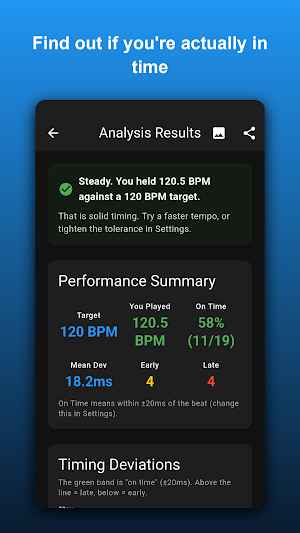
"Steady. You held 119.4 BPM against a 120 BPM target."
"You dragged. You played 112.8 BPM against a 120 BPM target - 7.2 BPM slow."
"You averaged the right tempo, but your spacing wandered."
That's the whole point. No score to game, no grade to argue with - just an honest measurement of how steady you were, and one thing to work on.
BEFORE YOU START - TWO THINGS
1. Bring your own metronome. Beat Check does not play a click. Use the metronome you already practise with - an app, a pedal, a hardware click, a backing track.
2. Put the click in headphones. If your phone's microphone can hear the metronome, it will count the click as if you played it, and your results will be wrong. Headphones, and Beat Check hears only you.
TWO WAYS TO USE IT
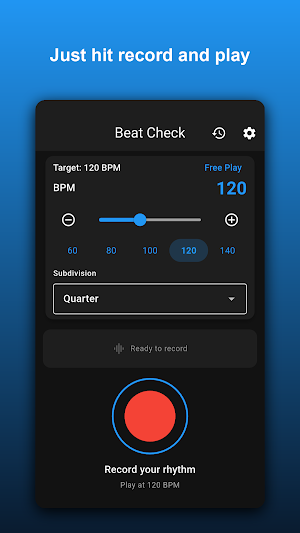
TARGET TEMPO - Name the tempo you're aiming for, play along with your click, and find out what tempo you actually held and how evenly you held it.
FREE PLAY - No target, no click. Just play, and find out how steady you are against yourself. Good for grooves, fills, and warming up.
WHAT IT MEASURES
Beat Check measures STEADINESS - whether every note lands the same distance from the last one, and whether the tempo you held matches the tempo you meant.
It is honest about what it cannot do: it fits its grid to your own playing, so it cannot tell you whether you sit fractionally ahead of or behind a click. That's a matter of feel, and no phone microphone can settle it. What it can tell you, precisely, is whether you are steady - which is the thing you can actually practise.
ALSO IN THE APP
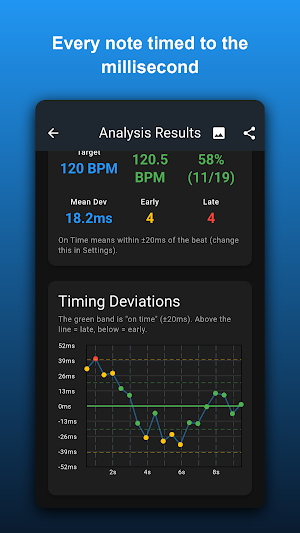
- Note-by-note timing chart, so you can see exactly which notes drifted
- Your real tempo, measured from your playing - not guessed from a preset
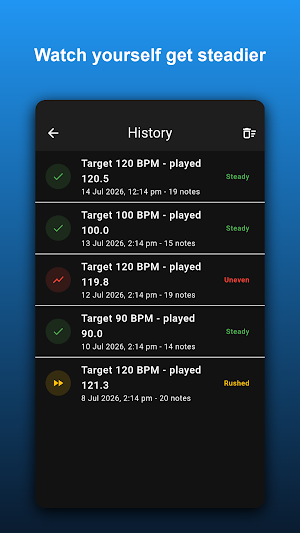
- History of your recent takes, saved on your device, so you can see whether you're improving
- Tolerance you can set: tight, normal, or loose
- Export any take to CSV, or share a screenshot of your results
- Warns you and refuses to score you when the recording is too quiet to read, instead of inventing a number
WHAT IT WORKS WITH
Beat Check is built for PERCUSSION, and that is where it is accurate: drum kit, practice pad, cajon, hand percussion, woodblock, claps. On those it finds essentially every note you play.
Melodic instruments are a different story, and we would rather tell you now than take your money and disappoint you. On a guitar played with real dynamics it misses a meaningful share of the quieter notes, so the results are indicative rather than exact. Sustained, soft-attack sources - bowed strings, voice, pads - often will not be detected at all. If you are a drummer or percussionist, this app is for you. If you are not, try it before you rely on it.
PRIVACY
Your recordings never leave your phone. There is no account, no sign-up, no ads, and no audio is ever uploaded anywhere. Your history is stored on your device and nowhere else.
Built for drummers, percussionists, and anyone who has ever been told "you're rushing" and wanted to know, precisely, by how much.
Record yourself playing, and Beat Check times every single note you play - to within a few milliseconds - then gives you one plain-English answer instead of a wall of numbers:
"Steady. You held 119.4 BPM against a 120 BPM target."
"You dragged. You played 112.8 BPM against a 120 BPM target - 7.2 BPM slow."
"You averaged the right tempo, but your spacing wandered."
That's the whole point. No score to game, no grade to argue with - just an honest measurement of how steady you were, and one thing to work on.
BEFORE YOU START - TWO THINGS
1. Bring your own metronome. Beat Check does not play a click. Use the metronome you already practise with - an app, a pedal, a hardware click, a backing track.
2. Put the click in headphones. If your phone's microphone can hear the metronome, it will count the click as if you played it, and your results will be wrong. Headphones, and Beat Check hears only you.
TWO WAYS TO USE IT
TARGET TEMPO - Name the tempo you're aiming for, play along with your click, and find out what tempo you actually held and how evenly you held it.
FREE PLAY - No target, no click. Just play, and find out how steady you are against yourself. Good for grooves, fills, and warming up.
WHAT IT MEASURES
Beat Check measures STEADINESS - whether every note lands the same distance from the last one, and whether the tempo you held matches the tempo you meant.
It is honest about what it cannot do: it fits its grid to your own playing, so it cannot tell you whether you sit fractionally ahead of or behind a click. That's a matter of feel, and no phone microphone can settle it. What it can tell you, precisely, is whether you are steady - which is the thing you can actually practise.
ALSO IN THE APP
- Note-by-note timing chart, so you can see exactly which notes drifted
- Your real tempo, measured from your playing - not guessed from a preset
- History of your recent takes, saved on your device, so you can see whether you're improving
- Tolerance you can set: tight, normal, or loose
- Export any take to CSV, or share a screenshot of your results
- Warns you and refuses to score you when the recording is too quiet to read, instead of inventing a number
WHAT IT WORKS WITH
Beat Check is built for PERCUSSION, and that is where it is accurate: drum kit, practice pad, cajon, hand percussion, woodblock, claps. On those it finds essentially every note you play.
Melodic instruments are a different story, and we would rather tell you now than take your money and disappoint you. On a guitar played with real dynamics it misses a meaningful share of the quieter notes, so the results are indicative rather than exact. Sustained, soft-attack sources - bowed strings, voice, pads - often will not be detected at all. If you are a drummer or percussionist, this app is for you. If you are not, try it before you rely on it.
PRIVACY
Your recordings never leave your phone. There is no account, no sign-up, no ads, and no audio is ever uploaded anywhere. Your history is stored on your device and nowhere else.
Built for drummers, percussionists, and anyone who has ever been told "you're rushing" and wanted to know, precisely, by how much.
What’s new
Version 1.0.2 · Updated October 24, 2026
Beat Check 1.0.2 - History has a new chart: are you getting steadier from take to take? - Results lead with the verdict and one main number; the other stats sit below - A short card on first launch shows what to do, and the record screen has one tempo header - Fixed layouts that broke at large text sizes - The rating prompt only appears right after a fresh take - A new blue color theme
Alternatives to Beat Check: Timing Trainer
Looking for apps like Beat Check: Timing Trainer? Here are 6 similar Android apps on Google Play. All of them are free to download.
-
SpiroCanvas Spirograph Mandala
-
Lottery Lifetime Odds Sim
-
Chinese Stroke Order: Hanzi
-
Note Quest
-
Avatar Arcade: Mini Games
-
Twin Subtitles: SRT Translator
| App | Rating | Price | Installs | Last updated | Compare |
|---|---|---|---|---|---|
| Beat Check: Timing Trainer | – | Free | 100+ | Oct 24, 2026 | |
| SpiroCanvas Spirograph Mandala | – | Free | 1,000+ | Oct 26, 2026 | Compare |
| Lottery Lifetime Odds Sim | – | Free | 10+ | Oct 22, 2026 | Compare |
| Chinese Stroke Order: Hanzi | – | Free | 100+ | Sep 20, 2026 | Compare |
| Note Quest | – | Free | 50+ | Nov 7, 2026 | Compare |
| Avatar Arcade: Mini Games | – | Free | 10+ | Sep 14, 2026 | Compare |
| Twin Subtitles: SRT Translator | – | Free | 100+ | Oct 23, 2026 | Compare |
Similar apps on Google Play
- SpiroCanvas Spirograph Mandala
- Lottery Lifetime Odds Sim
- Chinese Stroke Order: Hanzi
- Note Quest
- Avatar Arcade: Mini Games
- Twin Subtitles: SRT Translator
- MCR: Learn Chinese Mahjong
- Shengji: Tractor Card Game
- Sage Council: AI Great Minds
- Shiji AI: Classical Chinese
- Riichi Dojo: Japanese Mahjong
- Mayfly Life: Memento Mori
- Paper Battleship: Sea Battle
- Rocket Driver
- (HD) Balance Master 2
- Honeycomb Bubble Breaker
- (HD) Ocean Bubble Shooter
- Ocean Bubble License Key
- Classic Bubble Breaker