
Image Converter – JPG PNG WebP
Patch and Prompt LLC Tools In-app purchases Contains ads
Compress and convert JPG, PNG, and WebP images — fast, offline, no cloud upload.
- Downloads
- 325+
- on Google Play
- Price
- Free
- In-app purchases
- Updated
- Jul 5
- 2026 · v1.0.1
Screenshots



About Image Converter – JPG PNG WebP
Image Converter & Compressor converts and compresses JPG, PNG, and WebP images directly on your Android device — no cloud upload, no account required, no internet connection needed.
Quickly change image formats, reduce file size, and save optimized photos straight to your gallery while keeping your files completely private.
Privacy-Focused Offline Processing
All image processing happens directly on your device.
Your photos are never uploaded to external servers.
This means faster processing and complete privacy — your images stay yours.
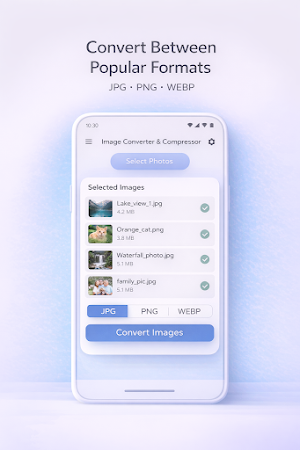
Convert Image Formats
Easily convert photos between common formats used on Android devices:
PNG to JPG
JPG to PNG
JPG to WebP
PNG to WebP
WebP to JPG
WebP to PNG
Converted images are saved directly to your device so you can share or use them immediately.
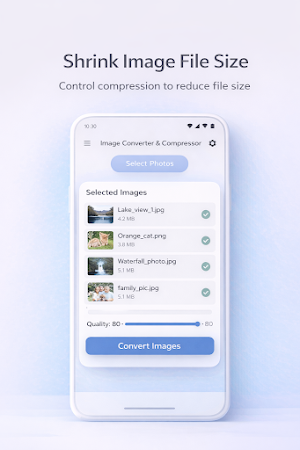
Compress Images and Reduce File Size
Need to reduce image size before sending or uploading a photo?
Use the built-in compression tools to lower file size while keeping good visual quality. Adjustable quality settings let you control how much compression is applied.
This is useful for:
Sharing photos through messaging apps
Uploading images to websites or forms
Saving storage space on your phone
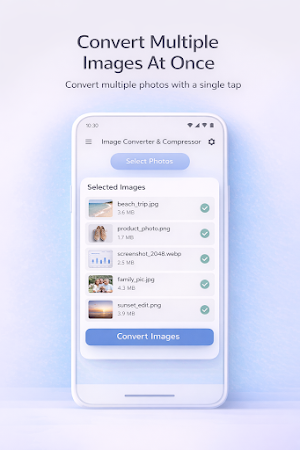
Batch Image Conversion
Select multiple images at once and convert them in a single step.
Clear progress tracking keeps you informed throughout the process.
Convert groups of photos quickly without repeating the same steps.
Features
Convert images to JPG, PNG, or WebP
Compress photos to reduce file size
Batch convert multiple images at once
Adjustable compression quality
Transparent PNG to JPG support
HEIC image support (best effort)
Clear conversion progress and results
Save images directly to your gallery
Works completely offline — no account needed
Perfect For
Reducing image size before sharing
Converting screenshots to another format
Preparing images for websites or documents
Saving storage space on your phone
Image Converter & Compressor is the straightforward Android tool for converting and compressing images — fully offline, no sign-up, no cloud.
Quickly change image formats, reduce file size, and save optimized photos straight to your gallery while keeping your files completely private.
Privacy-Focused Offline Processing
All image processing happens directly on your device.
Your photos are never uploaded to external servers.
This means faster processing and complete privacy — your images stay yours.
Convert Image Formats
Easily convert photos between common formats used on Android devices:
PNG to JPG
JPG to PNG
JPG to WebP
PNG to WebP
WebP to JPG
WebP to PNG
Converted images are saved directly to your device so you can share or use them immediately.
Compress Images and Reduce File Size
Need to reduce image size before sending or uploading a photo?
Use the built-in compression tools to lower file size while keeping good visual quality. Adjustable quality settings let you control how much compression is applied.
This is useful for:
Sharing photos through messaging apps
Uploading images to websites or forms
Saving storage space on your phone
Batch Image Conversion
Select multiple images at once and convert them in a single step.
Clear progress tracking keeps you informed throughout the process.
Convert groups of photos quickly without repeating the same steps.
Features
Convert images to JPG, PNG, or WebP
Compress photos to reduce file size
Batch convert multiple images at once
Adjustable compression quality
Transparent PNG to JPG support
HEIC image support (best effort)
Clear conversion progress and results
Save images directly to your gallery
Works completely offline — no account needed
Perfect For
Reducing image size before sharing
Converting screenshots to another format
Preparing images for websites or documents
Saving storage space on your phone
Image Converter & Compressor is the straightforward Android tool for converting and compressing images — fully offline, no sign-up, no cloud.
What’s new
Version 1.0.1 · Updated July 5, 2026
Compress images to a target file size (100 KB, 200 KB, 500 KB, or 1 MB) Resize images by longest side (800, 1280, or 1920 px) Screen reader label added to the remove-image button Sharper image thumbnails in the selection list Faster PNG and WebP batch conversions
User reviews

I've used this several times already, and it's been great. Super easy to use, converts images quickly, and saves me a lot of hassle.
Alternatives to Image Converter – JPG PNG WebP
Looking for apps like Image Converter – JPG PNG WebP? Here are 6 similar Android apps on Google Play. All of them are free to download.
-
Coldlight: Idle Tower Defense
-
Cribbage Board
-
Incident Commander: Sysadmin
-
Seedling: Bible Stories
-
Stay Salty
-
Patch Tuesday Companion
| App | Rating | Price | Installs | Last updated | Compare |
|---|---|---|---|---|---|
| Image Converter – JPG PNG WebP | – | Free | 100+ | Jul 5, 2026 | |
| Coldlight: Idle Tower Defense | – | Free | 50+ | Aug 3, 2026 | Compare |
| Cribbage Board | – | Free | 50+ | Jul 28, 2026 | Compare |
| Incident Commander: Sysadmin | – | Free | 50+ | Jul 23, 2026 | Compare |
| Seedling: Bible Stories | – | Free | 10+ | Jul 5, 2026 | Compare |
| Stay Salty | – | Free | 10+ | Jul 4, 2026 | Compare |
| Patch Tuesday Companion | – | Free | 10+ | – | Compare |