
Quick IPTV Player - Live TV
Video Players & Editors
Fast IPTV player for M3U/M3U8 playlists with mini player & favorites
- Rating
- 2.2
- 52 ratings
- Downloads
- 10K+
- on Google Play
- Price
- Free
- No in-app purchases
- Updated
- Apr 15
- 2026 · v2.2
Screenshots
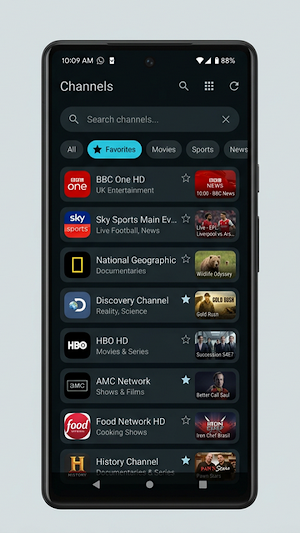
About Quick IPTV Player - Live TV
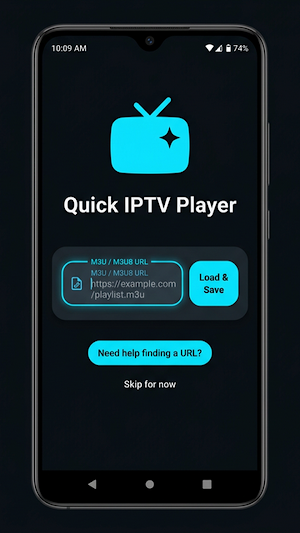
Quick IPTV Player is a fast, lightweight, and modern IPTV player for Android designed to play M3U and M3U8 playlists provided by users.
The app focuses on smooth streaming, a clean interface, and powerful playback features while keeping your data private. Quick IPTV Player does not provide channels — it simply plays the playlists you add.
Built with modern Android technologies like Jetpack Compose and Media3 ExoPlayer, the app delivers stable performance and a smooth viewing experience.
📺 Play Your IPTV Playlists Easily
Quick IPTV Player allows you to load playlists from M3U or M3U8 URLs and instantly browse channels in an organized list or grid layout.
Features include:
• Load IPTV playlists from URL
• Support for M3U and M3U8 playlists
• Fast playlist parsing
• Channel logos and groups
• Search channels by name or category
▶ Powerful Video Player
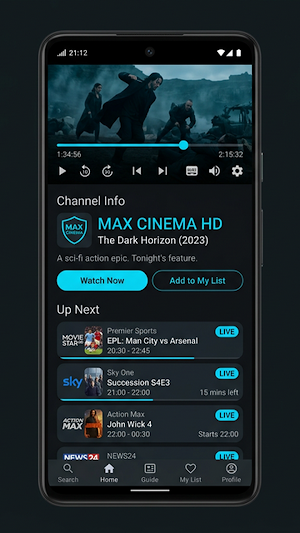
The built-in player is powered by Media3 ExoPlayer, offering reliable playback for many streaming formats.
Player features:
• Full-screen playback
• HLS and DASH streaming support
• Playback speed control (0.5x – 2x)
• Rewind and forward controls
• Aspect ratio modes (Fit, Zoom, Width, Height)
• Buffering indicator
• Network speed display
• Automatic retry on streaming errors
🧩 Mini Player
Quick IPTV Player includes a convenient mini player that allows you to continue watching while browsing other channels within the app.
You can:
• Keep watching while navigating the channel list
• Quickly switch channels
• Resume full-screen playback anytime
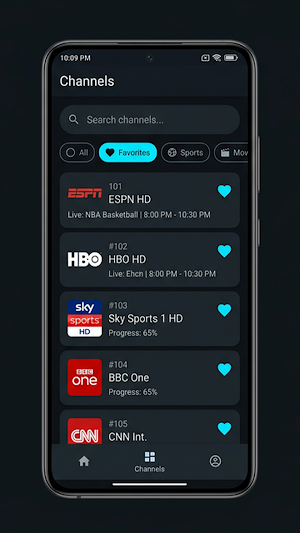
⭐ Favorites & Channel Management
Quickly organize your most watched channels.
• Add channels to favorites
• Easy access to favorite channels
• Search channels instantly
• Clean and simple interface
🎨 Modern Android Design
Quick IPTV Player uses Material Design and modern Android architecture.
• Clean and minimal UI
• Dark mode and light mode support
• Smooth animations
• Fast performance
🔒 Privacy Friendly
Your privacy matters.
Quick IPTV Player:
• Does not collect personal data
• Does not track users
• Does not include analytics or ads
• Stores playlists locally on your device
🌐 Supported Formats
The player supports multiple streaming formats including:
• M3U playlists
• M3U8 streams
• HLS streaming
• DASH streaming
⚠ Important Notice
Quick IPTV Player does not provide any TV channels or content.
Users must provide their own legal IPTV playlists.
The developer does **not host, distribute, or control any streaming content accessed through the app.
The app focuses on smooth streaming, a clean interface, and powerful playback features while keeping your data private. Quick IPTV Player does not provide channels — it simply plays the playlists you add.
Built with modern Android technologies like Jetpack Compose and Media3 ExoPlayer, the app delivers stable performance and a smooth viewing experience.
📺 Play Your IPTV Playlists Easily
Quick IPTV Player allows you to load playlists from M3U or M3U8 URLs and instantly browse channels in an organized list or grid layout.
Features include:
• Load IPTV playlists from URL
• Support for M3U and M3U8 playlists
• Fast playlist parsing
• Channel logos and groups
• Search channels by name or category
▶ Powerful Video Player
The built-in player is powered by Media3 ExoPlayer, offering reliable playback for many streaming formats.
Player features:
• Full-screen playback
• HLS and DASH streaming support
• Playback speed control (0.5x – 2x)
• Rewind and forward controls
• Aspect ratio modes (Fit, Zoom, Width, Height)
• Buffering indicator
• Network speed display
• Automatic retry on streaming errors
🧩 Mini Player
Quick IPTV Player includes a convenient mini player that allows you to continue watching while browsing other channels within the app.
You can:
• Keep watching while navigating the channel list
• Quickly switch channels
• Resume full-screen playback anytime
⭐ Favorites & Channel Management
Quickly organize your most watched channels.
• Add channels to favorites
• Easy access to favorite channels
• Search channels instantly
• Clean and simple interface
🎨 Modern Android Design
Quick IPTV Player uses Material Design and modern Android architecture.
• Clean and minimal UI
• Dark mode and light mode support
• Smooth animations
• Fast performance
🔒 Privacy Friendly
Your privacy matters.
Quick IPTV Player:
• Does not collect personal data
• Does not track users
• Does not include analytics or ads
• Stores playlists locally on your device
🌐 Supported Formats
The player supports multiple streaming formats including:
• M3U playlists
• M3U8 streams
• HLS streaming
• DASH streaming
⚠ Important Notice
Quick IPTV Player does not provide any TV channels or content.
Users must provide their own legal IPTV playlists.
The developer does **not host, distribute, or control any streaming content accessed through the app.
Alternatives to Quick IPTV Player - Live TV
Looking for apps like Quick IPTV Player - Live TV? Here are 6 similar Android apps on Google Play. All of them are free to download.
-
Ez CPU – Smart Device Monitor
-
Screen Relay – Mirror and Cast
-
Near Call - Offline Messenger
-
Ez QR – Quick & Smart
-
Desk Remote – PC Control
-
PlayWave - Ez Video Player
| App | Rating | Price | Installs | Last updated | Compare |
|---|---|---|---|---|---|
| Quick IPTV Player - Live TV | 2.2 / 5 | Free | 10,000+ | Apr 15, 2026 | |
| Ez CPU – Smart Device Monitor | – | Free | 10,000+ | Sep 27, 2026 | Compare |
| Screen Relay – Mirror and Cast | – | Free | 100+ | Feb 28, 2026 | Compare |
| Near Call - Offline Messenger | – | Free | 1,000+ | Feb 10, 2026 | Compare |
| Ez QR – Quick & Smart | – | Free | 10+ | Feb 5, 2026 | Compare |
| Desk Remote – PC Control | – | Free | 100+ | Jan 31, 2026 | Compare |
| PlayWave - Ez Video Player | – | Free | 500+ | Sep 16, 2026 | Compare |