

Photo Cleaner: Swipe & Sort
Tools Contains ads
Sort a month of photos by swiping: left to delete, right to keep. Trash-first.
- Downloads
- 6+
- on Google Play
- Price
- Free
- No in-app purchases
- Updated
- Oct 8
- 2026 · v1.0.3
Screenshots
About Photo Cleaner: Swipe & Sort
Nobody sits down and sorts four thousand photos. Sorting one month, one photo at a time, is a different proposition.
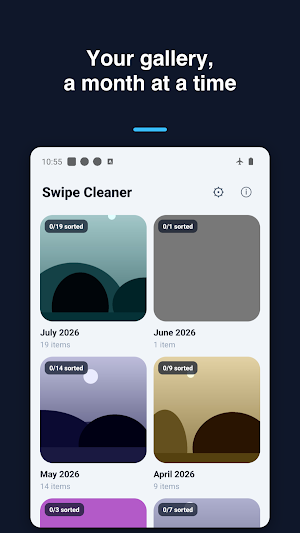
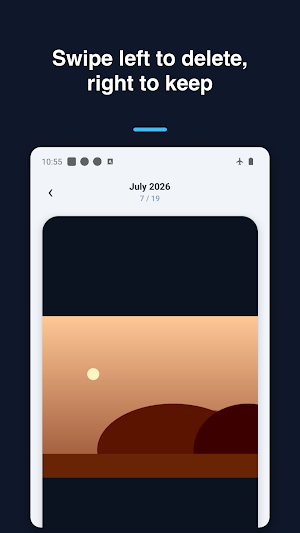
Your gallery opens as a grid of months with a count on each, so you can start with the month that got out of hand. Inside, a single photo at a time: swipe left to delete, right to keep, and the counter moves. Change your mind and the last swipe comes back.
- Months laid out with counts and sorted progress
- One photo at a time, decided with a swipe
- Undo any swipe before you commit
- A review step before anything is removed
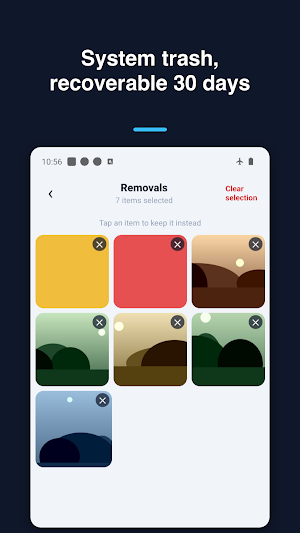
- Deletions go to Android's system trash
- Whatever is trashed can be restored for thirty days
- A summary of what the cleanup freed, and a way to share it
The review screen shows everything you swiped left on as a grid, and tapping an item pulls it back out. Only when you confirm does anything leave the gallery, and even then it lands in the trash rather than disappearing.
Photos stay on the device throughout. There is no upload, no account and no daily limit on how much you sort.
Your gallery opens as a grid of months with a count on each, so you can start with the month that got out of hand. Inside, a single photo at a time: swipe left to delete, right to keep, and the counter moves. Change your mind and the last swipe comes back.
- Months laid out with counts and sorted progress
- One photo at a time, decided with a swipe
- Undo any swipe before you commit
- A review step before anything is removed
- Deletions go to Android's system trash
- Whatever is trashed can be restored for thirty days
- A summary of what the cleanup freed, and a way to share it
The review screen shows everything you swiped left on as a grid, and tapping an item pulls it back out. Only when you confirm does anything leave the gallery, and even then it lands in the trash rather than disappearing.
Photos stay on the device throughout. There is no upload, no account and no daily limit on how much you sort.
What’s new
Version 1.0.3 · Updated October 8, 2026
17 interface languages with a saved System option, Settings access on every screen and optional localized Tally feedback. Improved safe selection and removal messages.
Alternatives to Photo Cleaner: Swipe & Sort
Looking for apps like Photo Cleaner: Swipe & Sort? Here are 6 similar Android apps on Google Play. All of them are free to download.
-
Tone Generator - Sweep & Noise
-
Vocal Warm Up - Sing Trainer
-
One Stroke: Line Draw Puzzle
-
Flags & Capitals: Geo Quiz
-
Checkers & Draughts
-
Gig Chord Book
| App | Rating | Price | Installs | Last updated | Compare |
|---|---|---|---|---|---|
| Photo Cleaner: Swipe & Sort | – | Free | 5+ | Oct 8, 2026 | |
| Tone Generator - Sweep & Noise | – | Free | 100+ | – | Compare |
| Vocal Warm Up - Sing Trainer | – | Free | 100+ | Oct 6, 2026 | Compare |
| One Stroke: Line Draw Puzzle | – | Free | 10+ | Oct 8, 2026 | Compare |
| Flags & Capitals: Geo Quiz | – | Free | 1+ | Oct 9, 2026 | Compare |
| Checkers & Draughts | – | Free | 10+ | Oct 7, 2026 | Compare |
| Gig Chord Book | – | Free | 1+ | Sep 26, 2026 | Compare |