
Rhythm: Time, Activity Tracker
Productivity Contains ads
Track time on what matters. Timers, streaks, and cross-device sync.
- Downloads
- 1+
- on Google Play
- Price
- Free
- No in-app purchases
- Updated
- Sep 1
- 2026 · v1.0.5
Screenshots


About Rhythm: Time, Activity Tracker
🎵 Rhythm is a simple, focused way to track time spent on the things you
care about — deep work, hobbies, workouts, reading, side projects,
anything you’d like to build a rhythm around. ⏱️
Track your way 🎯
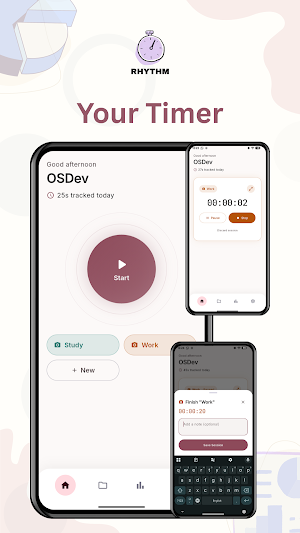
Create your own activities, each with its own icon and color. 🎨 Start a
timer with one tap, pause and resume freely, add a note when you finish, 📝
and let Rhythm quietly keep the history. 📚
See your patterns 📊
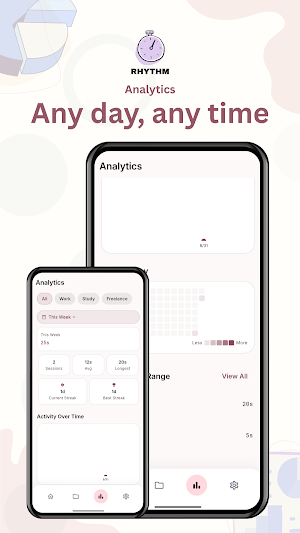
A GitHub-style contribution grid shows your consistency at a glance. 🔥
Current and longest streaks, totals by day/week/month/year, and a fully
custom date range when you want to look at a specific stretch of time. 📅
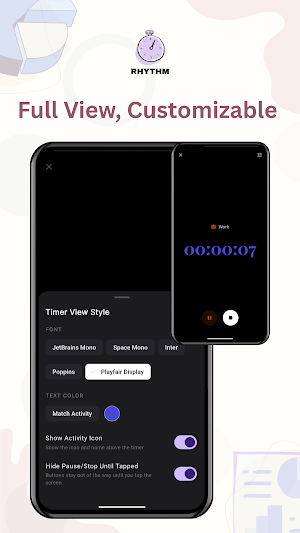
Distraction-free Timer View ⏱️
Go full-screen with a big, clean timer. 🖥️ Choose the font, the color, and
whether the controls stay visible or fade away until you tap the screen
— set up once, exactly the way you like it. ✨
Track from more than one device 📱💻
Pair your phone with the desktop app by scanning a QR code — no
account, no cloud. 🔒 Once paired, your activities, sessions, and settings
stay in sync between them automatically, and a paired phone can even
lock or unlock a paired desktop, or extend it by watching a quick ad
for extra days. 📺 Each device can still track its own timer independently
too, so you can see what’s running elsewhere at a glance. 👀
Make it yours 🛠️
Light, dark, or system theme. ☀️🌙 A custom accent color. 🎨 Rename “Activity”
to whatever fits how you think about your own time. ✏️ Choose which quick-
start shortcuts show up on your home screen. 🏠
Private by design 🔐
Your activities, sessions, and notes are stored on your device — there’s
no account to create and no cloud required to use the app, sync
between your own devices included. ☁️❌ Device pairing only ever runs
on your own home network. 🏠🔒
Whether you’re a student tracking study sessions, 🎓 a freelancer logging
hours, 💼 or just someone who wants a clearer picture of where their time
actually goes, ⏳ Rhythm gets out of the way and lets you focus on the
thing you’re doing — not the app doing the tracking. 🎯✨
care about — deep work, hobbies, workouts, reading, side projects,
anything you’d like to build a rhythm around. ⏱️
Track your way 🎯
Create your own activities, each with its own icon and color. 🎨 Start a
timer with one tap, pause and resume freely, add a note when you finish, 📝
and let Rhythm quietly keep the history. 📚
See your patterns 📊
A GitHub-style contribution grid shows your consistency at a glance. 🔥
Current and longest streaks, totals by day/week/month/year, and a fully
custom date range when you want to look at a specific stretch of time. 📅
Distraction-free Timer View ⏱️
Go full-screen with a big, clean timer. 🖥️ Choose the font, the color, and
whether the controls stay visible or fade away until you tap the screen
— set up once, exactly the way you like it. ✨
Track from more than one device 📱💻
Pair your phone with the desktop app by scanning a QR code — no
account, no cloud. 🔒 Once paired, your activities, sessions, and settings
stay in sync between them automatically, and a paired phone can even
lock or unlock a paired desktop, or extend it by watching a quick ad
for extra days. 📺 Each device can still track its own timer independently
too, so you can see what’s running elsewhere at a glance. 👀
Make it yours 🛠️
Light, dark, or system theme. ☀️🌙 A custom accent color. 🎨 Rename “Activity”
to whatever fits how you think about your own time. ✏️ Choose which quick-
start shortcuts show up on your home screen. 🏠
Private by design 🔐
Your activities, sessions, and notes are stored on your device — there’s
no account to create and no cloud required to use the app, sync
between your own devices included. ☁️❌ Device pairing only ever runs
on your own home network. 🏠🔒
Whether you’re a student tracking study sessions, 🎓 a freelancer logging
hours, 💼 or just someone who wants a clearer picture of where their time
actually goes, ⏳ Rhythm gets out of the way and lets you focus on the
thing you’re doing — not the app doing the tracking. 🎯✨
What’s new
Version 1.0.5 · Updated September 1, 2026
- First Lunch - Bug fixes and performance improvement
Alternatives to Rhythm: Time, Activity Tracker
Looking for apps like Rhythm: Time, Activity Tracker? Here are 6 similar Android apps on Google Play. All of them are free to download.
-
Live Note: Notification Center
-
Spinning Wheel: Spin & Pick
-
Link Save Read Content Offline
-
QR Code Scanner & Generator
-
Period Tracker: Cycle Calendar
-
Tasbih - Dhikr Rosary Counter
| App | Rating | Price | Installs | Last updated | Compare |
|---|---|---|---|---|---|
| Rhythm: Time, Activity Tracker | – | Free | 1+ | Sep 1, 2026 | |
| Live Note: Notification Center | – | Free | 1+ | – | Compare |
| Spinning Wheel: Spin & Pick | – | Free | 1+ | – | Compare |
| Link Save Read Content Offline | – | Free | 0+ | – | Compare |
| QR Code Scanner & Generator | – | Free | 1+ | Sep 5, 2026 | Compare |
| Period Tracker: Cycle Calendar | – | Free | 10+ | Aug 9, 2026 | Compare |
| Tasbih - Dhikr Rosary Counter | – | Free | 10+ | – | Compare |