

Omni: Trade Remote
Omni: Trading Tools Tools
The ultimate visual trade manager and remote control for your MT5 terminals.
- Downloads
- 39+
- on Google Play
- Price
- Free
- No in-app purchases
- Updated
- Sep 18
- 2026 · v1.0.1
Screenshots
About Omni: Trade Remote
IMPORTANT REQUIREMENTS:
• This application operates strictly as a utility remote control. It does not support new account creation or registration. You must have an active Omni account configured via our web dashboard.
• This is not a cloud-hosted broker. You must have your MT5 terminal actively running on your desktop computer or a Virtual Private Server (VPS).
• You must install the Omni Expert Advisor (EA) on each MT5 terminal to enable remote connection.
KEY FEATURES:
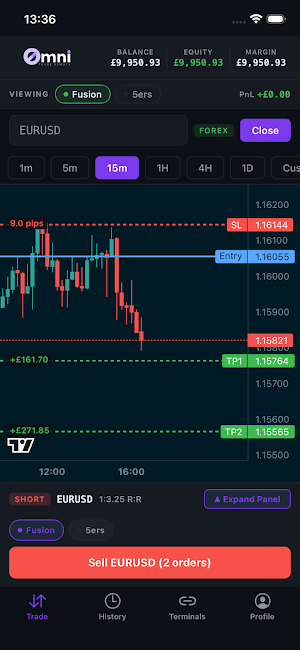
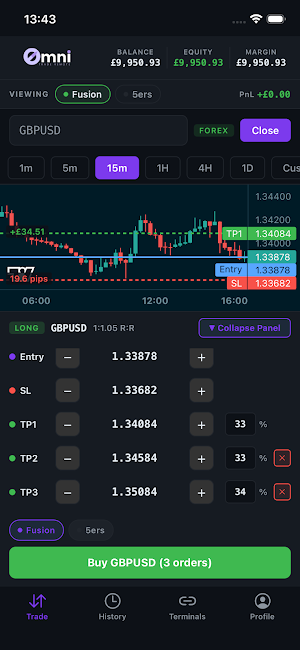
• Visual Order Entry: Ditch the manual number crunching. Tap and drag lines directly on your screen to instantly set your Entry, Stop Loss (SL), and Take Profit (TP) levels.
• Instant Risk Calculation: Automatically calculate exact risk percentages dynamically as you adjust your SL and TP lines.
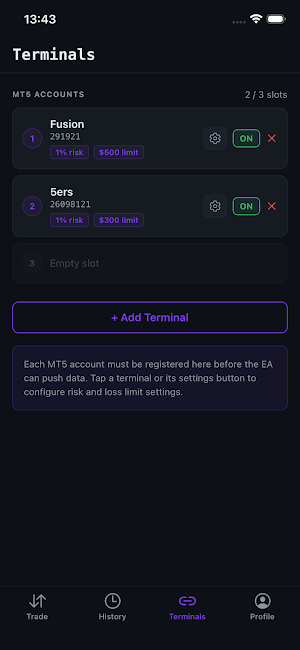
• Multi-Terminal Sync: Manage up to 3 MT5 terminals simultaneously. Set separate risk profiles for each, and send trade executions to all 3 terminals at the tap of a single button.
• Advanced Trade Management: Scale out effortlessly. Support for multiple TPs, instantly move your SL to breakeven, or cut 50% of your open position with dedicated quick-action buttons.
• Secure Connection: Built with standard HTTPS encryption to ensure your terminal data and execution commands remain fully protected.
HOW TO USE:
Install the Omni EA on your active desktop or VPS MT5 terminals.
Set up your account and link your terminals on the Omni web platform.
Download the Omni: Trade Remote app.
Log in using your existing mobile access credentials to visually manage your trades.
What’s new
Version 1.0.1 · Updated September 18, 2026
- Push notifications now work on Android - get alerted the moment a trade closes - Take profit and stop loss changes now apply reliably when editing an open trade - The trade button no longer ignores taps while the chart is still loading - Account groups now show how many of their accounts can trade the selected symbol
User reviews

This is really great for every trader. You can easily manage your position risk percentage just like we do on PC. 100% recommended. Super easy to use
Alternatives to Omni: Trade Remote
Looking for apps like Omni: Trade Remote? Here are 6 similar Android apps on Google Play. The highest rated is Musaffa: Halal Investing App (4.8/5), and all 6 are free to download.
-
MIT Technology Review 4.7
-
Jasper AI Copy Content Writer 4.7
-
Clubworx
-
Koyfin: Stock Market Analysis 4.7
-
Musaffa: Halal Investing App 4.8
-
OpenSea: Trade Crypto & NFTs 3.6
| App | Rating | Price | Installs | Last updated | Compare |
|---|---|---|---|---|---|
| Omni: Trade Remote | – | Free | 10+ | Sep 18, 2026 | |
| MIT Technology Review | 4.7 / 5 | Free | 100,000+ | Sep 3, 2026 | Compare |
| Jasper AI Copy Content Writer | 4.7 / 5 | Free | 100,000+ | Oct 28, 2026 | Compare |
| Clubworx | – | Free | 10,000+ | Sep 14, 2026 | Compare |
| Koyfin: Stock Market Analysis | 4.7 / 5 | Free | 50,000+ | Oct 23, 2026 | Compare |
| Musaffa: Halal Investing App | 4.8 / 5 | Free | 1,000,000+ | Sep 16, 2026 | Compare |
| OpenSea: Trade Crypto & NFTs | 3.6 / 5 | Free | 5,000,000+ | Nov 10, 2026 | Compare |
Compare Omni: Trade Remote with the top alternatives: ratings, updates, ASO score and keyword gaps →
Similar apps on Google Play
- MIT Technology Review
- Jasper AI Copy Content Writer
- Clubworx
- Koyfin: Stock Market Analysis
- Musaffa: Halal Investing App
- OpenSea: Trade Crypto & NFTs
- NOEX Training Platform
- Liner - AI Search and Finance
- cTrader: CFD Trading & Charts
- Pavlok
- ServiceNow Agent
- Bloomberg: Finance Market News
- GitMind: AI Mind Mapping App
- DEX Screener
- CoinAnk: Live Crypto Tracker
- Popl: AI Lead Capture
- CryptoRank Tracker & Portfolio
- Zerion: Crypto Wallet
- Stocktwits: Trading Community