

.MD Easy - Markdown reader.
Official Intelligence Pty. Ltd Productivity
Simple, offline, free, lightweight powerful Markdown reader.
- Downloads
- 424+
- on Google Play
- Price
- Free
- No in-app purchases
- Updated
- Aug 1
- 2026 · v1.7
Screenshots


About .MD Easy - Markdown reader.
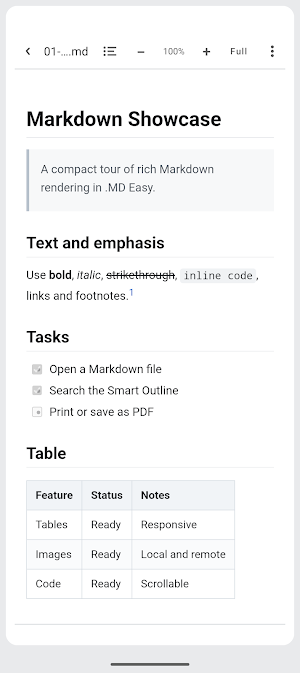
.MD Easy is a focused, read-only Markdown viewer for Android. Open a file and read it properly, without creating an account, seeing advertising or handing your documents to a cloud service.
Rich Markdown, rendered clearly
Read headings, tables, images, links, block quotes, task lists, ordered and unordered lists, code blocks, inline code, strikethrough, footnotes, alerts and expandable details in a clean reading surface.
Move through long documents quickly
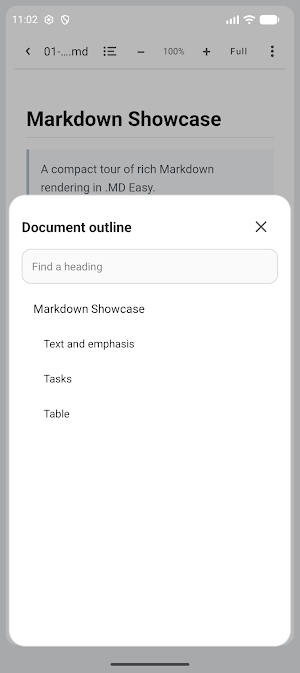
Smart Outline finds headings from H1 to H6, shows the document structure and lets you search or jump directly to a section. Your zoom preference is remembered, and landscape mode can make better use of a wider screen.
Useful reader tools
- Day and night reading modes
- Full-page reading view
- Remembered page zoom
- Searchable Smart Outline
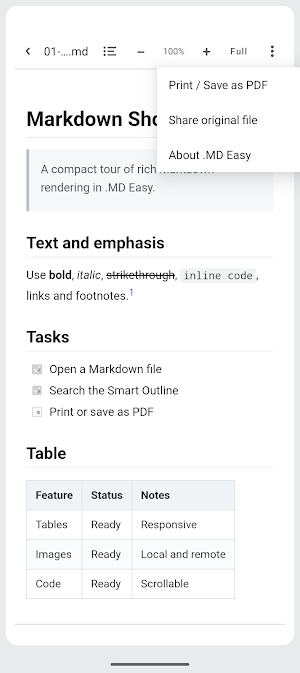
- Print or Save as PDF through Android's print service
- Share the original Markdown file
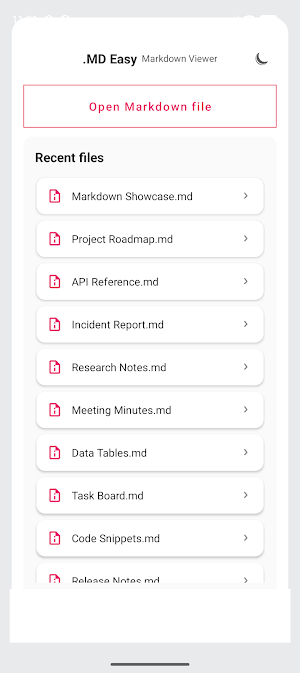
- Built-in sample library that can be hidden permanently
- Reliable Recent files list that automatically removes moved or deleted items
- Phone and tablet layouts
Private by design
.MD Easy does not require an account and does not include advertising, subscriptions or analytics. Files selected inside the app remain in their original location. When Android's Open with action provides only temporary access, .MD Easy keeps a private app copy so the file remains available in Recent files. Removing that Recent entry also removes the private copy. Documents are not uploaded by the app. A document can still contain an external image or link. That external resource is contacted only when required to display it or when you choose to open it.
Simple on purpose
.MD Easy is a viewer, not an editor. It does one job well: open Markdown, render it accurately and make long documents easy to read.
Rich Markdown, rendered clearly
Read headings, tables, images, links, block quotes, task lists, ordered and unordered lists, code blocks, inline code, strikethrough, footnotes, alerts and expandable details in a clean reading surface.
Move through long documents quickly
Smart Outline finds headings from H1 to H6, shows the document structure and lets you search or jump directly to a section. Your zoom preference is remembered, and landscape mode can make better use of a wider screen.
Useful reader tools
- Day and night reading modes
- Full-page reading view
- Remembered page zoom
- Searchable Smart Outline
- Print or Save as PDF through Android's print service
- Share the original Markdown file
- Built-in sample library that can be hidden permanently
- Reliable Recent files list that automatically removes moved or deleted items
- Phone and tablet layouts
Private by design
.MD Easy does not require an account and does not include advertising, subscriptions or analytics. Files selected inside the app remain in their original location. When Android's Open with action provides only temporary access, .MD Easy keeps a private app copy so the file remains available in Recent files. Removing that Recent entry also removes the private copy. Documents are not uploaded by the app. A document can still contain an external image or link. That external resource is contacted only when required to display it or when you choose to open it.
Simple on purpose
.MD Easy is a viewer, not an editor. It does one job well: open Markdown, render it accurately and make long documents easy to read.
User reviews

Wow! It’s been ages since I’ve seen such a lightweight and useful app. It’s only 1 MB! Reminded me of those old golden days. Two suggestion though! 1. Please hide that red exit button on the full screen. Users can simply get back to the previous state just by tapping the phone's back button 2. Please implement an ea...
Frequently asked questions
What is .MD Easy?
A read-only Markdown viewer for Android with no account or ads.
Can I save a document as PDF?
Yes, through Android's print service.
Alternatives to .MD Easy - Markdown reader.
Looking for apps like .MD Easy - Markdown reader.? Here are 5 similar Android apps on Google Play. The highest rated is UpNote - notes, diary, journal (4.8/5), and 4 of the 5 are free to download.
-
UpNote - notes, diary, journal 4.8
-
Notesnook Secure Private Notes 4.5
-
HiNotes by HiDock 3.8
-
Mindbook Pro: Markdown Notes
-
OPERI
| App | Rating | Price | Installs | Last updated | Compare |
|---|---|---|---|---|---|
| .MD Easy - Markdown reader. | – | Free | 100+ | Aug 1, 2026 | |
| UpNote - notes, diary, journal | 4.8 / 5 | Free | 500,000+ | Oct 23, 2026 | Compare |
| Notesnook Secure Private Notes | 4.5 / 5 | Free | 100,000+ | – | Compare |
| HiNotes by HiDock | 3.8 / 5 | Free | 10,000+ | Sep 24, 2026 | Compare |
| Mindbook Pro: Markdown Notes | – | 9.99 USD | 500+ | Oct 26, 2026 | Compare |
| OPERI | – | Free | 5,000+ | Aug 31, 2026 | Compare |