

Stuffing List
Odomhae Productivity Contains ads
Your to-do list appears on the lock screen.
- Downloads
- 10+
- on Google Play
- Price
- Free
- No in-app purchases
- Updated
- Jul 22
- 2026 · v2.0
Screenshots
About Stuffing List
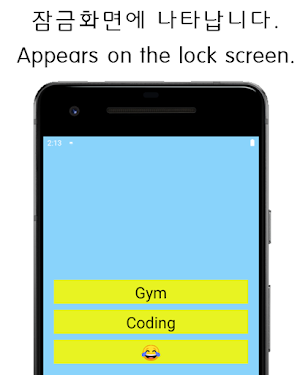
Pre-saved to-do list appears on the lock screen.
★★★★★How to use★★★★★
0. Check Permission Settings!!
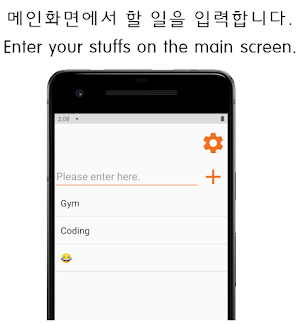
1. Enter the work to be done on the main screen.
- You can modify or delete them.
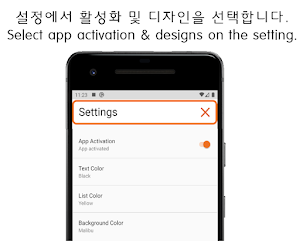
2. Enter the setup screen with the setting button above the main screen + button.
Check App Activation & Designs
3. List appears on the lock screen.
- Swipe to delete when it's done.
If you give us feedback, we will actively reflect it.
Thank you.
★★★★★How to use★★★★★
0. Check Permission Settings!!
1. Enter the work to be done on the main screen.
- You can modify or delete them.
2. Enter the setup screen with the setting button above the main screen + button.
Check App Activation & Designs
3. List appears on the lock screen.
- Swipe to delete when it's done.
If you give us feedback, we will actively reflect it.
Thank you.
What’s new
Version 2.0 · Updated July 22, 2026
Sdk Updated
Alternatives to Stuffing List
Looking for apps like Stuffing List? Here are 6 similar Android apps on Google Play. All of them are free to download.
-
ShutApp - App Time Limit
-
MoodLight- Baby, Nursing light
-
Color Pop QR – Scan & Make
-
Please Sleep_Baby Lullaby
-
Burger Kiosk - Order Simulator
-
LED BOARD-Blink & Scroller
| App | Rating | Price | Installs | Last updated | Compare |
|---|---|---|---|---|---|
| Stuffing List | – | Free | 10+ | Jul 22, 2026 | |
| ShutApp - App Time Limit | – | Free | 50+ | – | Compare |
| MoodLight- Baby, Nursing light | – | Free | 10+ | – | Compare |
| Color Pop QR – Scan & Make | – | Free | 5+ | Jun 17, 2026 | Compare |
| Please Sleep_Baby Lullaby | – | Free | 10+ | – | Compare |
| Burger Kiosk - Order Simulator | – | Free | 100+ | Jul 23, 2026 | Compare |
| LED BOARD-Blink & Scroller | – | Free | 100+ | Jul 22, 2026 | Compare |
Compare Stuffing List with the top alternatives: ratings, updates, ASO score and keyword gaps →