

Archivy - file and archive
Tools Contains ads
Dual-panel file manager with archive support for 20+ formats. Fast & powerful.
- Downloads
- 1.4K+
- on Google Play
- Price
- Free
- No in-app purchases
- Updated
- Jun 22
- 2026 · v1.0.1
Screenshots
About Archivy - file and archive
Archivy -- Dual-Panel File Manager & Archive ToolManage your files and archives like a pro. Archivy gives you a powerful dual-panel file manager with built-in support for 20+ archive formats, all in one fast, beautiful app.FILE MANAGEMENT
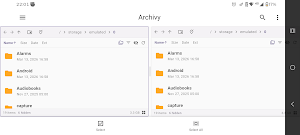
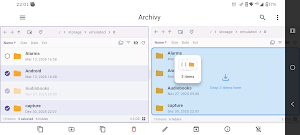
Dual-panel layout -- browse two folders side by side, drag & drop files between them
Copy, move, delete, rename, and batch rename files and folders
Quick access sidebar to jump to Downloads, Documents, Pictures, DCIM, Music, and Movies
Bookmarks for your favorite folders
Sort by name, size, date, or extension. Filter by type or size
Grid view with image thumbnails or detailed list view
Pull-to-refresh, file search across directories
ARCHIVE SUPPORT -- 20+ FORMATS
Open and extract: ZIP, RAR, 7z, TAR, TAR.GZ, TAR.BZ2, TAR.XZ, TAR.ZST, TAR.LZ4, GZ, BZ2, XZ, LZ4, ZSTD, LZMA, ISO, CAB, CPIO, AR, WIM, DMG, RPM, DEB
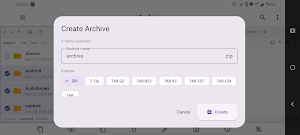
Create archives in 8 formats: ZIP, 7z, TAR, TAR.GZ, TAR.BZ2, TAR.XZ, TAR.ZST, TAR.LZ4
Adjustable compression levels (0-9)
Password-protected archives (ZIP & 7z)
Convert between archive formats
Browse archive contents without extracting
Extract individual files or everything at once
Test archive integrity
ADVANCED TOOLS
Duplicate file finder (MD5-based detection)
File comparison (size, date, hash)
Operation history tracking
Trash with undo support -- recover accidentally deleted files
Inline text file preview (code, config, markdown, and more)
Image preview with thumbnails
File properties with MD5 hash, permissions, and symlink info
25 LANGUAGES
English, Chinese, Hindi, Spanish, French, Arabic, Bengali, Portuguese, Russian, Japanese, Indonesian, German, Korean, Turkish, Vietnamese, Italian, Thai, Urdu, Polish, Ukrainian, Malay, Dutch, Persian, Swahili, TamilCUSTOMIZATION
Light, Dark, and AMOLED Black themes
Adjustable accent color (Material 3)
5 UI scale options
Show/hide hidden files
Directories-first sorting
NATIVE PERFORMANCE
Archivy uses native C++ libraries through FFI for archive operations, with background isolate processing for smooth performance even with large files and directories.
What's New (Release Notes)
Dual-panel file manager with drag & drop
20+ archive format support (ZIP, RAR, 7z, TAR, ISO, CAB, and more)
Create password-protected archives
Archive format conversion
Duplicate file finder and file comparison
Trash with undo for deleted files
Interactive tutorial on first launch
25 languages supported
Light, Dark, and AMOLED themes
Dual-panel layout -- browse two folders side by side, drag & drop files between them
Copy, move, delete, rename, and batch rename files and folders
Quick access sidebar to jump to Downloads, Documents, Pictures, DCIM, Music, and Movies
Bookmarks for your favorite folders
Sort by name, size, date, or extension. Filter by type or size
Grid view with image thumbnails or detailed list view
Pull-to-refresh, file search across directories
ARCHIVE SUPPORT -- 20+ FORMATS
Open and extract: ZIP, RAR, 7z, TAR, TAR.GZ, TAR.BZ2, TAR.XZ, TAR.ZST, TAR.LZ4, GZ, BZ2, XZ, LZ4, ZSTD, LZMA, ISO, CAB, CPIO, AR, WIM, DMG, RPM, DEB
Create archives in 8 formats: ZIP, 7z, TAR, TAR.GZ, TAR.BZ2, TAR.XZ, TAR.ZST, TAR.LZ4
Adjustable compression levels (0-9)
Password-protected archives (ZIP & 7z)
Convert between archive formats
Browse archive contents without extracting
Extract individual files or everything at once
Test archive integrity
ADVANCED TOOLS
Duplicate file finder (MD5-based detection)
File comparison (size, date, hash)
Operation history tracking
Trash with undo support -- recover accidentally deleted files
Inline text file preview (code, config, markdown, and more)
Image preview with thumbnails
File properties with MD5 hash, permissions, and symlink info
25 LANGUAGES
English, Chinese, Hindi, Spanish, French, Arabic, Bengali, Portuguese, Russian, Japanese, Indonesian, German, Korean, Turkish, Vietnamese, Italian, Thai, Urdu, Polish, Ukrainian, Malay, Dutch, Persian, Swahili, TamilCUSTOMIZATION
Light, Dark, and AMOLED Black themes
Adjustable accent color (Material 3)
5 UI scale options
Show/hide hidden files
Directories-first sorting
NATIVE PERFORMANCE
Archivy uses native C++ libraries through FFI for archive operations, with background isolate processing for smooth performance even with large files and directories.
What's New (Release Notes)
Dual-panel file manager with drag & drop
20+ archive format support (ZIP, RAR, 7z, TAR, ISO, CAB, and more)
Create password-protected archives
Archive format conversion
Duplicate file finder and file comparison
Trash with undo for deleted files
Interactive tutorial on first launch
25 languages supported
Light, Dark, and AMOLED themes
What’s new
Version 1.0.1 · Updated June 22, 2026
updated 3d party librarys UI\UX changes
User reviews

отличный удобный менеджер, мне понравилось в нем работать
Alternatives to Archivy - file and archive
Looking for apps like Archivy - file and archive? Here are 4 similar Android apps on Google Play. The highest rated is Nested Folder Notes - Folino (4.2/5), and all 4 are free to download.
-
Nested Folder Notes - Folino 4.2
-
Sherlock Holmes Detect 3.0
-
Content - Workspace ONE 3.9
-
Deleted Photo & Video Recovery 3.8
| App | Rating | Price | Installs | Last updated | Compare |
|---|---|---|---|---|---|
| Archivy - file and archive | – | Free | 1,000+ | Jun 22, 2026 | |
| Nested Folder Notes - Folino | 4.2 / 5 | Free | 50,000+ | Oct 20, 2026 | Compare |
| Sherlock Holmes Detect | 3.0 / 5 | Free | 5,000+ | Oct 26, 2026 | Compare |
| Content - Workspace ONE | 3.9 / 5 | Free | 1,000,000+ | Oct 16, 2026 | Compare |
| Deleted Photo & Video Recovery | 3.8 / 5 | Free | 1,000,000+ | Oct 29, 2026 | Compare |