

SwipeNote
Productivity
Beautiful and comfortable notepad for recording your notes
- Downloads
- 5K+
- on Google Play
- Price
- Free
- No in-app purchases
- Updated
- Feb 2
- 2015 · v1.1
Screenshots


About SwipeNote
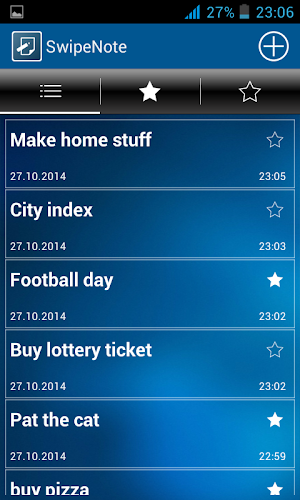
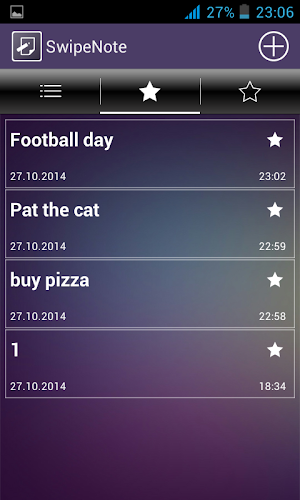
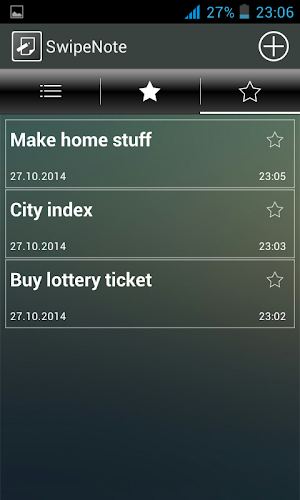
SwipeNote - is notepad with the ability to mark notes as important/unimportant, then displaying them on a separate page or all together. Just create note and select its type. Later you can change it, for example, if you have already completed some task and don't want to show it in the list next to other important notes.
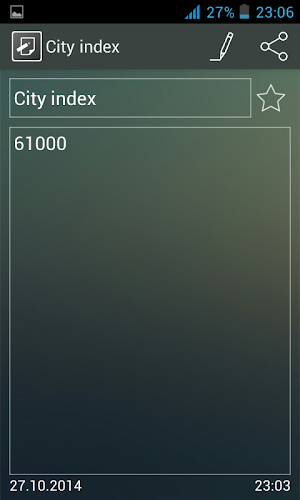
If you want to share your notes, you do not need to manually copy the text and paste it on the social networks, SMS, etc. You just simply select the desired note and press the share button in the top right corner!
The application has the Backup mode. If you want to transfer notes from one smartphone to another, you can use this feature.
WARNING !! Before backing up and restoring your notes, read this manual carefully! To make a copy of all your notes, enter into a Backup from the menu. In the appeared window check the box next to Allow backup, then select Copy to memory card. If the copying was successful, your notes will be saved to the file swipenote.db in the folder MEMORY_CARD/SwipeNote/backup/
To restore all your notes, you must place the file swipenote.db in the folder MEMORY_CARD/SwipeNote/backup/. WARNING !! After you select Restore from memory card all your current notes will be completely replaced, the ones that were saved in a file swipenote.db earlier, without the possibility of their return!! After you've spent the saving/restoration of notes it is strongly recommended to uncheck Allow backup in order to avoid accidental and unwanted saving and restoring of your notes!
In the settings you can change the font size, font style, order of the notes, their appearance and language
If you want to share your notes, you do not need to manually copy the text and paste it on the social networks, SMS, etc. You just simply select the desired note and press the share button in the top right corner!
The application has the Backup mode. If you want to transfer notes from one smartphone to another, you can use this feature.
WARNING !! Before backing up and restoring your notes, read this manual carefully! To make a copy of all your notes, enter into a Backup from the menu. In the appeared window check the box next to Allow backup, then select Copy to memory card. If the copying was successful, your notes will be saved to the file swipenote.db in the folder MEMORY_CARD/SwipeNote/backup/
To restore all your notes, you must place the file swipenote.db in the folder MEMORY_CARD/SwipeNote/backup/. WARNING !! After you select Restore from memory card all your current notes will be completely replaced, the ones that were saved in a file swipenote.db earlier, without the possibility of their return!! After you've spent the saving/restoration of notes it is strongly recommended to uncheck Allow backup in order to avoid accidental and unwanted saving and restoring of your notes!
In the settings you can change the font size, font style, order of the notes, their appearance and language
What’s new
Version 1.1 · Updated February 2, 2015
v 1.1 Some small bugs and app crash fixed.
Alternatives to SwipeNote
Looking for apps like SwipeNote? Here are 2 similar Android apps on Google Play. The highest rated is Aqua Pal - Water Tracker (4.9/5), and all 2 are free to download.


| App | Rating | Price | Installs | Last updated | Compare |
|---|---|---|---|---|---|
| SwipeNote | – | Free | 5,000+ | Feb 2, 2015 | |
| Aqua Pal - Water Tracker | 4.9 / 5 | Free | 1,000+ | Oct 1, 2026 | Compare |
| Деберц запись (Клабор) | 4.2 / 5 | Free | 100,000+ | – | Compare |
Compare SwipeNote with the top alternatives: ratings, updates, ASO score and keyword gaps →