
Lumi Pop Icon Pack
Personalization
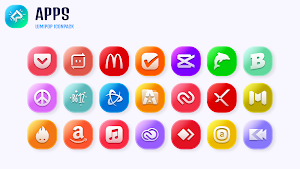
A vibrant icon pack that blends bold colors with a modern, minimalistic design.
- Rating
- 4.8
- 30 ratings
- Downloads
- 100+
- on Google Play
- Price
- $0.99
- No in-app purchases
- Updated
- Sep 29
- 2024 · v1.0.2
Screenshots


About Lumi Pop Icon Pack
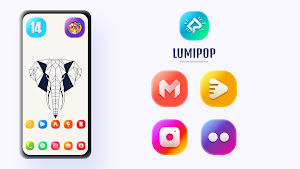
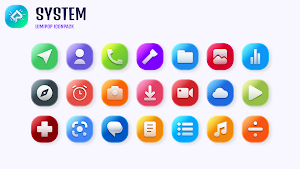
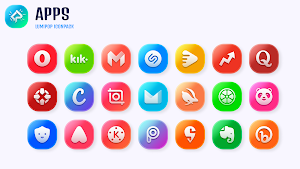
Lumi Pop Icon Pack is a vibrant and playful theme. Featuring a bold mix of bright colors, each icon is carefully crafted.
Features :
• 2500+ Icons and growing...
• New Icons added each week
• Auto Icon Masking for unthemed App Icons
• Material Dashboard
• 100+ Beautiful Wallpapers
• Custom folder icons
• Category-based Icons
• Custom app drawer icons
• Easy Icon Request
Support
If you have any issue with using Icon pack. Just email me at [email protected]
How to use this Icon pack?
Step 1 : Install supported theme Launcher
Step 2 : Open Lumi Pop Icon Pack and Go to Apply section and Select Launcher to apply.
If your launcher is not in a list make sure you apply it from your launcher settings
DISCLAIMER
• A supported launcher is required to use this icon pack!
Icon Pack Supported Launchers
Action Launcher • ADW Launcher • Apex Launcher •Atom Launcher • Aviate Launcher • CM Theme Engine • GO Launcher • Holo Launcher • Holo Launcher HD • LG Home • Lucid Launcher • M Launcher • Mini Launcher • Next Launcher • Nougat Launcher •Nova Launcher(recommended) • Smart Launcher •Solo Launcher •V Launcher • ZenUI Launcher •Zero Launcher • ABC Launcher •Evie Launcher • L Launcher • Lawnchair
Icon Pack Supported Launchers not Included in Apply Section
Arrow Launcher • ASAP Launcher •Cobo Launcher •Line Launcher •Mesh Launcher •Peek Launcher • Z Launcher • Launch by Quixey Launcher • iTop Launcher • KK Launcher • MN Launcher • New Launcher • S Launcher • Open Launcher • Flick Launcher • Poco Launcher
This icon pack has been tested, and it works with these launchers. However, it may also work with others too.In case you do not found an apply section in dashboard. You can apply icon pack from a theme setting.
Extra Notes
• Icon pack needs a launcher in order to work.
• Google Now Launcher do not support any icon packs.
• Missing an Icon? feel free to send me an icon request and I will try to update this pack with your requests.
Contact Me
Email : [email protected]
Features :
• 2500+ Icons and growing...
• New Icons added each week
• Auto Icon Masking for unthemed App Icons
• Material Dashboard
• 100+ Beautiful Wallpapers
• Custom folder icons
• Category-based Icons
• Custom app drawer icons
• Easy Icon Request
Support
If you have any issue with using Icon pack. Just email me at [email protected]
How to use this Icon pack?
Step 1 : Install supported theme Launcher
Step 2 : Open Lumi Pop Icon Pack and Go to Apply section and Select Launcher to apply.
If your launcher is not in a list make sure you apply it from your launcher settings
DISCLAIMER
• A supported launcher is required to use this icon pack!
Icon Pack Supported Launchers
Action Launcher • ADW Launcher • Apex Launcher •Atom Launcher • Aviate Launcher • CM Theme Engine • GO Launcher • Holo Launcher • Holo Launcher HD • LG Home • Lucid Launcher • M Launcher • Mini Launcher • Next Launcher • Nougat Launcher •Nova Launcher(recommended) • Smart Launcher •Solo Launcher •V Launcher • ZenUI Launcher •Zero Launcher • ABC Launcher •Evie Launcher • L Launcher • Lawnchair
Icon Pack Supported Launchers not Included in Apply Section
Arrow Launcher • ASAP Launcher •Cobo Launcher •Line Launcher •Mesh Launcher •Peek Launcher • Z Launcher • Launch by Quixey Launcher • iTop Launcher • KK Launcher • MN Launcher • New Launcher • S Launcher • Open Launcher • Flick Launcher • Poco Launcher
This icon pack has been tested, and it works with these launchers. However, it may also work with others too.In case you do not found an apply section in dashboard. You can apply icon pack from a theme setting.
Extra Notes
• Icon pack needs a launcher in order to work.
• Google Now Launcher do not support any icon packs.
• Missing an Icon? feel free to send me an icon request and I will try to update this pack with your requests.
Contact Me
Email : [email protected]
What’s new
Version 1.0.2 · Updated September 29, 2024
Added New Icons
User reviews

Amazing icons 🤩

Beautiful icons with vibrant colour palette.

Loving it!

Absolutely stunning icon pack. So beautiful and colourful

Amazing 🤩🤩 looks great on amoled display
such a beautiful icon pack. lovely 😍
Alternatives to Lumi Pop Icon Pack
Looking for apps like Lumi Pop Icon Pack? Here are 6 similar Android apps on Google Play. The highest rated is Winter Wonderland Watch Face (4.0/5), and 1 of the 6 are free to download.
-
HoneyBee Watch Face Nodeshaper
-
Legion Watch Face Nodeshaper
-
Radar Watch Face by Nodeshaper
-
Bullseye Watch Face
-
Solar Watch Face by NodeShaper
-
Winter Wonderland Watch Face 4.0
| App | Rating | Price | Installs | Last updated | Compare |
|---|---|---|---|---|---|
| Lumi Pop Icon Pack | 4.8 / 5 | $0.99 | 100+ | Sep 29, 2024 | |
| HoneyBee Watch Face Nodeshaper | – | 0.49 USD | 500+ | Aug 29, 2024 | Compare |
| Legion Watch Face Nodeshaper | – | 0.49 USD | 1,000+ | Jul 26, 2024 | Compare |
| Radar Watch Face by Nodeshaper | – | 0.99 USD | 1,000+ | Aug 29, 2024 | Compare |
| Bullseye Watch Face | – | 0.99 USD | 1,000+ | Aug 29, 2024 | Compare |
| Solar Watch Face by NodeShaper | – | 0.49 USD | 1,000+ | Jul 26, 2024 | Compare |
| Winter Wonderland Watch Face | 4.0 / 5 | Free | 1,000+ | – | Compare |
Compare Lumi Pop Icon Pack with the top alternatives: ratings, updates, ASO score and keyword gaps →
Similar apps on Google Play
- Lumi Pop Icon Pack
- HoneyBee Watch Face Nodeshaper
- Legion Watch Face Nodeshaper
- Radar Watch Face by Nodeshaper
- Bullseye Watch Face
- Solar Watch Face by NodeShaper
- Winter Wonderland Watch Face
- Blood Moon Watch Face
- Midas 3D Icon Pack
- Minimalist Marvel Watch Face
- WallNode - 4K, HD Wallpapers
- Mint Melon Icon Pack
- Glasstic 3D Icon Pack
- Midnight Club Icon Pack
- Retromatic Icon Pack
- Boho Icon Pack