
JiaKe.app
Tools In-app purchases
Quick export and polished frames for Garmin watch screenshots.
- Downloads
- 10+
- on Google Play
- Price
- Free
- In-app purchases
- Updated
- Jul 19
- 2026 · v0.1.14
Screenshots


About JiaKe.app
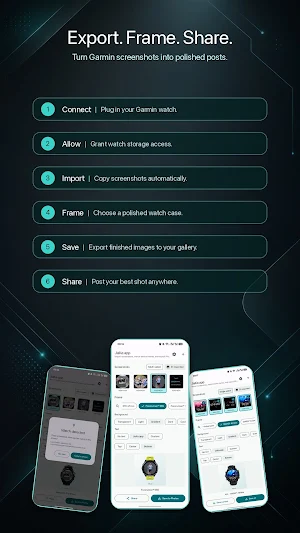
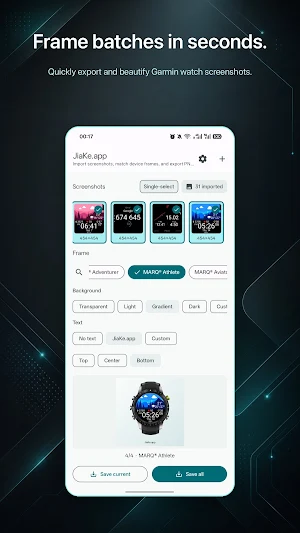
JiaKe.app helps you move Garmin watch screenshots to your Android phone and turn them into clean, share-ready images.
Connect your watch with a USB cable, import screenshots, choose a matching device frame or circular crop, then save the result to your gallery or share it anywhere.
What you can do:
- Import screenshots from compatible Garmin watches over USB
- Keep imported screenshots organized in a local gallery
- Select one screenshot or batch-select multiple screenshots
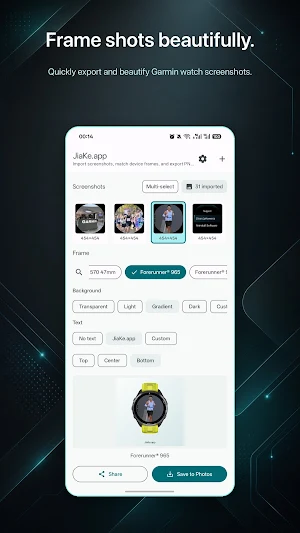
- Add polished watch frames for supported Garmin models
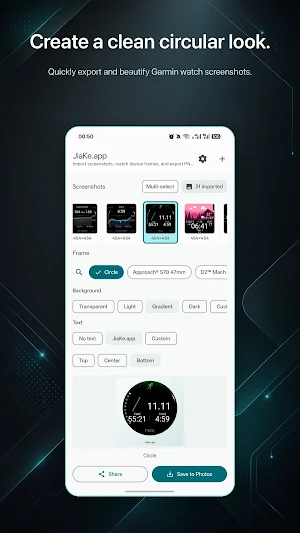
- Create a clean circular crop for simple watch-face previews
- Choose transparent, light, dark, gradient, or custom-color backgrounds
- Add optional text and adjust its placement
- Export all selected images
- Share finished images directly from your phone
JiaKe.app is designed for runners, cyclists, hikers, and Garmin users who want better-looking screenshots without moving files through a desktop workflow.
Notes:
- USB import depends on your watch, phone, cable, and Android storage permission support.
- Screenshots are stored locally on your phone.
- Garmin is a trademark of Garmin Ltd. or its subsidiaries. JiaKe.app is an independent app and is not affiliated with Garmin.
Terms of Service: https://jiake.app/en/terms-android
Privacy Policy: https://jiake.app/en/privacy-android
Connect your watch with a USB cable, import screenshots, choose a matching device frame or circular crop, then save the result to your gallery or share it anywhere.
What you can do:
- Import screenshots from compatible Garmin watches over USB
- Keep imported screenshots organized in a local gallery
- Select one screenshot or batch-select multiple screenshots
- Add polished watch frames for supported Garmin models
- Create a clean circular crop for simple watch-face previews
- Choose transparent, light, dark, gradient, or custom-color backgrounds
- Add optional text and adjust its placement
- Export all selected images
- Share finished images directly from your phone
JiaKe.app is designed for runners, cyclists, hikers, and Garmin users who want better-looking screenshots without moving files through a desktop workflow.
Notes:
- USB import depends on your watch, phone, cable, and Android storage permission support.
- Screenshots are stored locally on your phone.
- Garmin is a trademark of Garmin Ltd. or its subsidiaries. JiaKe.app is an independent app and is not affiliated with Garmin.
Terms of Service: https://jiake.app/en/terms-android
Privacy Policy: https://jiake.app/en/privacy-android
What’s new
Version 0.1.14 · Updated July 19, 2026
• Added multi-angle shell options for more Garmin models. • Added live preview to the shell picker.
Alternatives to JiaKe.app
Looking for apps like JiaKe.app? Here are 6 similar Android apps on Google Play. All of them are free to download.
-
GameraSnap Garmin Remote Cam
-
WristAlbum
-
WristTale- eReader for watches
-
WristPark – Find My Car
-
WristListen - AI Audiobooks
-
2FA4G: Garmin OTP
| App | Rating | Price | Installs | Last updated | Compare |
|---|---|---|---|---|---|
| JiaKe.app | – | Free | 10+ | Jul 19, 2026 | |
| GameraSnap Garmin Remote Cam | – | Free | 1,000+ | Apr 8, 2026 | Compare |
| WristAlbum | – | Free | 500+ | Sep 10, 2026 | Compare |
| WristTale- eReader for watches | – | Free | 1,000+ | Oct 6, 2026 | Compare |
| WristPark – Find My Car | – | Free | 10+ | Aug 14, 2026 | Compare |
| WristListen - AI Audiobooks | – | Free | 50+ | – | Compare |
| 2FA4G: Garmin OTP | – | Free | 50+ | – | Compare |
Compare JiaKe.app with the top alternatives: ratings, updates, ASO score and keyword gaps →