

Phone Armor - Antivirus
Kalsoom Afzal Tools Contains ads
Malware scan, file browser, and device status in one simple app.
- Rating
- 4.6
- 628 ratings
- Downloads
- 50K+
- on Google Play
- Price
- Free
- No in-app purchases
- Updated
- Jul 23
- 2026 · v1.0.2
Screenshots


About Phone Armor - Antivirus
Phone Armor is built for people who want a clearer way to understand what is happening on their phone. Instead of jumping between different screens and guessing where space is going, Phone Armor brings important device information, scan results, and file categories into a clean, easy-to-read experience.
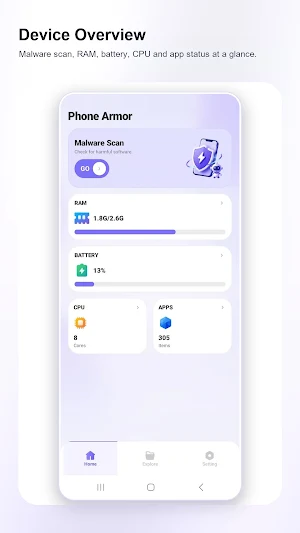
From the home screen, you can quickly review the core status areas shown inside the app: malware scan access, RAM usage, battery level, CPU cores, and app item count. This gives you a simple starting point when your phone feels crowded, when you want to check basic device information, or when you just want a more organized view of your phone's condition.
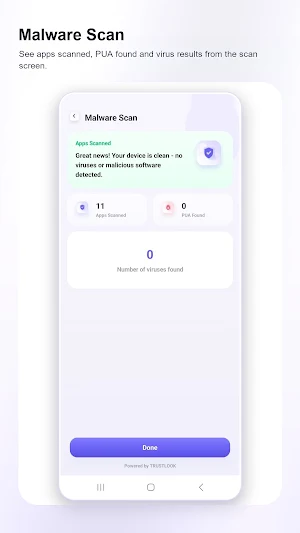
The Malware Scan screen helps you review scan information in a focused way. It shows apps scanned, PUA found, and the number of viruses found, so you can check the current scan result without searching through complicated menus. The screen is designed to be direct and readable, showing the result summary first and keeping the key numbers easy to notice.
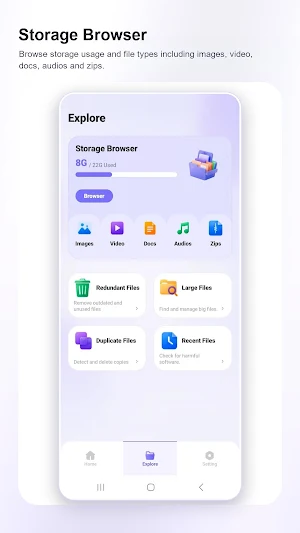
Phone Armor also includes a Storage Browser for reviewing phone storage by file type. You can see used storage and browse common categories such as images, video, docs, audios, and zips. This is useful when you want to understand what kinds of files are taking space on your device and where to start looking before managing files.
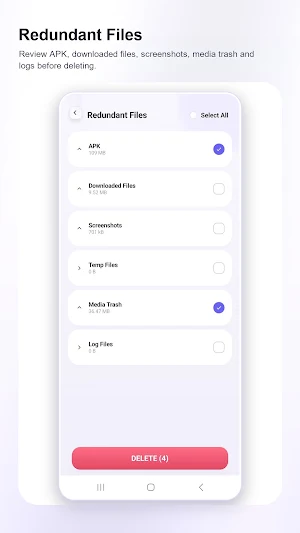
For file cleanup review, the Redundant Files screen organizes file groups such as APK files, downloaded files, screenshots, temp files, media trash, and log files. The app presents these categories with sizes and selection controls, helping you review file groups before choosing what to delete. Phone Armor is designed to support a more careful cleanup flow: see the category, check the size, review the item group, and then decide what action to take.
The RAM screen gives a simple view of RAM usage and related app status. It shows current RAM usage with a percentage and total amount, plus a visible app status area. This makes Phone Armor useful not only for file review, but also for quick device status checks when you want to understand memory use from a single screen.
Phone Armor keeps the experience simple. The interface uses large cards, clear labels, and focused status screens, making it easy to move between home, explore, and setting areas. The design is made for quick checking: open the app, review the status, browse storage, inspect redundant file categories, and understand the scan result.
Why download Phone Armor?
Use it when you want a simple dashboard for phone status.
Use it when you want to review malware scan results in a clear screen.
Use it when you want to browse storage by common file types.
Use it when you want to inspect redundant file categories before deletion.
Use it when you want to check RAM, battery, CPU, and app status without a cluttered layout.
Phone Armor does not need to overcomplicate phone care. It focuses on the essentials shown in the app: malware scan information, storage browsing, redundant file review, RAM usage, battery status, CPU information, and app item status. If you want a straightforward phone utility with a clean interface and practical status views, Phone Armor is ready to help you review your device with more confidence.
Download Phone Armor and give yourself a simpler way to check device status, review storage, and manage file categories from one organized app.
From the home screen, you can quickly review the core status areas shown inside the app: malware scan access, RAM usage, battery level, CPU cores, and app item count. This gives you a simple starting point when your phone feels crowded, when you want to check basic device information, or when you just want a more organized view of your phone's condition.
The Malware Scan screen helps you review scan information in a focused way. It shows apps scanned, PUA found, and the number of viruses found, so you can check the current scan result without searching through complicated menus. The screen is designed to be direct and readable, showing the result summary first and keeping the key numbers easy to notice.
Phone Armor also includes a Storage Browser for reviewing phone storage by file type. You can see used storage and browse common categories such as images, video, docs, audios, and zips. This is useful when you want to understand what kinds of files are taking space on your device and where to start looking before managing files.
For file cleanup review, the Redundant Files screen organizes file groups such as APK files, downloaded files, screenshots, temp files, media trash, and log files. The app presents these categories with sizes and selection controls, helping you review file groups before choosing what to delete. Phone Armor is designed to support a more careful cleanup flow: see the category, check the size, review the item group, and then decide what action to take.
The RAM screen gives a simple view of RAM usage and related app status. It shows current RAM usage with a percentage and total amount, plus a visible app status area. This makes Phone Armor useful not only for file review, but also for quick device status checks when you want to understand memory use from a single screen.
Phone Armor keeps the experience simple. The interface uses large cards, clear labels, and focused status screens, making it easy to move between home, explore, and setting areas. The design is made for quick checking: open the app, review the status, browse storage, inspect redundant file categories, and understand the scan result.
Why download Phone Armor?
Use it when you want a simple dashboard for phone status.
Use it when you want to review malware scan results in a clear screen.
Use it when you want to browse storage by common file types.
Use it when you want to inspect redundant file categories before deletion.
Use it when you want to check RAM, battery, CPU, and app status without a cluttered layout.
Phone Armor does not need to overcomplicate phone care. It focuses on the essentials shown in the app: malware scan information, storage browsing, redundant file review, RAM usage, battery status, CPU information, and app item status. If you want a straightforward phone utility with a clean interface and practical status views, Phone Armor is ready to help you review your device with more confidence.
Download Phone Armor and give yourself a simpler way to check device status, review storage, and manage file categories from one organized app.
User reviews

best
Alternatives to Phone Armor - Antivirus
Looking for apps like Phone Armor - Antivirus? Here are 6 similar Android apps on Google Play. All of them are free to download.
-
Laptop Qist & Tax Calc
-
Morse Code - Decode & Chat
-
NetKey Wifi Hotspot Connect
-
Quay Amber Safe Taupe
-
CMS - Services
-
SIGMA LA RODA
| App | Rating | Price | Installs | Last updated | Compare |
|---|---|---|---|---|---|
| Phone Armor - Antivirus | 4.6 / 5 | Free | 50,000+ | Jul 23, 2026 | |
| Laptop Qist & Tax Calc | – | Free | 10+ | – | Compare |
| Morse Code - Decode & Chat | – | Free | 1,000+ | Jun 14, 2026 | Compare |
| NetKey Wifi Hotspot Connect | – | Free | 500,000+ | Sep 26, 2026 | Compare |
| Quay Amber Safe Taupe | – | Free | 5+ | Apr 9, 2026 | Compare |
| CMS - Services | – | Free | 10+ | Oct 29, 2026 | Compare |
| SIGMA LA RODA | – | Free | 1+ | – | Compare |
Similar apps on Google Play
- Laptop Qist & Tax Calc
- Morse Code - Decode & Chat
- NetKey Wifi Hotspot Connect
- Quay Amber Safe Taupe
- CMS - Services
- SIGMA LA RODA
- App Risk Scanner
- Ignite Unite Viper Trace
- JunkSweeper Clean
- Silver Sterling Stream
- Aero Storage Cleaner
- Hazel Xenops Jet Cap
- Bluetooth Finder and Scanner
- Echo Kindle Yore Bat
- RedVPN
- All Kar Stream
- SubsChannel - Get Views & Sub
- Botexi - AI Visual Engine
- Screen Mirroring: Cast To TV
- Cast to TV - Screen Mirroring
- Stopwatch Blue Mild Yabby
- Status Downloader Status Saver
- RexStick
- OTG Nexus - USB File Manager
- Ҳисоб Авто - калькулятор ТО