

KeySafe Beta, Password Manager
Nexzt Tools
KeySafe: Effortless management for a safer digital life.
- Downloads
- 1+
- on Google Play
- Price
- $1.49
- No in-app purchases
- Updated
- Aug 31
- 2024 · v1.0.4
Screenshots

About KeySafe Beta, Password Manager
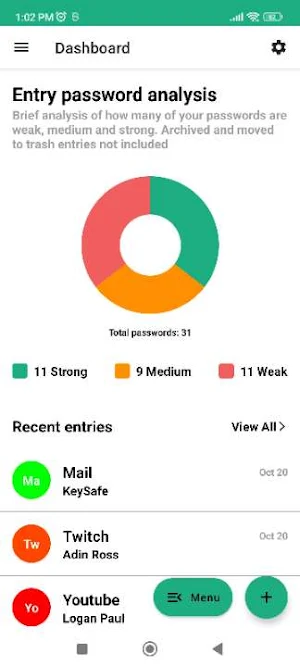
KeySafe revolutionizes password management, offering unparalleled security in an offline environment. With cyber threats on the rise, safeguarding sensitive information is paramount. This app ensures that your digital keys stay exclusively on your device, free from online vulnerabilities.
At the core of KeySafe is its user-friendly interface, providing an intuitive experience for users of all levels. Effortlessly store, generate, and organize complex passwords with a few taps. The app's design prioritizes simplicity without compromising functionality.
Security is KeySafe's hallmark. Employing robust encryption algorithms, it guarantees the highest level of protection for your credentials. Your passwords are shielded from potential breaches, giving you peace of mind in an increasingly interconnected world.
KeySafe's offline functionality is a game-changer. It means your data remains on your device, reducing the risk associated with cloud-based solutions. You control access, mitigating the threat of remote attacks. The app operates seamlessly without the need for a constant internet connection.
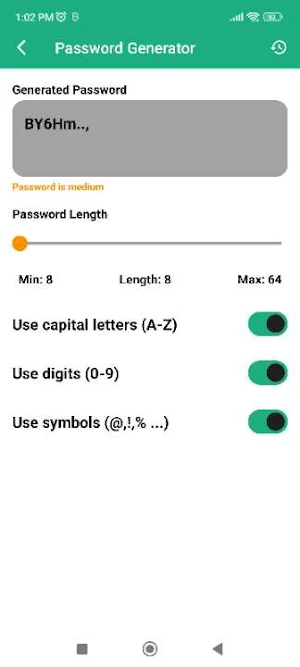
The password generation feature enhances your digital security. Create strong, unique passwords for each account with ease. The app encourages good security practices, minimizing the risk of unauthorized access due to weak or reused passwords.
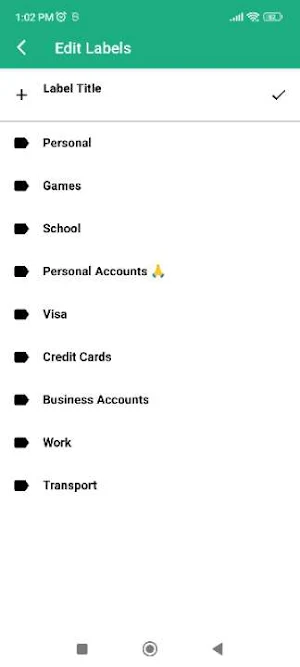
Organization is key to efficient password management. KeySafe allows you to categorize and label your passwords, ensuring quick and easy retrieval when needed. Its search functionality further streamlines the process, making it a reliable tool for users with numerous accounts.
KeySafe's versatility extends to various platforms, providing a consistent experience across devices. Whether you're on your smartphone, tablet, or computer, your passwords are accessible whenever and wherever you need them.
In a world where cyber threats evolve daily, KeySafe stands as a fortress against unauthorized access. It empowers you with control over your digital identity, offering a safer online experience. Make KeySafe your trusted companion in the digital realm—where security meets simplicity.
At the core of KeySafe is its user-friendly interface, providing an intuitive experience for users of all levels. Effortlessly store, generate, and organize complex passwords with a few taps. The app's design prioritizes simplicity without compromising functionality.
Security is KeySafe's hallmark. Employing robust encryption algorithms, it guarantees the highest level of protection for your credentials. Your passwords are shielded from potential breaches, giving you peace of mind in an increasingly interconnected world.
KeySafe's offline functionality is a game-changer. It means your data remains on your device, reducing the risk associated with cloud-based solutions. You control access, mitigating the threat of remote attacks. The app operates seamlessly without the need for a constant internet connection.
The password generation feature enhances your digital security. Create strong, unique passwords for each account with ease. The app encourages good security practices, minimizing the risk of unauthorized access due to weak or reused passwords.
Organization is key to efficient password management. KeySafe allows you to categorize and label your passwords, ensuring quick and easy retrieval when needed. Its search functionality further streamlines the process, making it a reliable tool for users with numerous accounts.
KeySafe's versatility extends to various platforms, providing a consistent experience across devices. Whether you're on your smartphone, tablet, or computer, your passwords are accessible whenever and wherever you need them.
In a world where cyber threats evolve daily, KeySafe stands as a fortress against unauthorized access. It empowers you with control over your digital identity, offering a safer online experience. Make KeySafe your trusted companion in the digital realm—where security meets simplicity.
What’s new
Version 1.0.4 · Updated August 31, 2024
Minor Changes
Alternatives to KeySafe Beta, Password Manager
Looking for apps like KeySafe Beta, Password Manager? Here are 6 similar Android apps on Google Play. The highest rated is Applock - lock apps - pin lock (4.8/5), and 2 of the 6 are free to download.
-
Passwords Kit: Master Password
-
Cloud Storage App
-
WOT Mobile Security Protection 4.5
-
MAK: Swipe, Events, Stories
-
Applock - lock apps - pin lock 4.8
-
Device Buddy – Usage Monitor
| App | Rating | Price | Installs | Last updated | Compare |
|---|---|---|---|---|---|
| KeySafe Beta, Password Manager | – | $1.49 | 1+ | Aug 31, 2024 | |
| Passwords Kit: Master Password | – | – | 10,000+ | Sep 25, 2026 | Compare |
| Cloud Storage App | – | – | – | Jun 17, 2025 | Compare |
| WOT Mobile Security Protection | 4.5 / 5 | Free | 1,000,000+ | Oct 21, 2026 | Compare |
| MAK: Swipe, Events, Stories | – | – | 500+ | Oct 4, 2026 | Compare |
| Applock - lock apps - pin lock | 4.8 / 5 | Free | 1,000,000+ | Sep 6, 2023 | Compare |
| Device Buddy – Usage Monitor | – | – | 1,000+ | Aug 29, 2026 | Compare |
Similar apps on Google Play
- Passwords Kit: Master Password
- Cloud Storage App
- WOT Mobile Security Protection
- MAK: Swipe, Events, Stories
- Applock - lock apps - pin lock
- Device Buddy – Usage Monitor
- Fingerprint Lock - App Lock
- AppLock - Fingerprint
- App Lock: Fingerprint, Pattern
- Chief Mobile
- App Locker - Lock App
- AppLock Master
- My Folder : Safe Secure Hidden
- KOL Kollectin Shopping
- One Key: password manager
- Magic Polish Master Lab
- Quick Search Plus
- TTLock
- Enpass Password Manager
- Threema. The Secure Messenger
- Nuki Smart Lock
- Sesame Search & Shortcuts
- mSecure - Password Manager
- NAVER MYBOX
- SafeInCloud 1
- NetGuard - no-root firewall
- LockMyPix Photo Vault PREMIUM
- Shortcut Maker
- Pavlok
- Pinwheel Caregiver
- Axonify
- Rosecrance Alumni
- Google Automotive Keyboard