

BlurCut: Face Blur & Eraser
Zentavo Softworks Video Players & Editors Contains ads
Blur faces in videos and erase unwanted logos or objects. Fast, private, HD
- Downloads
- 118+
- on Google Play
- Price
- Free
- No in-app purchases
- Updated
- Aug 18
- 2026 · v1.0
Screenshots


About BlurCut: Face Blur & Eraser
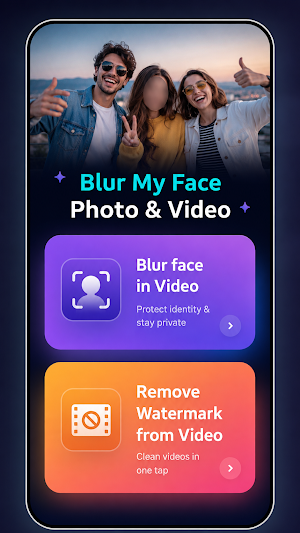
Blur faces in your videos and erase unwanted objects, logos or text — right on your phone, in a few taps.
BlurCut is a simple video privacy and cleanup editor. Hide the faces of people who didn't agree to be filmed, then remove distracting elements from clips you own before you post them.
■ FACE BLUR FOR VIDEOS
- Auto face detection that follows faces as they move
- Manual blur boxes for anything the detector misses
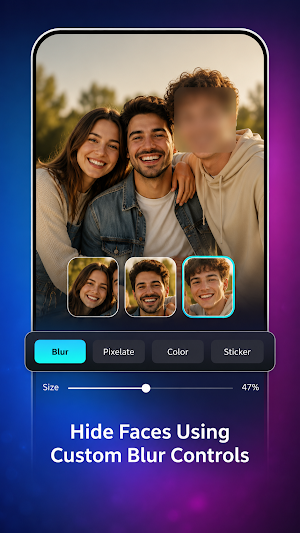
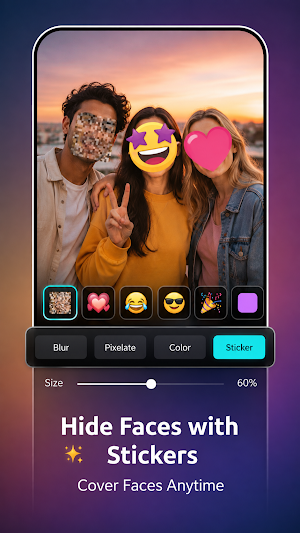
- Blur, pixelate or mosaic styles
- Adjustable blur strength and shape size
- Blur license plates, tattoos, ID cards, screens, house numbers
- Works on multiple faces in the same shot
■ OBJECT & LOGO ERASER
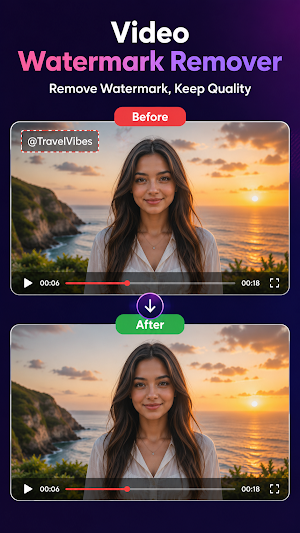
- Brush over an unwanted logo, sticker, date stamp or object
- Frame-aware fill blends the area with the surrounding video
- Remove text overlays and captions from your own footage
- Clean up the corners of clips before reposting
■ MADE FOR EVERYDAY PRIVACY
- Share family videos without exposing other people
- Post street, gym, school event and travel footage safely
- Prepare clips for YouTube, Shorts, Reels and Stories
- Anonymise footage for reports, evidence or classroom use
■ QUALITY YOU CAN KEEP
- Export in the original resolution, up to 4K
- 30 and 60 fps supported
- MP4 and MOV
- Trim and crop before export
- Audio kept intact, or muted if you prefer
■ SIMPLE BY DESIGN
- Import, tap a face, export — no timeline to learn
- Preview before you render
- No watermark added to your export
- No account required to start editing
WHAT YOU SHOULD KNOW
Editing happens on your device. Your videos are not uploaded to our servers, and we don't need access to your contacts or location.
The eraser tool is intended for footage you created or have the rights to edit. Please don't use it to remove other people's branding, credits or copyright notices from content that isn't yours — respect creators and the terms of the platform you post to.
Results depend on your clip. Fast motion, busy backgrounds and heavily textured areas are harder to fill cleanly, and the face detector can miss faces that are turned away, very small or in low light. Always check the preview before you publish.
PERMISSIONS
Media access is used to open the video you pick and save your export. Nothing else.
Free to use, with optional Pro for [list exactly what Pro unlocks].
Questions or a clip that didn't turn out right? Email [[email protected]] and we'll take a look.
BlurCut is a simple video privacy and cleanup editor. Hide the faces of people who didn't agree to be filmed, then remove distracting elements from clips you own before you post them.
■ FACE BLUR FOR VIDEOS
- Auto face detection that follows faces as they move
- Manual blur boxes for anything the detector misses
- Blur, pixelate or mosaic styles
- Adjustable blur strength and shape size
- Blur license plates, tattoos, ID cards, screens, house numbers
- Works on multiple faces in the same shot
■ OBJECT & LOGO ERASER
- Brush over an unwanted logo, sticker, date stamp or object
- Frame-aware fill blends the area with the surrounding video
- Remove text overlays and captions from your own footage
- Clean up the corners of clips before reposting
■ MADE FOR EVERYDAY PRIVACY
- Share family videos without exposing other people
- Post street, gym, school event and travel footage safely
- Prepare clips for YouTube, Shorts, Reels and Stories
- Anonymise footage for reports, evidence or classroom use
■ QUALITY YOU CAN KEEP
- Export in the original resolution, up to 4K
- 30 and 60 fps supported
- MP4 and MOV
- Trim and crop before export
- Audio kept intact, or muted if you prefer
■ SIMPLE BY DESIGN
- Import, tap a face, export — no timeline to learn
- Preview before you render
- No watermark added to your export
- No account required to start editing
WHAT YOU SHOULD KNOW
Editing happens on your device. Your videos are not uploaded to our servers, and we don't need access to your contacts or location.
The eraser tool is intended for footage you created or have the rights to edit. Please don't use it to remove other people's branding, credits or copyright notices from content that isn't yours — respect creators and the terms of the platform you post to.
Results depend on your clip. Fast motion, busy backgrounds and heavily textured areas are harder to fill cleanly, and the face detector can miss faces that are turned away, very small or in low light. Always check the preview before you publish.
PERMISSIONS
Media access is used to open the video you pick and save your export. Nothing else.
Free to use, with optional Pro for [list exactly what Pro unlocks].
Questions or a clip that didn't turn out right? Email [[email protected]] and we'll take a look.
What’s new
Version 1.0 · Updated August 18, 2026
Video face blur
Alternatives to BlurCut: Face Blur & Eraser
Looking for apps like BlurCut: Face Blur & Eraser? Here are 6 similar Android apps on Google Play. All of them are free to download.
-
My Diary: Journal ,Mood & Lock
-
Invoice Maker
-
AI Music Generator
-
Face Expression Editor: AI Fx
-
AI Object Remover: Photo Edit
-
Background Eraser: AI Editor
| App | Rating | Price | Installs | Last updated | Compare |
|---|---|---|---|---|---|
| BlurCut: Face Blur & Eraser | – | Free | 100+ | Aug 18, 2026 | |
| My Diary: Journal ,Mood & Lock | – | Free | 10+ | – | Compare |
| Invoice Maker | – | Free | 10+ | Jul 22, 2026 | Compare |
| AI Music Generator | – | Free | 50+ | Jul 24, 2026 | Compare |
| Face Expression Editor: AI Fx | – | Free | 100+ | Jul 16, 2026 | Compare |
| AI Object Remover: Photo Edit | – | Free | 100+ | – | Compare |
| Background Eraser: AI Editor | – | Free | 50+ | Aug 29, 2026 | Compare |
Similar apps on Google Play
- My Diary: Journal ,Mood & Lock
- Invoice Maker
- AI Music Generator
- Face Expression Editor: AI Fx
- AI Object Remover: Photo Edit
- Background Eraser: AI Editor
- AI Photo Enhancer: Auto Edit
- AI Video Enhancer
- Video To Audio & Mp3 Cutter
- Battery Health & Life Checker
- Video Collage: Reels & Stories
- Collage Maker: No Watermark
- Screentime & unlocks times
- WhatsDeleted - Recover Message
- NoteAlarm–Smart Reminder,Notes
- Block unknown Callers – Spam
- Bhoomi Help Desk
- Puzzle Mania
- QuickNote Pro: Simple, Smart
- Sketch Master: Draw Like a Pro