
Image Compressor & Resizer Pro
Tools
Offline image compressor, resizer, and format converter with batch processing.
- Downloads
- 7+
- on Google Play
- Price
- $1.99
- No in-app purchases
- Updated
- Apr 19
- 2026 · v1.0 (PRO)
Screenshots


About Image Compressor & Resizer Pro
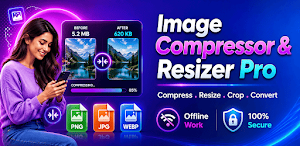
Optimize your storage and manage your photos securely with Image Compressor & Resizer Pro. Designed for absolute privacy and efficiency, this offline-first utility tool allows you to compress, resize, crop, and convert your images directly on your device without requiring an internet connection.
🚀 Key Features:
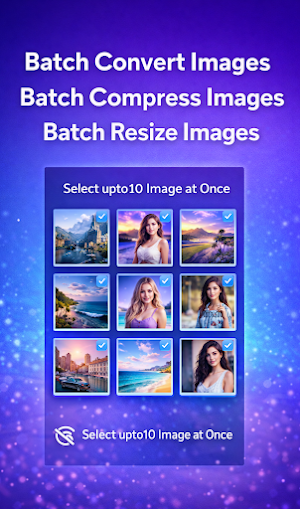
⚡Batch Processing Power: Save valuable time by selecting up to 10 images at once. Apply batch compression, batch resizing, or batch format conversion seamlessly.
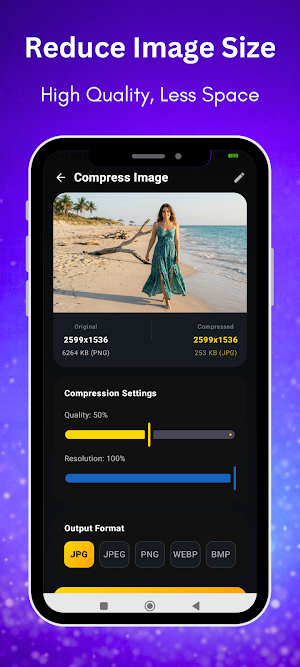
📉 Smart Image Compression: Drastically reduce file sizes with minimal quality loss. Choose your exact quality level and resolution scale.
🖼️ Advanced Resizing: Scale images by exact pixels (Width x Height) or by percentage while maintaining the perfect aspect ratio.
🔄 Format Conversion: Easily convert your images between popular formats to suit your specific needs (JPEG, PNG, and WEBP).
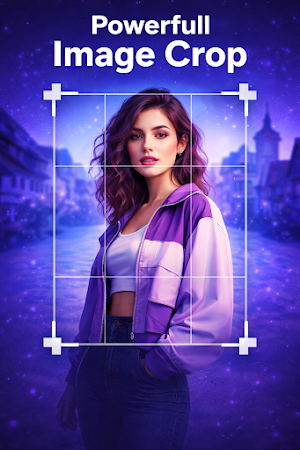
✂️ Crop with Precision : Crop images to the exact frame you need with simple and accurate controls.
📁 Clean Management: Save directly to your gallery.
💎 WHY THE PRO VERSION?
•100% Offline & Private: No internet permissions. Your photos never leave your device.
•Ad-Free Experience: Zero interruptions. Focus entirely on your work.
•Batch Processing: Resize, compress, or convert up to 10 images simultaneously to save time.
•One-Time Purchase: No subscriptions, no hidden fees. Lifetime access.
🛜 100% Offline & Secure (Zero Data Transfer)
Your privacy is the highest priority. This application functions completely offline. Your images are processed locally on your device they are never uploaded, transmitted, or stored on any external servers. What happens on your device, stays on your device.
💳 One-Time Purchase
Unlock the complete suite of image editing tools with a single, one-time purchase. Enjoy full access to all features without any recurring subscriptions.
🔐 Take control of your image files today with a secure, reliable, and fast processing tool!
🎬 How to Use This App (Watch Video):
Video : https://youtube.com/shorts/1NJiW4fX-fM
🔒 PRIVACY & SECURITY:
• No Data Collection: We do not track your usage or collect personal information.
•Scoped Storage: Compliant with modern Android security standards. No unnecessary file permissions.
•Metadata (EXIF) Support: Keeps your photo details intact during processing.
⚠️ Compatibility Requirements :
To ensure peak performance and security, this app requires:
- Android 10 or higher devices only.
💌 Contact Us
For support, feedback, or business inquiries, feel free to contact us:
Email : [email protected]
Website : https://newkingsapps.blogspot.com
🚀 Key Features:
⚡Batch Processing Power: Save valuable time by selecting up to 10 images at once. Apply batch compression, batch resizing, or batch format conversion seamlessly.
📉 Smart Image Compression: Drastically reduce file sizes with minimal quality loss. Choose your exact quality level and resolution scale.
🖼️ Advanced Resizing: Scale images by exact pixels (Width x Height) or by percentage while maintaining the perfect aspect ratio.
🔄 Format Conversion: Easily convert your images between popular formats to suit your specific needs (JPEG, PNG, and WEBP).
✂️ Crop with Precision : Crop images to the exact frame you need with simple and accurate controls.
📁 Clean Management: Save directly to your gallery.
💎 WHY THE PRO VERSION?
•100% Offline & Private: No internet permissions. Your photos never leave your device.
•Ad-Free Experience: Zero interruptions. Focus entirely on your work.
•Batch Processing: Resize, compress, or convert up to 10 images simultaneously to save time.
•One-Time Purchase: No subscriptions, no hidden fees. Lifetime access.
🛜 100% Offline & Secure (Zero Data Transfer)
Your privacy is the highest priority. This application functions completely offline. Your images are processed locally on your device they are never uploaded, transmitted, or stored on any external servers. What happens on your device, stays on your device.
💳 One-Time Purchase
Unlock the complete suite of image editing tools with a single, one-time purchase. Enjoy full access to all features without any recurring subscriptions.
🔐 Take control of your image files today with a secure, reliable, and fast processing tool!
🎬 How to Use This App (Watch Video):
Video : https://youtube.com/shorts/1NJiW4fX-fM
🔒 PRIVACY & SECURITY:
• No Data Collection: We do not track your usage or collect personal information.
•Scoped Storage: Compliant with modern Android security standards. No unnecessary file permissions.
•Metadata (EXIF) Support: Keeps your photo details intact during processing.
⚠️ Compatibility Requirements :
To ensure peak performance and security, this app requires:
- Android 10 or higher devices only.
💌 Contact Us
For support, feedback, or business inquiries, feel free to contact us:
Email : [email protected]
Website : https://newkingsapps.blogspot.com
Alternatives to Image Compressor & Resizer Pro
Looking for apps like Image Compressor & Resizer Pro? Here are 6 similar Android apps on Google Play. All of them are free to download.
-
Ram Sita HD Wallpapers
-
MP3 Converter, Cutter & Editor
-
PromptCraft – AI Image Prompts
-
Shiva & Vishnu Wallpapers 4K
-
Video Compressor: Reduce Size
-
Secure PDF: Compress & Lock
| App | Rating | Price | Installs | Last updated | Compare |
|---|---|---|---|---|---|
| Image Compressor & Resizer Pro | – | $1.99 | 5+ | Apr 19, 2026 | |
| Ram Sita HD Wallpapers | – | Free | 1,000+ | Jul 22, 2026 | Compare |
| MP3 Converter, Cutter & Editor | – | Free | 100+ | Jun 9, 2026 | Compare |
| PromptCraft – AI Image Prompts | – | Free | 100+ | Sep 19, 2026 | Compare |
| Shiva & Vishnu Wallpapers 4K | – | Free | 1,000+ | – | Compare |
| Video Compressor: Reduce Size | – | Free | 100+ | May 21, 2026 | Compare |
| Secure PDF: Compress & Lock | – | Free | 10+ | Jun 2, 2026 | Compare |