
Net Tools: Wi-Fi Analyzer
Splens Apps Tools
WiFi analyzer, network scanner — signal strength, channel, IP & net tools.
- Downloads
- 326+
- on Google Play
- Price
- Free
- No in-app purchases
- Updated
- Apr 29
- 2026 · v1.0
Screenshots

About Net Tools: Wi-Fi Analyzer
Net Tools is a WiFi analyzer and network scanner app for Android. View your connected WiFi signal strength, channel info, IP address details, and scan nearby wireless networks — all in one clean, modern interface. No ads. No account needed.
📡 WIFI ANALYZER & SIGNAL METER
─────────────────────────────────
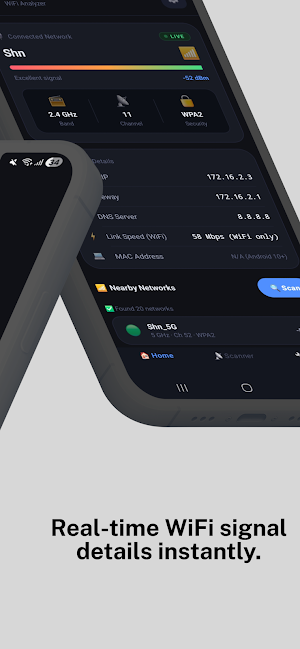
Instantly see detailed info about your connected WiFi network:
• WiFi signal strength meter in dBm with live visual indicator
• Network name (SSID), frequency band (2.4 GHz / 5 GHz / 6 GHz)
• WiFi channel number and security type (WPA3, WPA2, WPA, WEP)
• WiFi link speed (device-to-router, in Mbps)
• Local IP address, gateway IP, and DNS server
• Live indicator with auto-refresh every 30 seconds
📶 WIFI SCANNER — NEARBY NETWORKS
───────────────────────────────────
Scan nearby wireless networks with our built-in WiFi scanner:
• See all nearby WiFi networks with signal strength details
• SSID, band, channel, and security for each scanned network
• Sorted by signal strength (strongest first)
• Option to include hidden SSID networks
📊 CHANNEL ANALYZER
────────────────────
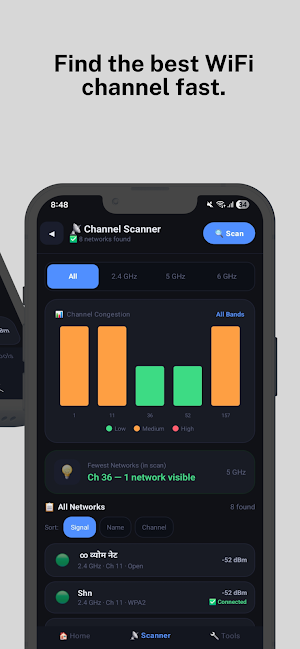
Visualize channel congestion — find less crowded channels:
• Channel congestion bar chart (2.4 GHz / 5 GHz / 6 GHz)
• Filter by band tab or sort by signal, name, or channel
• See which channels have fewer networks nearby
🔧 NETWORK TOOLS & DIAGNOSTICS
────────────────────────────────
Net Tools includes essential network utility tools:
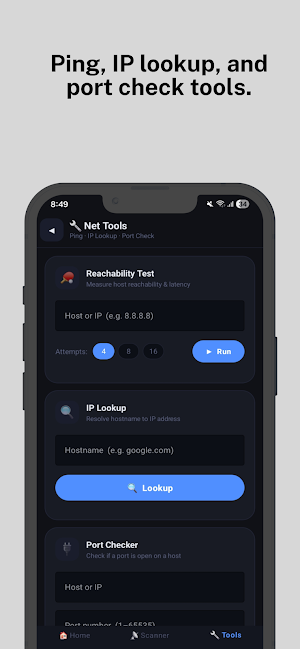
• Ping Tool — Check if any host or IP is reachable.
Measure min, avg, max response time in milliseconds.
Run 4, 8, or 16 attempts with scrollable live log.
• IP Lookup / DNS Lookup — Resolve any hostname to IP.
Standard DNS query via Android system APIs.
• Port Checker — Test if a TCP port responds on a host.
One-tap port chips: HTTP (80), HTTPS (443),
SSH (22), FTP (21), RDP (3389)
⚙️ SETTINGS
────────────
• Auto-refresh toggle for connected network info
• Show / hide blank SSID (hidden) networks in scan
• Ping timeout control (500 ms – 5000 ms)
• Share app or rate on Google Play
• Privacy Policy readable inside the app
🔒 PRIVACY
───────────
• Zero data collected, stored, or shared — ever
• No ads, no analytics, no third-party tracking SDKs
• No account or registration required
• Location permission required by Android OS for WiFi scan only
• All WiFi data shown locally on your device only
NOTES
──────
• Signal and channel data depend on device hardware and Android version.
📡 WIFI ANALYZER & SIGNAL METER
─────────────────────────────────
Instantly see detailed info about your connected WiFi network:
• WiFi signal strength meter in dBm with live visual indicator
• Network name (SSID), frequency band (2.4 GHz / 5 GHz / 6 GHz)
• WiFi channel number and security type (WPA3, WPA2, WPA, WEP)
• WiFi link speed (device-to-router, in Mbps)
• Local IP address, gateway IP, and DNS server
• Live indicator with auto-refresh every 30 seconds
📶 WIFI SCANNER — NEARBY NETWORKS
───────────────────────────────────
Scan nearby wireless networks with our built-in WiFi scanner:
• See all nearby WiFi networks with signal strength details
• SSID, band, channel, and security for each scanned network
• Sorted by signal strength (strongest first)
• Option to include hidden SSID networks
📊 CHANNEL ANALYZER
────────────────────
Visualize channel congestion — find less crowded channels:
• Channel congestion bar chart (2.4 GHz / 5 GHz / 6 GHz)
• Filter by band tab or sort by signal, name, or channel
• See which channels have fewer networks nearby
🔧 NETWORK TOOLS & DIAGNOSTICS
────────────────────────────────
Net Tools includes essential network utility tools:
• Ping Tool — Check if any host or IP is reachable.
Measure min, avg, max response time in milliseconds.
Run 4, 8, or 16 attempts with scrollable live log.
• IP Lookup / DNS Lookup — Resolve any hostname to IP.
Standard DNS query via Android system APIs.
• Port Checker — Test if a TCP port responds on a host.
One-tap port chips: HTTP (80), HTTPS (443),
SSH (22), FTP (21), RDP (3389)
⚙️ SETTINGS
────────────
• Auto-refresh toggle for connected network info
• Show / hide blank SSID (hidden) networks in scan
• Ping timeout control (500 ms – 5000 ms)
• Share app or rate on Google Play
• Privacy Policy readable inside the app
🔒 PRIVACY
───────────
• Zero data collected, stored, or shared — ever
• No ads, no analytics, no third-party tracking SDKs
• No account or registration required
• Location permission required by Android OS for WiFi scan only
• All WiFi data shown locally on your device only
NOTES
──────
• Signal and channel data depend on device hardware and Android version.
What’s new
Version 1.0 · Updated April 29, 2026
New Release
Alternatives to Net Tools: Wi-Fi Analyzer
Looking for apps like Net Tools: Wi-Fi Analyzer? Here are 6 similar Android apps on Google Play. The highest rated is Quik Facebook Video downloader (4.9/5), and all 6 are free to download.
-
Word Counter
-
iFlow Smay
-
くじボックス - あみだくじ・ルーレット・席替え
-
EarthCurve: Horizon Calculator
-
DevPDF - PDF Scanner & Editor
-
Quik Facebook Video downloader 4.9
| App | Rating | Price | Installs | Last updated | Compare |
|---|---|---|---|---|---|
| Net Tools: Wi-Fi Analyzer | – | Free | 100+ | Apr 29, 2026 | |
| Word Counter | – | Free | 10+ | – | Compare |
| iFlow Smay | – | Free | 10+ | Jul 22, 2026 | Compare |
| くじボックス - あみだくじ・ルーレット・席替え | – | Free | 10+ | Jul 20, 2026 | Compare |
| EarthCurve: Horizon Calculator | – | Free | 10+ | Oct 20, 2026 | Compare |
| DevPDF - PDF Scanner & Editor | – | Free | 5,000+ | Apr 12, 2026 | Compare |
| Quik Facebook Video downloader | 4.9 / 5 | Free | 10,000+ | Aug 8, 2026 | Compare |
Similar apps on Google Play
- Word Counter
- iFlow Smay
- くじボックス - あみだくじ・ルーレット・席替え
- EarthCurve: Horizon Calculator
- DevPDF - PDF Scanner & Editor
- Quik Facebook Video downloader
- To Da Liquor Store!
- Advanced Time SeriesResearcher
- AI Cartoon Generator
- ScanMaster QR - Barcode Reader
- Essabri Catalog Planner
- My Ginpon
- Scanyx - Escáner de Documentos
- iPass Secure Auth
- Hydro Tracker
- WLClient
- WDIG - Loan & Payment Tracker
- Net Flux Full
- Russian Vietnamese Translator
- Active2 SquareRound Watchfaces
- AniVera Premium
- SunLink Tool
- IQ Test Online
- CEC Tracker
- Dara Rent