

Win Workout
sharo apps Tools
Win Workout - Tabata timer with Easy, Medium, Hard presets and custom intervals
- Price
- Free
- No in-app purchases
- Updated
- Jul 23
- 2026 · v1.0
Screenshots


About Win Workout
⏱️ WHAT IS Win Workout?
Win Workout is a focused Tabata interval timer for short, structured interval training on your phone. The app guides you through alternating work and rest phases with a circular countdown, color-coded phase labels, and a clear path from home to preset selection, active timer, and session results.
🏠 HOME SCREEN
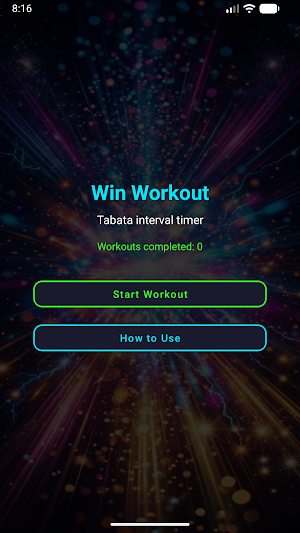
Open Win Workout and see the title, Tabata interval timer subtitle, and a count of fully completed workouts. Tap Start Workout to pick a plan, or How to Use for a built-in Tabata guide. Your completed total updates when you finish an entire session.
📋 PRESET PLANS
Win Workout offers three named presets:
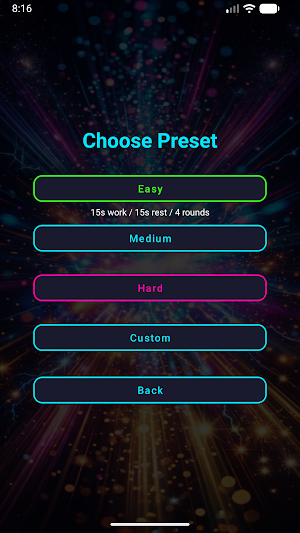
• Easy — 15s work, 15s rest, 4 rounds • Medium — 20s work, 10s rest, 8 rounds • Hard — 30s work, 10s rest, 12 rounds
Each shows work, rest, and round count before you begin. Select a level and the timer loads instantly.
⚙️ CUSTOM SETUP
Choose Custom to adjust work seconds (5–120, step 5), rest seconds (5–120, step 5), and rounds (1–30). Win Workout saves your last custom work, rest, and round values locally so the next session opens ready to edit. Tap Start Timer when set.
🔄 SESSION PHASES
Each session follows a structured cycle:
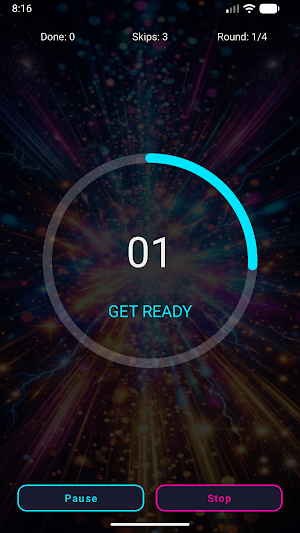
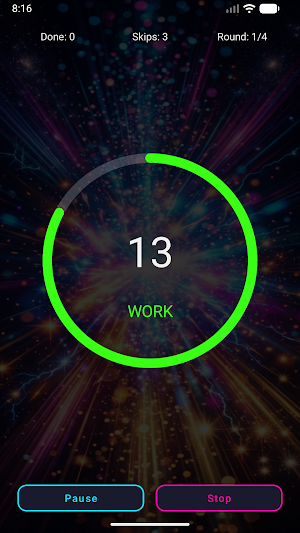
• GET READY — 3-second prepare countdown (cyan ring) • WORK — active interval (green ring) • REST — recovery between rounds (magenta ring)
Phase names and remaining seconds appear inside the circular timer throughout the session.
🎯 TIMER AND HUD
A status bar shows completed work intervals, skip allowance remaining, and current round out of total. The progress ring counts down visually with large second digits at the center, changing color by phase for quick reading during movement.
⏸️ PAUSE, RESUME, AND STOP
Tap the circular ring to pause or resume. A Pause button switches to Resume while paused. The Stop button ends the session early after a confirmation dialog, because stopping clears current session progress.
⏭️ SKIP REST
During rest, Skip Rest jumps to the next work round. Each session starts with a skip allowance of 3. Every three Skip Rest uses reduce the allowance by one; when allowance reaches zero, the session ends early.
📊 RESULTS AND PROGRESS
When a session finishes, Win Workout shows a results screen. Full completion displays Workout Complete in green; an early end shows Workout Ended Early in magenta. Review work intervals completed, rounds completed versus planned, and your total completed workouts count. Only fully completed sessions increase the stored counter. Start Again relaunches the same configuration, or go Home for a new plan.
📖 HOW TO USE
The built-in guide explains choosing presets or custom intervals, the preparation countdown, work and rest phases, tap-to-pause, skip allowance rules, and stopping a session early — all inside Win Workout.
🎨 DESIGN
Dark interface with neon cyan, green, and magenta accents. Large tap-friendly buttons, vertical mobile layout, centered timer ring, and vector drawables. Simple flow: choose intervals, run the timer, review your summary.
💪 WHO IS IT FOR?
Win Workout is a timing tool for anyone who follows Tabata-style intervals. Use preset plans for quick starts or custom intervals with up to thirty rounds and work or rest durations from 5 to 120 seconds.
✅ KEY FEATURES
• Tabata interval timer with GET READY, WORK, and REST phases • Easy, Medium, and Hard presets plus custom intervals • Circular countdown ring with phase colors • HUD: intervals done, skip allowance, round count • Tap ring to pause or resume, plus Pause and Stop buttons • Skip Rest during recovery with tracked allowance per session • Results screen with intervals, rounds, and total completed workouts • Locally saved last custom work, rest, and round settings • Built-in How to Use guide for the Tabata method
Win Workout is a focused Tabata interval timer for short, structured interval training on your phone. The app guides you through alternating work and rest phases with a circular countdown, color-coded phase labels, and a clear path from home to preset selection, active timer, and session results.
🏠 HOME SCREEN
Open Win Workout and see the title, Tabata interval timer subtitle, and a count of fully completed workouts. Tap Start Workout to pick a plan, or How to Use for a built-in Tabata guide. Your completed total updates when you finish an entire session.
📋 PRESET PLANS
Win Workout offers three named presets:
• Easy — 15s work, 15s rest, 4 rounds • Medium — 20s work, 10s rest, 8 rounds • Hard — 30s work, 10s rest, 12 rounds
Each shows work, rest, and round count before you begin. Select a level and the timer loads instantly.
⚙️ CUSTOM SETUP
Choose Custom to adjust work seconds (5–120, step 5), rest seconds (5–120, step 5), and rounds (1–30). Win Workout saves your last custom work, rest, and round values locally so the next session opens ready to edit. Tap Start Timer when set.
🔄 SESSION PHASES
Each session follows a structured cycle:
• GET READY — 3-second prepare countdown (cyan ring) • WORK — active interval (green ring) • REST — recovery between rounds (magenta ring)
Phase names and remaining seconds appear inside the circular timer throughout the session.
🎯 TIMER AND HUD
A status bar shows completed work intervals, skip allowance remaining, and current round out of total. The progress ring counts down visually with large second digits at the center, changing color by phase for quick reading during movement.
⏸️ PAUSE, RESUME, AND STOP
Tap the circular ring to pause or resume. A Pause button switches to Resume while paused. The Stop button ends the session early after a confirmation dialog, because stopping clears current session progress.
⏭️ SKIP REST
During rest, Skip Rest jumps to the next work round. Each session starts with a skip allowance of 3. Every three Skip Rest uses reduce the allowance by one; when allowance reaches zero, the session ends early.
📊 RESULTS AND PROGRESS
When a session finishes, Win Workout shows a results screen. Full completion displays Workout Complete in green; an early end shows Workout Ended Early in magenta. Review work intervals completed, rounds completed versus planned, and your total completed workouts count. Only fully completed sessions increase the stored counter. Start Again relaunches the same configuration, or go Home for a new plan.
📖 HOW TO USE
The built-in guide explains choosing presets or custom intervals, the preparation countdown, work and rest phases, tap-to-pause, skip allowance rules, and stopping a session early — all inside Win Workout.
🎨 DESIGN
Dark interface with neon cyan, green, and magenta accents. Large tap-friendly buttons, vertical mobile layout, centered timer ring, and vector drawables. Simple flow: choose intervals, run the timer, review your summary.
💪 WHO IS IT FOR?
Win Workout is a timing tool for anyone who follows Tabata-style intervals. Use preset plans for quick starts or custom intervals with up to thirty rounds and work or rest durations from 5 to 120 seconds.
✅ KEY FEATURES
• Tabata interval timer with GET READY, WORK, and REST phases • Easy, Medium, and Hard presets plus custom intervals • Circular countdown ring with phase colors • HUD: intervals done, skip allowance, round count • Tap ring to pause or resume, plus Pause and Stop buttons • Skip Rest during recovery with tracked allowance per session • Results screen with intervals, rounds, and total completed workouts • Locally saved last custom work, rest, and round settings • Built-in How to Use guide for the Tabata method
Alternatives to Win Workout
Looking for apps like Win Workout? Here are 6 similar Android apps on Google Play. All of them are free to download.






| App | Rating | Price | Installs | Last updated | Compare |
|---|---|---|---|---|---|
| Win Workout | – | Free | 0+ | Jul 23, 2026 | |
| Paripesa | – | Free | 0+ | Jul 13, 2026 | Compare |
| Jackpot Wheel | – | Free | 1+ | Jul 23, 2026 | Compare |
| Chanz | – | Free | 0+ | Jul 23, 2026 | Compare |
| Interwetten | – | Free | 0+ | Jul 23, 2026 | Compare |
| IPLwin | – | Free | 0+ | Jul 23, 2026 | Compare |
| IME88 | – | Free | 1+ | Jul 23, 2026 | Compare |
Compare Win Workout with the top alternatives: ratings, updates, ASO score and keyword gaps →