

AuthRelay
Productivity
Sign in with Google on desktop by scanning a QR code with your phone.
- Downloads
- 1+
- on Google Play
- Price
- Free
- No in-app purchases
- Updated
- Mar 18
- 2026 · v1.0.0
Screenshots
About AuthRelay
AuthRelay lets you use your phone to complete Google sign-in on any desktop browser — no passwords typed, no credentials shared.
HOW IT WORKS
━━━━━━━━━━━━
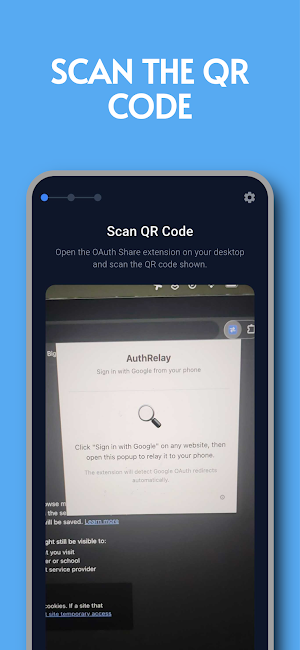
1. See a Google sign-in prompt on your desktop? A QR code appears.
2. Open AuthRelay and scan the QR code with your phone.
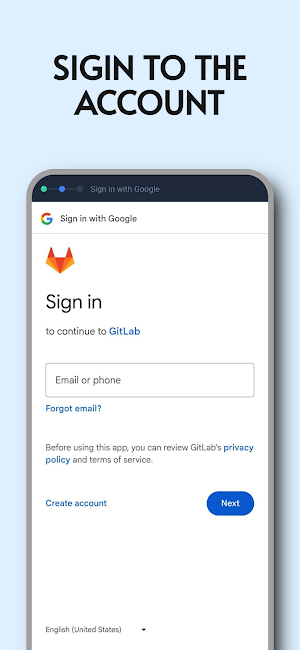
3. Sign in with your Google account on your phone — the way you always do.
4. Your desktop is signed in automatically. Done.
No copy-pasting. No switching windows. Just scan and done.
WHY AUTHRELAY
━━━━━━━━━━━━━
Typing passwords on a desktop keyboard is inconvenient and risky. AuthRelay lets your phone — which you're already signed into — do the work. Your desktop browser gets the session it needs without ever seeing your credentials.
BUILT FOR PRIVACY & SECURITY
━━━━━━━━━━━━━━━━━━━━━━━━━━━━
• End-to-end encrypted — all data is encrypted on your device before it's relayed. The server cannot read anything.
• Zero-knowledge relay — our relay server only passes encrypted packets. It never sees your Google credentials, tokens, or session data.
• Ephemeral sessions — relay sessions expire automatically and are never stored to disk or database.
• No account required — AuthRelay doesn't ask you to create an account or log in.
• No tracking — no analytics, no ads, no data collection.
• Open source — the complete source code is publicly available for anyone to audit.
WHAT YOU NEED
━━━━━━━━━━━━━
• The free AuthRelay Chrome extension installed on your desktop browser
• This app on your Android phone
• A Google account you're already signed in to on your phone
AuthRelay works with any website that uses Google OAuth sign-in, including Google Workspace, GitHub (Google login), and many others.
OPEN SOURCE
━━━━━━━━━━━
AuthRelay is fully open source under the MIT License. You can read, audit, and contribute to the code on GitHub. We believe privacy tools should be transparent.
Questions or feedback? Open an issue on our GitHub repository — we read everything
HOW IT WORKS
━━━━━━━━━━━━
1. See a Google sign-in prompt on your desktop? A QR code appears.
2. Open AuthRelay and scan the QR code with your phone.
3. Sign in with your Google account on your phone — the way you always do.
4. Your desktop is signed in automatically. Done.
No copy-pasting. No switching windows. Just scan and done.
WHY AUTHRELAY
━━━━━━━━━━━━━
Typing passwords on a desktop keyboard is inconvenient and risky. AuthRelay lets your phone — which you're already signed into — do the work. Your desktop browser gets the session it needs without ever seeing your credentials.
BUILT FOR PRIVACY & SECURITY
━━━━━━━━━━━━━━━━━━━━━━━━━━━━
• End-to-end encrypted — all data is encrypted on your device before it's relayed. The server cannot read anything.
• Zero-knowledge relay — our relay server only passes encrypted packets. It never sees your Google credentials, tokens, or session data.
• Ephemeral sessions — relay sessions expire automatically and are never stored to disk or database.
• No account required — AuthRelay doesn't ask you to create an account or log in.
• No tracking — no analytics, no ads, no data collection.
• Open source — the complete source code is publicly available for anyone to audit.
WHAT YOU NEED
━━━━━━━━━━━━━
• The free AuthRelay Chrome extension installed on your desktop browser
• This app on your Android phone
• A Google account you're already signed in to on your phone
AuthRelay works with any website that uses Google OAuth sign-in, including Google Workspace, GitHub (Google login), and many others.
OPEN SOURCE
━━━━━━━━━━━
AuthRelay is fully open source under the MIT License. You can read, audit, and contribute to the code on GitHub. We believe privacy tools should be transparent.
Questions or feedback? Open an issue on our GitHub repository — we read everything
What’s new
Version 1.0.0 · Updated March 18, 2026
Introducing AuthRelay — the easiest way to sign in with Google on your desktop. • Scan the QR code shown on your desktop browser • Authenticate with your phone's Google account • Your desktop signs in automatically — no passwords typed End-to-end encrypted. Zero-knowledge relay. Your credentials never leave your devices. This is our first release. We'd love your feedback!
Alternatives to AuthRelay
Looking for apps like AuthRelay? Here is 1 similar Android app on Google Play.

| App | Rating | Price | Installs | Last updated | Compare |
|---|---|---|---|---|---|
| AuthRelay | – | Free | 1+ | Mar 18, 2026 | |
| Feeds | – | Free | 10+ | Apr 1, 2026 | Compare |
Compare AuthRelay with the top alternatives: ratings, updates, ASO score and keyword gaps →