
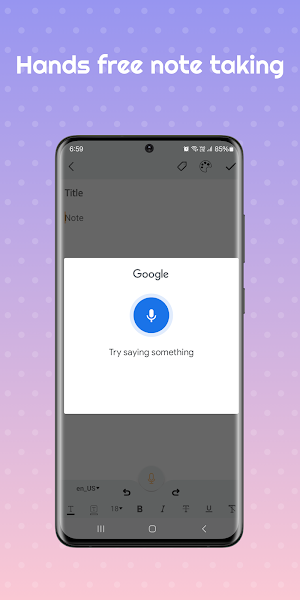
Notes keeper: speech to text
Productivity In-app purchases Contains ads
Notes keeper is a simple and easy notepad app for creating and editing notes.
- Rating
- 4.9
- 82 ratings
- Downloads
- 3.5K+
- on Google Play
- Price
- Free
- In-app purchases
- Updated
- Aug 20
- 2026 · v1.0.21
Screenshots


About Notes keeper: speech to text
Notes Keeper is the perfect companion for capturing your thoughts on the go. With its simple interface and powerful features, you can effortlessly jot down ideas, make to-do lists, and organize your notes with ease. Whether you're a student, professional, or creative thinker, Notes Keeper helps you stay organized and productive wherever you are. Download now and unlock the potential of your ideas!
Features:
1. Simple Interface: With a clean and intuitive design, Notes Keeper makes it effortless to capture your thoughts quickly and efficiently.
2.Customizable Themes: Personalize your note-taking experience with a variety of themes to suit your style and mood.
3. Organized Categories: Stay organized by categorizing your notes and memos into tags for easy access and management.
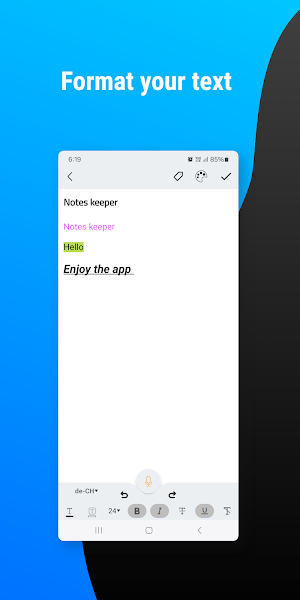
4.Rich Text Editing: Format your notes and memos with ease using rich text editing features like bold, italic, underline, text color, and more.
5.Share : Share your notes and memos with friends, family, or colleagues
- Taking notes
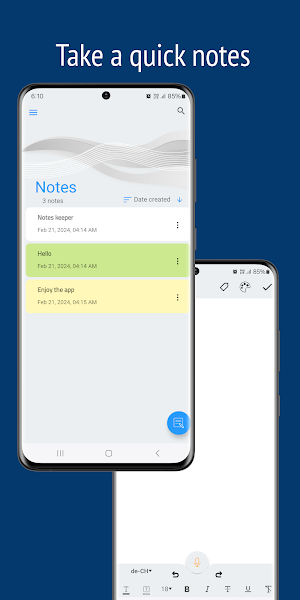
• Make a note or a memo by tapping the new note button,The note editor will open and you can easily write what is in your mind
- Saving notes
• Notes keeper allows you to save you notes and memos to your phone storage as a text file or MS file.
- Find what you need, fast
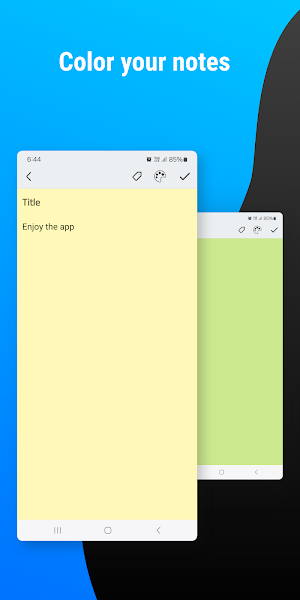
• Color and add tags to notes and memos to quickly organize.
- Backup and restore notes
• Backup your notes and memos and app date to keep a save on your phone storage and you can restore it whenever you what.The copy will be encrypted and save.
*Note: when you restore a backup it will overwrite all existing data.
Why Notes Keeper?
Whether you're a student, professional, or anyone in between, Notes Keeper is the perfect tool for staying organized and productive. Say goodbye to scattered scraps of paper and hello to a streamlined note-taking experience that fits seamlessly into your life.
Download Notes Keeper today and start capturing your ideas with ease!
-Features summary
• Text formatting
• Color code notes
• Search notes
• Save backup notes to SD storage
• Quick making/editing memo and notes
• Share notes via all social apps
Features:
1. Simple Interface: With a clean and intuitive design, Notes Keeper makes it effortless to capture your thoughts quickly and efficiently.
2.Customizable Themes: Personalize your note-taking experience with a variety of themes to suit your style and mood.
3. Organized Categories: Stay organized by categorizing your notes and memos into tags for easy access and management.
4.Rich Text Editing: Format your notes and memos with ease using rich text editing features like bold, italic, underline, text color, and more.
5.Share : Share your notes and memos with friends, family, or colleagues
- Taking notes
• Make a note or a memo by tapping the new note button,The note editor will open and you can easily write what is in your mind
- Saving notes
• Notes keeper allows you to save you notes and memos to your phone storage as a text file or MS file.
- Find what you need, fast
• Color and add tags to notes and memos to quickly organize.
- Backup and restore notes
• Backup your notes and memos and app date to keep a save on your phone storage and you can restore it whenever you what.The copy will be encrypted and save.
*Note: when you restore a backup it will overwrite all existing data.
Why Notes Keeper?
Whether you're a student, professional, or anyone in between, Notes Keeper is the perfect tool for staying organized and productive. Say goodbye to scattered scraps of paper and hello to a streamlined note-taking experience that fits seamlessly into your life.
Download Notes Keeper today and start capturing your ideas with ease!
-Features summary
• Text formatting
• Color code notes
• Search notes
• Save backup notes to SD storage
• Quick making/editing memo and notes
• Share notes via all social apps
What’s new
Version 1.0.21 · Updated August 20, 2026
• Added a new “Remove Ads” option for an uninterrupted experience • Improved app stability and performance • Fixed minor bugs and UI issues • Better overall responsiveness and smoother experience Thank you for using Notes Keeper
User reviews

Beautifully done! Quite enthused to have a note keeper so easy to use. The design is stellar. Very impressed.

This notepad app is exactly what I've been looking for. It's straightforward and easy to use, with no unnecessary clutter or distractions. I appreciate the clean interface and the ability to organize my notes into different categories. Plus, the dark mode option is a nice touch for late-night brainstorming sessions....

Useful, beautiful and easy to use application

This app is very useful and It is very important for people who love writing!

Great , simple and easy to use note app
Alternatives to Notes keeper: speech to text
Looking for apps like Notes keeper: speech to text? Here is 1 similar Android app on Google Play.

| App | Rating | Price | Installs | Compare |
|---|---|---|---|---|
| Notes keeper: speech to text | 4.9 / 5 | Free | 1,000+ | |
| Shake Flashlight & Camera | 3.7 / 5 | Free | 500,000+ | Compare |