About BlueRadar: Bluetooth Finder
Lost a Bluetooth device? BlueRadar is a signal-based Bluetooth finder that helps you locate nearby devices like wireless earbuds, smartwatches, fitness trackers, speakers, and other compatible Bluetooth gear.
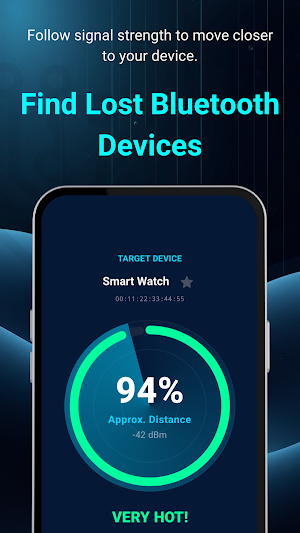
BlueRadar turns the search into a simple Hot / Cold experience. By reading signal strength in real time, it helps you estimate whether you are getting closer to your target device or moving farther away.
What You Can Do with BlueRadar
• Find nearby Bluetooth devices with signal-guided tracking
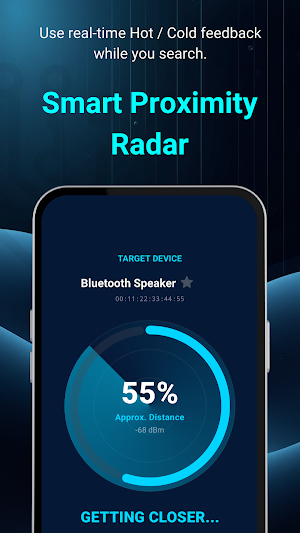
• Use the Proximity Radar to follow signal changes while you move
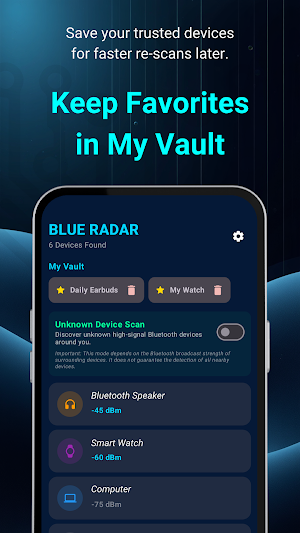
• Save trusted devices in My Vault for faster re-scans later
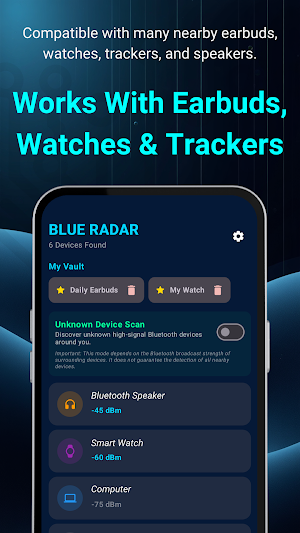
• Scan stronger nearby signals from devices not saved in your Vault
• Use a limited free version, then unlock more access when needed
Key Features
• Signal-Based Bluetooth Finder
Track nearby compatible devices by following signal strength changes in real time.
• Smart Proximity Radar
Use clear Hot / Cold guidance to understand whether you are moving closer to your device.
• My Vault
Save your trusted devices for quicker access and easier repeat tracking.
• Nearby Signal Scan
Review stronger nearby Bluetooth signals from devices that are not saved in your Vault.
• Broad Everyday Use
Designed for many common Bluetooth and BLE use cases, including earbuds, watches, fitness trackers, speakers, and key trackers.
Premium Unlocks
• Unlimited Radar Scans
• Unlimited Vault Saves
• Unknown Signals Mode
• Ad-Free Experience
How to Use
1. Open BlueRadar and allow the required Bluetooth permissions.
2. Pick a device from the scanner or save trusted devices to My Vault.
3. Move slowly while watching the Proximity Radar.
4. Follow the signal trend as it gets hotter when you move closer.
Important Notes
BlueRadar uses Bluetooth signal strength to provide approximate proximity guidance. Signal quality can change because of walls, cases, interference, device behavior, and surrounding conditions.
BlueRadar does not guarantee the exact location, recovery, or detection of every nearby device. Proximity tracking works best with compatible nearby BLE devices that are actively broadcasting a signal.
Similar Apps
Bubble Level & Angle Meter
AR bubble level & angle meter with project records and PDF reports.
SmartCut: Cut List Optimizer
Create cut layouts and cut lists for MDF, plywood and panels.
BlueRadar: Bluetooth Finder
Find nearby earbuds, watches, trackers, and speakers faster.