

Swoopbox: Archive & Clipboard
Productivity In-app purchases Contains ads
Save, copy & paste in one archive and clipboard app
- Downloads
- 95+
- on Google Play
- Price
- Free
- In-app purchases
- Updated
- Jun 18
- 2026 · v2.6.9
Screenshots


About Swoopbox: Archive & Clipboard
Have you ever saved a link, text, image, or file for later and then had trouble finding it again?
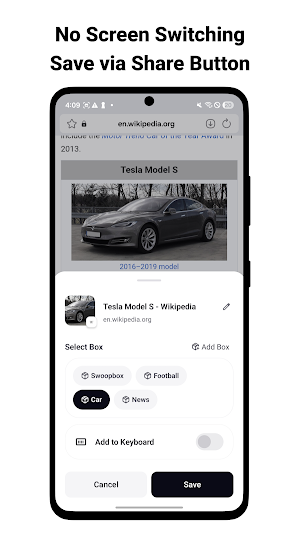
Save it with one tap from the share button, then pull it up right when you need it.
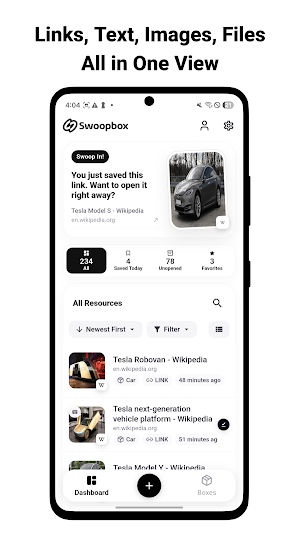
Swoopbox helps you quickly save links, text, images, and files and keep them easy to find again.
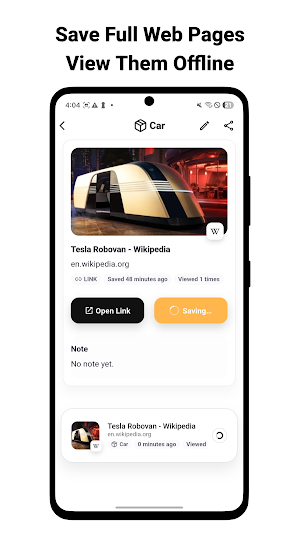
Web pages can be saved for offline viewing, so you can reopen them without internet. Supported files such as images and PDFs can also be viewed inside the app.
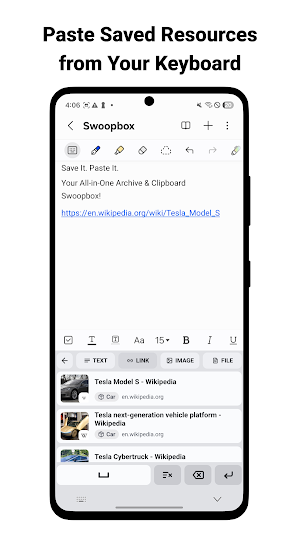
Now you can add saved resources to the custom keyboard and paste them directly into input fields in other apps and websites.
• Key Features
1. Save Fast
- Save links, text, images, and files from anywhere with one tap of Share
- Add resources easily without switching apps
- Choose a box or create a new box while saving
2. Use Directly from the Custom Keyboard
- Add saved links, text, images, and files to the Swoopbox keyboard
- Paste the resource you need right into input fields in other apps and websites
- Use type filters and pins to reach frequent items faster
3. Organize for Easy Finding
- Manage important resources with boxes, favorites, and pinned items
- Find links, images, and files quickly with search and filters
- Add notes to each resource so you remember why you saved it
4. Save Pages and Files, Even Offline
- Save web pages as they are (WebArchive / full-page capture)
- Reopen saved pages without an internet connection
- View supported files such as images and PDFs directly in the app
5. Recommendations and Reminders
- Rediscover recent, popular, and recommended resources from Home
- Get unread-resource alerts and daily or weekly summaries
6. Continue Across Devices
- Sign in to automatically sync links, images, files, boxes, notes, and saved pages
- Pick up on any device
• What’s New
- Added a custom keyboard so saved links, text, images, and files can be added to the Swoopbox keyboard and pasted anywhere
- Added guides for external share saving and custom keyboard setup
- Improved the dashboard UI/UX so the app is easier to use
• Contact
- Email: [email protected]
Save it with one tap from the share button, then pull it up right when you need it.
Swoopbox helps you quickly save links, text, images, and files and keep them easy to find again.
Web pages can be saved for offline viewing, so you can reopen them without internet. Supported files such as images and PDFs can also be viewed inside the app.
Now you can add saved resources to the custom keyboard and paste them directly into input fields in other apps and websites.
• Key Features
1. Save Fast
- Save links, text, images, and files from anywhere with one tap of Share
- Add resources easily without switching apps
- Choose a box or create a new box while saving
2. Use Directly from the Custom Keyboard
- Add saved links, text, images, and files to the Swoopbox keyboard
- Paste the resource you need right into input fields in other apps and websites
- Use type filters and pins to reach frequent items faster
3. Organize for Easy Finding
- Manage important resources with boxes, favorites, and pinned items
- Find links, images, and files quickly with search and filters
- Add notes to each resource so you remember why you saved it
4. Save Pages and Files, Even Offline
- Save web pages as they are (WebArchive / full-page capture)
- Reopen saved pages without an internet connection
- View supported files such as images and PDFs directly in the app
5. Recommendations and Reminders
- Rediscover recent, popular, and recommended resources from Home
- Get unread-resource alerts and daily or weekly summaries
6. Continue Across Devices
- Sign in to automatically sync links, images, files, boxes, notes, and saved pages
- Pick up on any device
• What’s New
- Added a custom keyboard so saved links, text, images, and files can be added to the Swoopbox keyboard and pasted anywhere
- Added guides for external share saving and custom keyboard setup
- Improved the dashboard UI/UX so the app is easier to use
• Contact
- Email: [email protected]
What’s new
Version 2.6.9 · Updated June 18, 2026
- Added and improved necessary features. - Fixed various bugs.
Alternatives to Swoopbox: Archive & Clipboard
Looking for apps like Swoopbox: Archive & Clipboard? Here are 5 similar Android apps on Google Play. The highest rated is Blue Sky Vitamin (4.8/5), and all 5 are free to download.
-
ISO Today 4.3
-
2Do - To do List & Reminders 4.1
-
Hamilton Aquatics
-
Headlamp Health 4.6
-
Blue Sky Vitamin 4.8
| App | Rating | Price | Installs | Last updated | Compare |
|---|---|---|---|---|---|
| Swoopbox: Archive & Clipboard | – | Free | 50+ | Jun 18, 2026 | |
| ISO Today | 4.3 / 5 | Free | 10,000+ | May 7, 2026 | Compare |
| 2Do - To do List & Reminders | 4.1 / 5 | Free | 100,000+ | Oct 28, 2026 | Compare |
| Hamilton Aquatics | – | Free | 10,000+ | Sep 2, 2026 | Compare |
| Headlamp Health | 4.6 / 5 | Free | 1,000+ | Aug 20, 2026 | Compare |
| Blue Sky Vitamin | 4.8 / 5 | Free | 1,000+ | Oct 8, 2026 | Compare |