
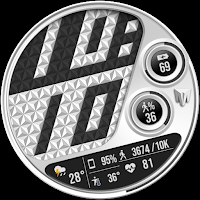
Merge Labs Imperial
Lifestyle
A uniquely designed digital smart watch face made for Wear OS
- Downloads
- 100+
- on Google Play
- Price
- $0.99
- No in-app purchases
- Updated
- Sep 6
- 2026
Screenshots


About Merge Labs Imperial
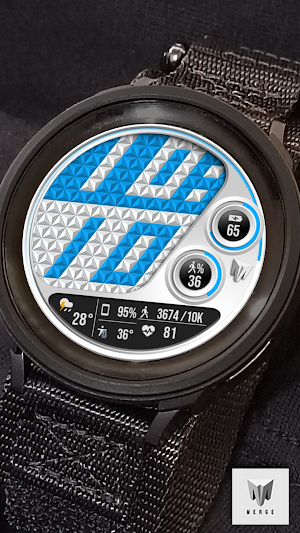
Enjoy this uniquely designed digital smart watch face with custom "Clos Triangular" guilloche patterned digital font that blends in seamlessly with the guilloche background made for Wear OS
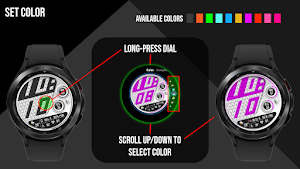
- Multiple colors and backgrounds to choose from in the “Customize” Menu which is accessible from the installed watch face and the Galaxy Wearable App
- 1 Small Box Complication on the left is recommended and designed for Google's default weather App. It is important to use to the “default” weather app in this small box complication as the resulting layout and appearance of other apps in this complication cannot be guaranteed.
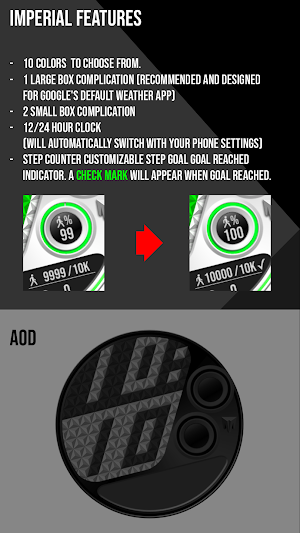
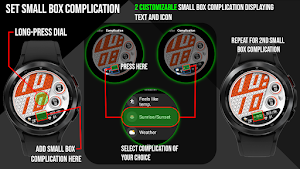
- 2 customizable Small Box Complications allowing the addition of the information you want to be displayed. (Text+Icon).
- Displayed numerical watch battery level with graphic indicator (0-100%). Tap the battery icon to open the watch battery app.
- Displays daily step counter with graphic indicator. Step goal is Synced with your device through Samsung Health App. Once your step goal is achieved, a checkmark will appear to show that you have made your goal. The graphic indicator will stop at at your synced step goal but the actual numeric step counter will continue to count steps all the way up to 50,000 steps. To set/change your step goal, please refer to the instructions (image) in the Google Play description of this watch face.
- Displays heart rate (BPM 0-240) with an animated graphical indicator that that increase/decreases in rate according to heart rate. You can also tap the heart rate Area to launch your default Heart Rate App.
**Important: this app does not use a companion app so it is not available to be installed from your phone onto your device. It is installed directly onto your device where it then can be loaded from.
Step 1: download/purchase face from Google Play Store on your phone or desktop. You must make sure you select your device in the dropdown menu where it asks you where you want to download from. (The “blue button” which is usually set to the default device which is your phone)
Step 2: once download starts it will automatically install onto your watch and you should get a notification that download/installation is complete on your watch.
Step 3: the new face can be accessed by long-pressing the center of your watch’s screen and the customization menu will appear, from there just swipe all the way to the right until the “add watch face” option appears. Press it and then scroll down to find the new watch face you just downloaded/select, and that’s it!
Made for Wear OS
*Many thanks for your ratings and reviews.
*If you see the message "Your device is not compatible" go to the Google Play Store in your WEB browser from a PC/Laptop and try to download from there.
Follow me at Merge Labs on Facebook/Instagram to get updates/announcements on more great faces to come!
- Multiple colors and backgrounds to choose from in the “Customize” Menu which is accessible from the installed watch face and the Galaxy Wearable App
- 1 Small Box Complication on the left is recommended and designed for Google's default weather App. It is important to use to the “default” weather app in this small box complication as the resulting layout and appearance of other apps in this complication cannot be guaranteed.
- 2 customizable Small Box Complications allowing the addition of the information you want to be displayed. (Text+Icon).
- Displayed numerical watch battery level with graphic indicator (0-100%). Tap the battery icon to open the watch battery app.
- Displays daily step counter with graphic indicator. Step goal is Synced with your device through Samsung Health App. Once your step goal is achieved, a checkmark will appear to show that you have made your goal. The graphic indicator will stop at at your synced step goal but the actual numeric step counter will continue to count steps all the way up to 50,000 steps. To set/change your step goal, please refer to the instructions (image) in the Google Play description of this watch face.
- Displays heart rate (BPM 0-240) with an animated graphical indicator that that increase/decreases in rate according to heart rate. You can also tap the heart rate Area to launch your default Heart Rate App.
**Important: this app does not use a companion app so it is not available to be installed from your phone onto your device. It is installed directly onto your device where it then can be loaded from.
Step 1: download/purchase face from Google Play Store on your phone or desktop. You must make sure you select your device in the dropdown menu where it asks you where you want to download from. (The “blue button” which is usually set to the default device which is your phone)
Step 2: once download starts it will automatically install onto your watch and you should get a notification that download/installation is complete on your watch.
Step 3: the new face can be accessed by long-pressing the center of your watch’s screen and the customization menu will appear, from there just swipe all the way to the right until the “add watch face” option appears. Press it and then scroll down to find the new watch face you just downloaded/select, and that’s it!
Made for Wear OS
*Many thanks for your ratings and reviews.
*If you see the message "Your device is not compatible" go to the Google Play Store in your WEB browser from a PC/Laptop and try to download from there.
Follow me at Merge Labs on Facebook/Instagram to get updates/announcements on more great faces to come!
What’s new
Updated September 6, 2026
Merge Labs Imperial Bredlix Companion App API 36/targetSdk 36
User reviews

Very well done. Thank you!

Nice face and unusual, easy to install, well done

Cool watch face 😎
Alternatives to Merge Labs Imperial
Looking for apps like Merge Labs Imperial? Here are 6 similar Android apps on Google Play. The highest rated is Merge Labs Prizm Dark (4.6/5), and 1 of the 6 are free to download.
-
Merge Labs Prizm Dark 4.6
-
Merge Labs KS 3
-
Merge Labs Isometric 6
-
Merge Labs MLT002
-
Merge Labs Polygon
-
Merge Labs Tiled
| App | Rating | Price | Installs | Last updated | Compare |
|---|---|---|---|---|---|
| Merge Labs Imperial | – | $0.99 | 100+ | Sep 6, 2026 | |
| Merge Labs Prizm Dark | 4.6 / 5 | Free | 50,000+ | Aug 12, 2025 | Compare |
| Merge Labs KS 3 | – | 1.49 USD | 100+ | Oct 1, 2026 | Compare |
| Merge Labs Isometric 6 | – | 0.99 USD | 100+ | – | Compare |
| Merge Labs MLT002 | – | 0.99 USD | 100+ | Oct 1, 2026 | Compare |
| Merge Labs Polygon | – | 0.99 USD | 100+ | – | Compare |
| Merge Labs Tiled | – | 0.99 USD | 100+ | Sep 9, 2025 | Compare |
Similar apps on Google Play
- Merge Labs Prizm Dark
- Merge Labs KS 3
- Merge Labs Isometric 6
- Merge Labs MLT002
- Merge Labs Polygon
- Merge Labs Tiled
- Merge Labs GTO
- Merge Labs Isometric 5
- Merge Labs KS 2
- Merge Labs Urban Scrawl 2
- Merge Labs Split
- Merge Labs Isometric SpaceBase
- Merge Labs NRW2
- Merge Labs MLT001
- Merge Labs Imperial
- Merge Labs Isometric 4
- Merge Labs Isometric Reflected
- Merge Labs KS 1
- Merge Labs Isometric City
- Merge Labs MOD9INE
- Merge Labs Urban Scrawl
- Merge Labs Fluid
- Merge Labs SPR
- Merge Labs Exhibition
- Merge Labs Isometric 1
- Merge Labs Apogee
- Merge Labs Apex Combi 1
- Merge Labs Apex Simple BMF
- Merge Labs Apex Simple
- Merge Labs Simple001