
SecureVault - Password Manager
Marwadi University - CE Department Tools
Secure offline password manager. Store passwords safely with encryption
- Downloads
- 22+
- on Google Play
- Price
- Free
- No in-app purchases
- Updated
- Jan 6
- 2026 · v1.0.1
Screenshots

About SecureVault - Password Manager
SecureVault - Your Secure Offline Password Manager
Keep all your passwords safe and organized in one place. SecureVault is a privacy-focused password manager that stores everything locally on your device - no cloud, no servers, no internet required.
🔐 KEY FEATURES
- Offline Storage: All passwords stored locally on your device
- Military-Grade Encryption: SQLCipher encryption protects your data
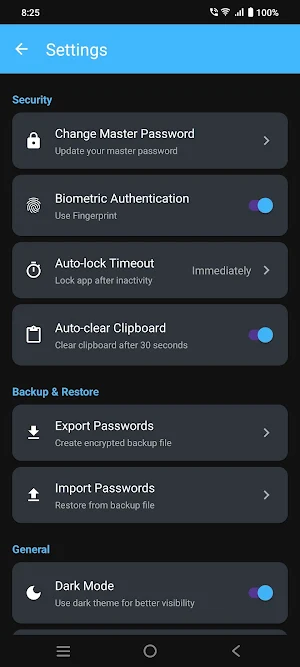
- Biometric Authentication: Quick unlock with fingerprint or face recognition
- Master Password Protection: Single password to access all your passwords
- Zero Cloud Storage: Your data never leaves your device
- No Internet Required: Works completely offline
- Easy to Use: Simple, clean interface for managing passwords
🛡️ SECURITY FEATURES
- AES-256 Encryption: Industry-standard encryption for maximum security
- Secure Database: SQLCipher encrypted database
- Auto-Lock: Automatically locks after inactivity
- No Permissions Needed: Doesn't require unnecessary phone permissions
- Open Source Friendly: Built with security best practices
- Local-Only Storage: No cloud sync = No data breaches
✨ POWERFUL FEATURES
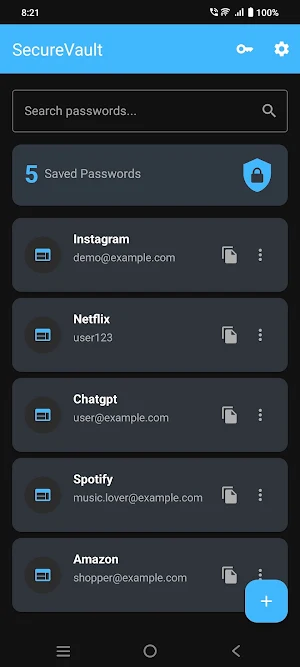
- Smart Search: Quickly find passwords with instant search
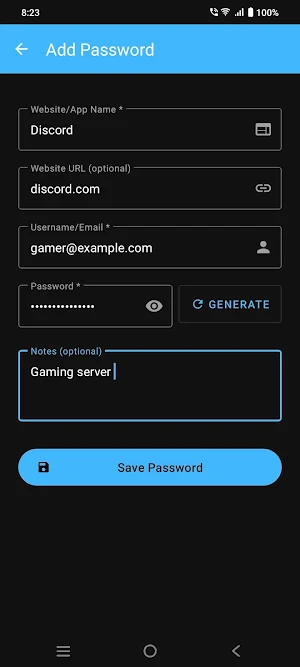
- Password Generator: Create strong, random passwords
- Organize by Category: Keep passwords organized
- Add Notes: Store additional information securely
- Easy Management: Add, edit, delete passwords easily
- Password Strength Indicator: Visual feedback on password security
- Copy with One Tap: Quick copy username and password
🎨 USER EXPERIENCE
- Material Design 3: Modern, beautiful interface
- Dark Mode Support: Easy on the eyes
- Intuitive Navigation: Simple and straightforward
- Fast Performance: Instant access to your passwords
- No Ads: Clean experience without interruptions
- Lightweight: Small app size, fast installation
🔒 PRIVACY FIRST
- No Account Required: No email, no registration
- No Data Collection: We don't track or collect your data
- No Internet Access: Works completely offline
- No Cloud Sync: Your passwords stay on your device
- Complete Privacy: Only you can access your passwords
- Transparent Security: Clear security practices
📱 HOW IT WORKS
1. Create a strong master password on first launch
2. Enable biometric unlock for quick access (optional)
3. Add your website passwords, usernames, and notes
4. Use powerful search to find passwords instantly
5. Copy passwords with one tap
6. Your data stays encrypted and secure on your device
🎯 PERFECT FOR
- Security-conscious users
- Privacy enthusiasts
- People who want offline password storage
- Anyone tired of cloud-based password managers
- Users who value data privacy
- Those seeking simple password management
⚡ WHY CHOOSE SECUREVAULT?
Unlike cloud-based password managers, SecureVault keeps everything local. No monthly fees, no data breaches, no privacy concerns. Your passwords are encrypted on your device and stay there.
🔐 ENCRYPTION DETAILS
SecureVault uses SQLCipher for database encryption with AES-256 encryption. Your master password is hashed using industry-standard algorithms and never stored in plain text.
📋 REQUIREMENTS
- Android 7.0 (API 24) or higher
- Fingerprint/Face sensor for biometric unlock (optional)
🆓 100% FREE
No subscriptions, no in-app purchases, no hidden costs. Just a secure, reliable password manager that respects your privacy.
💡 TIPS FOR BEST SECURITY
- Use a strong master password (mix of letters, numbers, symbols)
- Enable biometric unlock for convenience
- Keep your device secure with a lock screen
- Regularly backup your passwords (export feature coming soon)
⚠️ IMPORTANT NOTE
Since all data is stored locally, if you uninstall the app or clear app data, all passwords will be permanently deleted. Make sure to remember your master password - there's no recovery option (by design, for your security).
Keep all your passwords safe and organized in one place. SecureVault is a privacy-focused password manager that stores everything locally on your device - no cloud, no servers, no internet required.
🔐 KEY FEATURES
- Offline Storage: All passwords stored locally on your device
- Military-Grade Encryption: SQLCipher encryption protects your data
- Biometric Authentication: Quick unlock with fingerprint or face recognition
- Master Password Protection: Single password to access all your passwords
- Zero Cloud Storage: Your data never leaves your device
- No Internet Required: Works completely offline
- Easy to Use: Simple, clean interface for managing passwords
🛡️ SECURITY FEATURES
- AES-256 Encryption: Industry-standard encryption for maximum security
- Secure Database: SQLCipher encrypted database
- Auto-Lock: Automatically locks after inactivity
- No Permissions Needed: Doesn't require unnecessary phone permissions
- Open Source Friendly: Built with security best practices
- Local-Only Storage: No cloud sync = No data breaches
✨ POWERFUL FEATURES
- Smart Search: Quickly find passwords with instant search
- Password Generator: Create strong, random passwords
- Organize by Category: Keep passwords organized
- Add Notes: Store additional information securely
- Easy Management: Add, edit, delete passwords easily
- Password Strength Indicator: Visual feedback on password security
- Copy with One Tap: Quick copy username and password
🎨 USER EXPERIENCE
- Material Design 3: Modern, beautiful interface
- Dark Mode Support: Easy on the eyes
- Intuitive Navigation: Simple and straightforward
- Fast Performance: Instant access to your passwords
- No Ads: Clean experience without interruptions
- Lightweight: Small app size, fast installation
🔒 PRIVACY FIRST
- No Account Required: No email, no registration
- No Data Collection: We don't track or collect your data
- No Internet Access: Works completely offline
- No Cloud Sync: Your passwords stay on your device
- Complete Privacy: Only you can access your passwords
- Transparent Security: Clear security practices
📱 HOW IT WORKS
1. Create a strong master password on first launch
2. Enable biometric unlock for quick access (optional)
3. Add your website passwords, usernames, and notes
4. Use powerful search to find passwords instantly
5. Copy passwords with one tap
6. Your data stays encrypted and secure on your device
🎯 PERFECT FOR
- Security-conscious users
- Privacy enthusiasts
- People who want offline password storage
- Anyone tired of cloud-based password managers
- Users who value data privacy
- Those seeking simple password management
⚡ WHY CHOOSE SECUREVAULT?
Unlike cloud-based password managers, SecureVault keeps everything local. No monthly fees, no data breaches, no privacy concerns. Your passwords are encrypted on your device and stay there.
🔐 ENCRYPTION DETAILS
SecureVault uses SQLCipher for database encryption with AES-256 encryption. Your master password is hashed using industry-standard algorithms and never stored in plain text.
📋 REQUIREMENTS
- Android 7.0 (API 24) or higher
- Fingerprint/Face sensor for biometric unlock (optional)
🆓 100% FREE
No subscriptions, no in-app purchases, no hidden costs. Just a secure, reliable password manager that respects your privacy.
💡 TIPS FOR BEST SECURITY
- Use a strong master password (mix of letters, numbers, symbols)
- Enable biometric unlock for convenience
- Keep your device secure with a lock screen
- Regularly backup your passwords (export feature coming soon)
⚠️ IMPORTANT NOTE
Since all data is stored locally, if you uninstall the app or clear app data, all passwords will be permanently deleted. Make sure to remember your master password - there's no recovery option (by design, for your security).
Alternatives to SecureVault - Password Manager
Looking for apps like SecureVault - Password Manager? Here are 6 similar Android apps on Google Play. All of them are free to download.





| App | Rating | Price | Installs | Last updated | Compare |
|---|---|---|---|---|---|
| SecureVault - Password Manager | – | Free | 10+ | Jan 6, 2026 | |
| Tic Tac Toe | – | Free | 10+ | Mar 9, 2026 | Compare |
| Parrot Dash | – | Free | 50+ | Mar 7, 2026 | Compare |
| Fitlife | – | Free | 5+ | Mar 3, 2026 | Compare |
| MU MCQ | – | Free | 100+ | Feb 26, 2026 | Compare |
| Studify | – | Free | 50+ | Feb 20, 2026 | Compare |
| Sedan Jump | – | Free | 10+ | Jan 24, 2026 | Compare |