

Lost and Found
Marwadi University - CE Department Tools
Post lost or found items, browse reports near you, and contact owners instantly.
- Downloads
- 107+
- on Google Play
- Price
- Free
- No in-app purchases
- Updated
- Jan 21
- 2026 · v3.0.0
Screenshots

About Lost and Found
Lost & Found is a highly reliable mobile application designed to reunite people with their lost belongings quickly, safely, and efficiently. Whether you misplaced a valuable item on campus, lost something , or discovered an item that doesn’t belong to you, the Lost & Found app offers a platform to report, search, and recover items with ease. Built with user-friendly design principles, secure backend infrastructure, and powerful smart-matching algorithms, this application creates a trusted community-driven system where users help one another by sharing information about lost or found items.
The app eliminates the traditional complications of managing lost items—long queues, going to the lost and found department , manual searches, and inefficient reporting systems. Instead, it transforms the process into a fast, transparent, and automated experience accessible directly from your mobile device. With features such as OTP-based authentication, image uploads, location mentioning, and real-time updates, Lost & Found provides a complete and reliable solution for item recovery.
Key Features:
--What You Can Do With the Lost & Found App?
Report Lost Items
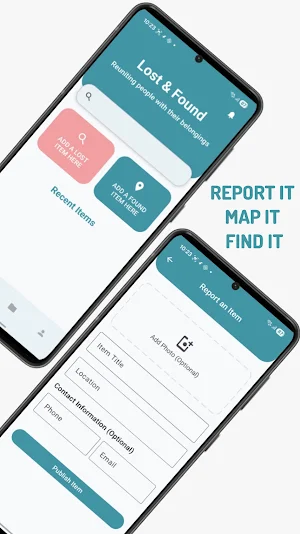
Create a detailed listing of your lost possession including title, description, last known location, and contact information. Adding photos makes it easier for others to identify and reach out if they find a match.
Upload Found Items
If you discover an item lying unattended, simply upload its details so the owner can locate it. Your contribution helps the community stay connected and responsible.
Browse All Reports
View all listed items — both lost and found — with clear categorization and image previews. This makes it easy to scan through reports and identify connected listings.
Location-Based Details
Each item entry allows you to mention where it was lost or found, helping reduce search time by narrowing down possible areas.
Easy Contact Sharing
Owners and finders can include optional phone numbers and email addresses for quick and secure communication.
Image Upload Support
Users can upload photos through a simple, built-in upload system. This manual approach ensures clarity, accuracy, and trust in each report.
--How It Works
Lost something? Create a lost-item report with details and an optional photo.
Found something? Upload the item so the owner can recognize it.
Browse listings to check for your missing belongings.
Contact safely using the provided information when you find a matching item.
Recover your belongings and help build a responsible community.
Detailed App Flow
1. Account Creation
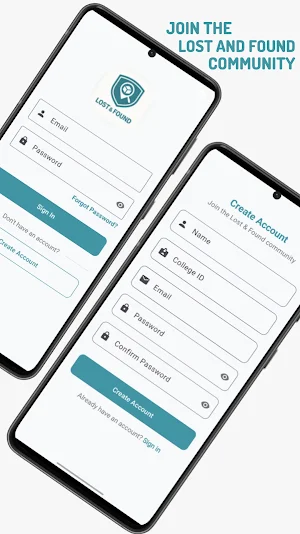
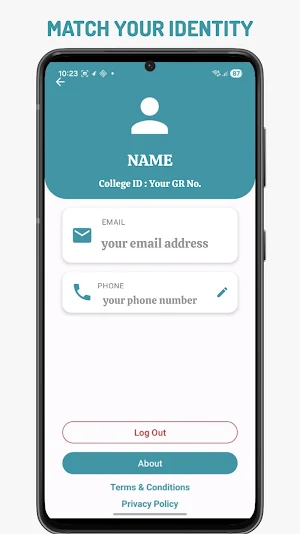
Users begin by signing in through OTP verification. This simple yet secure process ensures legitimate profiles and prevents misuse. After logging in, users can complete their basic details for identity confirmation during item recovery communication.
2. Posting a Lost or Found Item
The posting process has been designed to be fast, intuitive, and informative. Users provide:
Item name
Description
Category selection via ChipGroup
Location
Phone number (optional)
Email
Image upload (optional but recommended)
A clean, aesthetic layout ensures clarity and prevents user confusion.
Keywords (e.g., "Samsung phone", "ID card")
Description keywords
Image tags (if supported via future updates)
If a match is found, both users receive instant notifications.
3. Viewing and Managing Items
Users can browse:
All items they reported
All items discovered by others
Matches and suggestions
The status of each report
This organized system ensures transparency and user convenience.
4. Contacting Finders
For privacy and security reasons, the app currently restricts direct personal messaging. Communication happens through:
Email (provided in item listing)
Phone number (if user chooses to share)
This enables secure, respectful communication without compromising user identity.
The app eliminates the traditional complications of managing lost items—long queues, going to the lost and found department , manual searches, and inefficient reporting systems. Instead, it transforms the process into a fast, transparent, and automated experience accessible directly from your mobile device. With features such as OTP-based authentication, image uploads, location mentioning, and real-time updates, Lost & Found provides a complete and reliable solution for item recovery.
Key Features:
--What You Can Do With the Lost & Found App?
Report Lost Items
Create a detailed listing of your lost possession including title, description, last known location, and contact information. Adding photos makes it easier for others to identify and reach out if they find a match.
Upload Found Items
If you discover an item lying unattended, simply upload its details so the owner can locate it. Your contribution helps the community stay connected and responsible.
Browse All Reports
View all listed items — both lost and found — with clear categorization and image previews. This makes it easy to scan through reports and identify connected listings.
Location-Based Details
Each item entry allows you to mention where it was lost or found, helping reduce search time by narrowing down possible areas.
Easy Contact Sharing
Owners and finders can include optional phone numbers and email addresses for quick and secure communication.
Image Upload Support
Users can upload photos through a simple, built-in upload system. This manual approach ensures clarity, accuracy, and trust in each report.
--How It Works
Lost something? Create a lost-item report with details and an optional photo.
Found something? Upload the item so the owner can recognize it.
Browse listings to check for your missing belongings.
Contact safely using the provided information when you find a matching item.
Recover your belongings and help build a responsible community.
Detailed App Flow
1. Account Creation
Users begin by signing in through OTP verification. This simple yet secure process ensures legitimate profiles and prevents misuse. After logging in, users can complete their basic details for identity confirmation during item recovery communication.
2. Posting a Lost or Found Item
The posting process has been designed to be fast, intuitive, and informative. Users provide:
Item name
Description
Category selection via ChipGroup
Location
Phone number (optional)
Image upload (optional but recommended)
A clean, aesthetic layout ensures clarity and prevents user confusion.
Keywords (e.g., "Samsung phone", "ID card")
Description keywords
Image tags (if supported via future updates)
If a match is found, both users receive instant notifications.
3. Viewing and Managing Items
Users can browse:
All items they reported
All items discovered by others
Matches and suggestions
The status of each report
This organized system ensures transparency and user convenience.
4. Contacting Finders
For privacy and security reasons, the app currently restricts direct personal messaging. Communication happens through:
Email (provided in item listing)
Phone number (if user chooses to share)
This enables secure, respectful communication without compromising user identity.
Alternatives to Lost and Found
Looking for apps like Lost and Found? Here are 6 similar Android apps on Google Play. All of them are free to download.






| App | Rating | Price | Installs | Last updated | Compare |
|---|---|---|---|---|---|
| Lost and Found | – | Free | 100+ | Jan 21, 2026 | |
| Tic Tac Toe | – | Free | 10+ | Mar 9, 2026 | Compare |
| Parrot Dash | – | Free | 50+ | Mar 7, 2026 | Compare |
| Fitlife | – | Free | 5+ | Mar 3, 2026 | Compare |
| MU MCQ | – | Free | 100+ | Feb 26, 2026 | Compare |
| Studify | – | Free | 50+ | Feb 20, 2026 | Compare |
| Sedan Jump | – | Free | 10+ | Jan 24, 2026 | Compare |
Compare Lost and Found with the top alternatives: ratings, updates, ASO score and keyword gaps →