
Text to Dialogue: Offline TTS
Productivity In-app purchases Contains ads
Offline text to speech with natural voices and multi-speaker dialogue.
- Downloads
- 432+
- on Google Play
- Price
- Free
- In-app purchases
- Updated
- Oct 16
- 2026 · v1.5
Screenshots
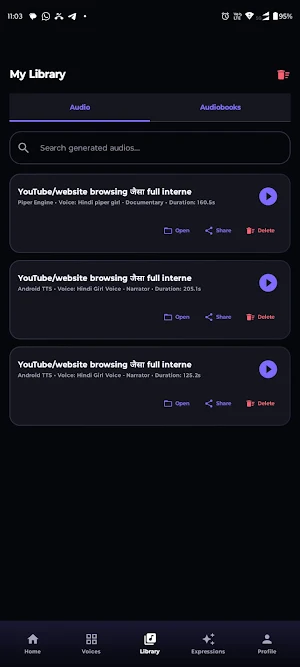

About Text to Dialogue: Offline TTS
Turn written text into speech and create conversations with different voices directly on your Android device.
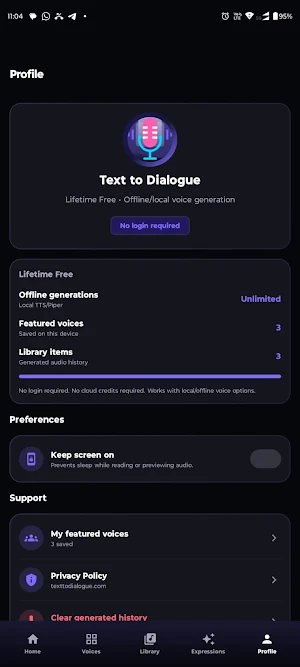
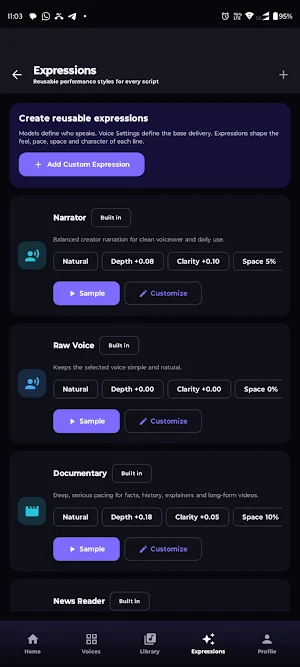
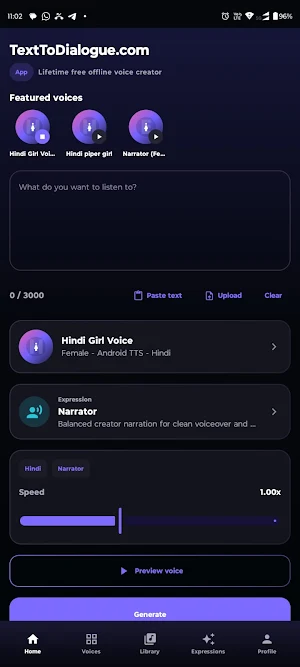
Text to Dialogue is an offline text-to-speech and dialogue maker for voiceovers, stories, scripts, learning material and read-aloud use. Download a supported voice model once, then generate speech locally on your device.
CREATE TEXT-TO-SPEECH AUDIO
Type or paste your text, select an installed voice and generate natural-sounding speech. Save the generated audio as a WAV file for listening, sharing or use in other compatible apps.
MAKE MULTI-SPEAKER DIALOGUES
Create conversations between multiple characters. Assign a different installed voice to each speaker and combine the complete dialogue into a single audio file.
DOWNLOAD NEURAL VOICES
Choose from supported Piper voice models and keep the voices you need on your device. Available languages and voices depend on the models provided inside the app.
WORK OFFLINE AFTER SETUP
An internet connection is required when downloading a voice model for the first time. After installation, the selected voice can generate speech locally without requiring a cloud text-to-speech service.
CREATE AUDIO FOR DIFFERENT PROJECTS
Use Text to Dialogue for:
• Video narration and voiceovers
• Multi-character stories and conversations
• Dialogue and script previews
• Learning and listening material
• Presentations and personal projects
• Game and character dialogue prototypes
• Reading written text aloud
PRIVACY-FOCUSED PROCESSING
After the selected voice model has been downloaded, speech generation takes place directly on your device. Your text does not need to be uploaded to a cloud speech-generation service.
Please note:
• Voice models must be downloaded before offline use.
• Generation speed depends on the text length, selected model and device performance.
• Voice quality and language availability vary by model.
• Generated audio is currently exported in WAV format.
Text to Dialogue is an offline text-to-speech and dialogue maker for voiceovers, stories, scripts, learning material and read-aloud use. Download a supported voice model once, then generate speech locally on your device.
CREATE TEXT-TO-SPEECH AUDIO
Type or paste your text, select an installed voice and generate natural-sounding speech. Save the generated audio as a WAV file for listening, sharing or use in other compatible apps.
MAKE MULTI-SPEAKER DIALOGUES
Create conversations between multiple characters. Assign a different installed voice to each speaker and combine the complete dialogue into a single audio file.
DOWNLOAD NEURAL VOICES
Choose from supported Piper voice models and keep the voices you need on your device. Available languages and voices depend on the models provided inside the app.
WORK OFFLINE AFTER SETUP
An internet connection is required when downloading a voice model for the first time. After installation, the selected voice can generate speech locally without requiring a cloud text-to-speech service.
CREATE AUDIO FOR DIFFERENT PROJECTS
Use Text to Dialogue for:
• Video narration and voiceovers
• Multi-character stories and conversations
• Dialogue and script previews
• Learning and listening material
• Presentations and personal projects
• Game and character dialogue prototypes
• Reading written text aloud
PRIVACY-FOCUSED PROCESSING
After the selected voice model has been downloaded, speech generation takes place directly on your device. Your text does not need to be uploaded to a cloud speech-generation service.
Please note:
• Voice models must be downloaded before offline use.
• Generation speed depends on the text length, selected model and device performance.
• Voice quality and language availability vary by model.
• Generated audio is currently exported in WAV format.
What’s new
Version 1.5 · Updated October 16, 2026
• Added first-launch voice setup for Narrator, Paul, and Jenny. • Improved voice selection with a colorful, compact design. • Fixed Narrator voice and audio channel mapping. • Removed the 10-second cutoff from story previews. • Improved character renaming and added deletion for custom characters. • Updated to Android 17 (API 37) and refreshed core libraries.
Alternatives to Text to Dialogue: Offline TTS
Looking for apps like Text to Dialogue: Offline TTS? Here are 6 similar Android apps on Google Play. All of them are free to download.
-
16 Gutiya: Solah Guti Game
-
TV File Manager
-
TrackDish: World SAT Finder
-
Kata Kati - 9 Gutia
-
महापुराण - Mahapuran
-
FTA Media Server
| App | Rating | Price | Installs | Last updated | Compare |
|---|---|---|---|---|---|
| Text to Dialogue: Offline TTS | – | Free | 100+ | Oct 16, 2026 | |
| 16 Gutiya: Solah Guti Game | – | Free | 100+ | Oct 31, 2026 | Compare |
| TV File Manager | – | Free | 1,000+ | Oct 19, 2026 | Compare |
| TrackDish: World SAT Finder | – | Free | 100+ | Oct 22, 2026 | Compare |
| Kata Kati - 9 Gutia | – | Free | 50+ | Oct 15, 2026 | Compare |
| महापुराण - Mahapuran | – | Free | 100+ | Aug 24, 2026 | Compare |
| FTA Media Server | – | Free | 500+ | Oct 19, 2026 | Compare |