

Atelier Studio
Mav%C3%A1rez Labs Art & Design
Draw, animate, and create sprites. Offline, ad-free, and account-free.
- Downloads
- 18+
- on Google Play
- Price
- Free
- No in-app purchases
- Updated
- Aug 16
- 2026 · v1.1
Screenshots
About Atelier Studio
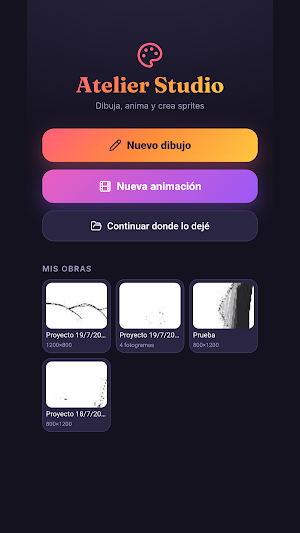
Atelier Studio is a mobile drawing and animation studio designed so you can start creating as soon as you open the app. No registration, no subscriptions, and no internet connection required.
DRAW WITH REAL TOOLS
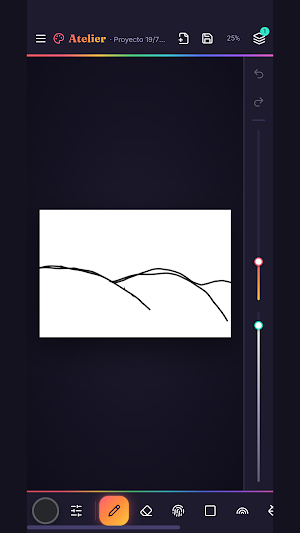
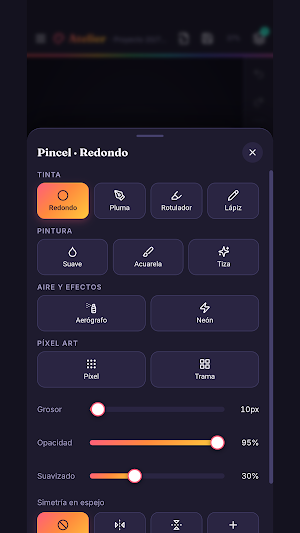
Choose from ink brushes (round, pen, marker, and pencil), paint brushes (soft, watercolor, and chalk), airbrushes and effects (airbrush and neon), and pixel art brushes (pixel and halftone), each with its own unique behavior. Adjust stroke thickness, opacity, and smoothness, and activate mirror symmetry so that what you draw on one side appears reflected on the other.
Complete your drawing with the paint bucket and tolerance control, gradients, patterns, blurring, the eyedropper tool to select any color from the canvas, and ready-to-use shapes: lines, squares, ellipses, stars, and arrows. You can also add text and transform what you've already drawn.
WORK IN LAYERS
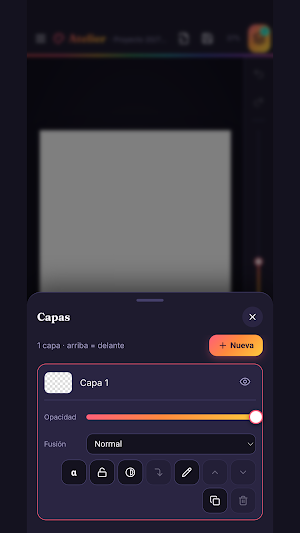
Organize your artwork in separate layers: rearrange them, adjust their opacity, lock them to avoid accidentally damaging them, and combine them when you're ready. Includes blending modes like Multiply and Overlay, as well as brightness and contrast adjustments. You can import an image from your gallery as an additional layer to trace or compose on top of.
ANIMATE FRAME BY FRAME
Create frame-by-frame animations with all the drawing tools. Duplicate the current frame to continue from where you left off, insert blank frames, and rearrange them as you wish.
Onion skinning lets you see the previous frame in transparency while you draw the next, which is the convenient way to achieve smooth movement. Play the animation at any time and adjust the speed until you find the perfect rhythm.
EXPORT AND SHARE
Save your drawings as PNGs with a transparent background or at double the resolution, or as JPGs if you prefer a smaller file size.
For your animations, you can generate a sprite sheet in horizontal, vertical, or grid orientation, ready to use in Unity, Godot, GameMaker, or any game engine. Everything you export is saved in your phone's Documents folder, where you can easily find it.
YOUR CREATIONS, ON YOUR PHONE
All your projects are automatically saved in the app, with a name and thumbnail, so you can pick them up again whenever you want. Choose the canvas size when you start, either horizontal or vertical.
TRUE PRIVACY
Atelier Studio works completely offline. It doesn't collect any data, doesn't display ads, doesn't require you to create an account, and doesn't send anything to any server. Your drawings are yours and never leave your device.
DRAW WITH REAL TOOLS
Choose from ink brushes (round, pen, marker, and pencil), paint brushes (soft, watercolor, and chalk), airbrushes and effects (airbrush and neon), and pixel art brushes (pixel and halftone), each with its own unique behavior. Adjust stroke thickness, opacity, and smoothness, and activate mirror symmetry so that what you draw on one side appears reflected on the other.
Complete your drawing with the paint bucket and tolerance control, gradients, patterns, blurring, the eyedropper tool to select any color from the canvas, and ready-to-use shapes: lines, squares, ellipses, stars, and arrows. You can also add text and transform what you've already drawn.
WORK IN LAYERS
Organize your artwork in separate layers: rearrange them, adjust their opacity, lock them to avoid accidentally damaging them, and combine them when you're ready. Includes blending modes like Multiply and Overlay, as well as brightness and contrast adjustments. You can import an image from your gallery as an additional layer to trace or compose on top of.
ANIMATE FRAME BY FRAME
Create frame-by-frame animations with all the drawing tools. Duplicate the current frame to continue from where you left off, insert blank frames, and rearrange them as you wish.
Onion skinning lets you see the previous frame in transparency while you draw the next, which is the convenient way to achieve smooth movement. Play the animation at any time and adjust the speed until you find the perfect rhythm.
EXPORT AND SHARE
Save your drawings as PNGs with a transparent background or at double the resolution, or as JPGs if you prefer a smaller file size.
For your animations, you can generate a sprite sheet in horizontal, vertical, or grid orientation, ready to use in Unity, Godot, GameMaker, or any game engine. Everything you export is saved in your phone's Documents folder, where you can easily find it.
YOUR CREATIONS, ON YOUR PHONE
All your projects are automatically saved in the app, with a name and thumbnail, so you can pick them up again whenever you want. Choose the canvas size when you start, either horizontal or vertical.
TRUE PRIVACY
Atelier Studio works completely offline. It doesn't collect any data, doesn't display ads, doesn't require you to create an account, and doesn't send anything to any server. Your drawings are yours and never leave your device.
What’s new
Version 1.1 · Updated August 16, 2026
Primera versión pública de Atelier Studio.
Alternatives to Atelier Studio
Looking for apps like Atelier Studio? Here are 6 similar Android apps on Google Play. The highest rated is ClayLab (4.7/5), and all 6 are free to download.
-
Fable - Kids' Story Creator 3.2
-
Your Little Hero: Kids Stories
-
iHuman Books 4.4
-
ClayLab 4.7
-
Twinkl Originals Story Books
-
Aware: Mindfulness & Wellbeing 4.3
| App | Rating | Price | Installs | Last updated | Compare |
|---|---|---|---|---|---|
| Atelier Studio | – | Free | 10+ | Aug 16, 2026 | |
| Fable - Kids' Story Creator | 3.2 / 5 | Free | 1,000+ | Jul 22, 2026 | Compare |
| Your Little Hero: Kids Stories | – | Free | 1,000+ | Sep 19, 2025 | Compare |
| iHuman Books | 4.4 / 5 | Free | 10,000+ | Jun 28, 2024 | Compare |
| ClayLab | 4.7 / 5 | Free | 10,000+ | – | Compare |
| Twinkl Originals Story Books | – | Free | 50,000+ | Jul 27, 2026 | Compare |
| Aware: Mindfulness & Wellbeing | 4.3 / 5 | Free | 50,000+ | Feb 26, 2025 | Compare |
Compare Atelier Studio with the top alternatives: ratings, updates, ASO score and keyword gaps →