

Circle of Fifths Auto
Music & Audio Contains ads
Keys, chords, scales, tuner and metronome — all in one music theory app.
- Downloads
- 500+
- on Google Play
- Price
- Free
- No in-app purchases
- Updated
- Jul 8
- 2026 · v1.2.114-PS
Screenshots


About Circle of Fifths Auto
🎯 CIRCLE OF FIFTHS
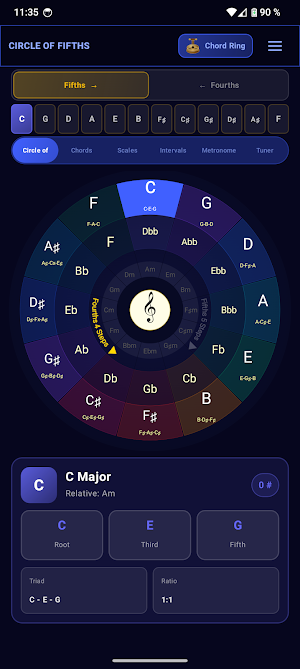
The central wheel shows all 24 keys at once — major on the outside, minor on the inside. A tap selects a key, a long press opens a detail view with key signature, relative key and the diatonic chord degrees. Relationships become visible instead of having to be memorised.
🎸 CHORDS
Over 30 chord types are available: triads, seventh and sixth chords, sus, add, altered and extended chords up to the 13th. If you want to analyse your own voicings, the "Special" mode recognises unusual tone combinations and suggests the matching chord name.
Common enharmonic aliases are shown alongside the primary name: C6 ~ Cadd13, Cm7b5 ~ Cø7, C° ~ Cdim, C+ ~ Caug. You meet both notations while learning — not only when they show up in a lead sheet.
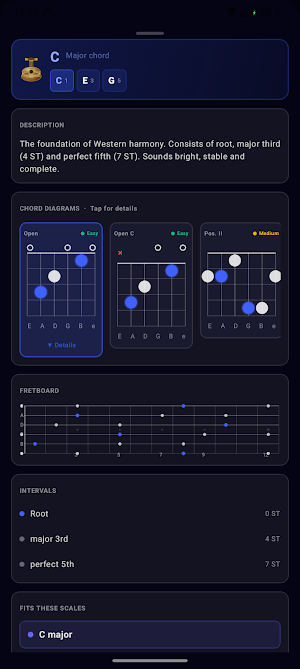
Each chord comes with several guitar shapes, sorted by difficulty (Easy, Medium, Advanced) and playing style (open or barre).
🎵 SCALES AND NOTATION
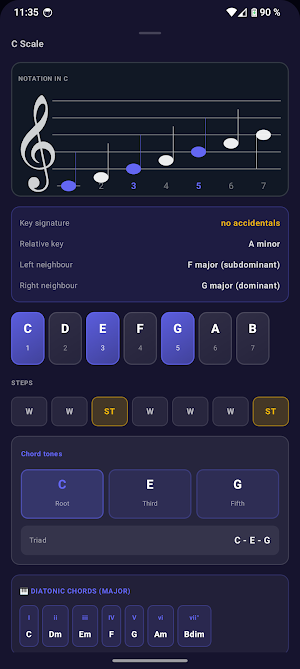
The selected major scale is rendered on the staff and accompanied by a degree overview with all 7 notes, the step pattern (whole/half steps) and an interval analysis from the root. Useful for students who want to connect notation and theory.
🎼 INTERVALS
A dedicated view lists the intervals of the selected key — including semitone count, function and an audible example on tap.
⏱️ METRONOME
40–240 BPM, time signatures 2/4, 3/4, 4/4 and 6/8. The visual pendulum supports practice by eye, the precise click supports practice by ear.
🎤 TUNER
A chromatic tuner based on the YIN algorithm detects the played note via the microphone and displays the deviation in cents. Standard tuning E–A–D–G–B–e is detected automatically; alternative tunings can be selected manually.
📤 EXPORT
Any chord can be saved as a PDF or a square image (sized for Instagram) — including name, aliases, formula, notes, intervals, description and chord diagram. Useful for personal practice sheets or for sharing in lessons.
🌍 LANGUAGES
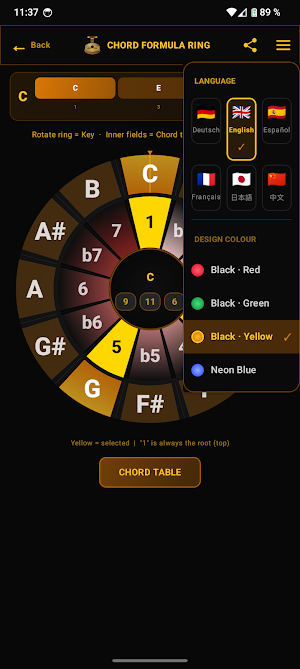
Deutsch · English · Español · Français · 日本語 · 中文
The app works fully offline — all features are available right away, without sign-in.
What’s new
Version 1.2.114-PS · Updated July 8, 2026
Major update: Tuner with 11 instruments, tappable reference tones, multiple chord voicings per chord. - Circle of Fifths: 24 keys, major/minor, scales and notation - Chord builder: 30+ types, from maj to 13, m7b5, add9, alt - Smart aliases: C6 ~ Cadd13, Cm7b5 ~ Cø7, Special detection - Up to 5 chord shapes per chord with difficulty levels - Tuner: guitar, bass, ukulele, mandolin, violin, cello, banjo - Custom tuning editor, reference tones on tap - Metronome 40-240 BPM, PDF and image export
Alternatives to Circle of Fifths Auto
Looking for apps like Circle of Fifths Auto? Here are 5 similar Android apps on Google Play. The highest rated is Circle of fifths + (3.7/5), and 3 of the 5 are free to download.
-
Chord of a Circle Pro
-
Chord Circle
-
Capodaster Sheet Pro
-
Circle of a fifth Pro
-
Circle of fifths + 3.7
| App | Rating | Price | Installs | Last updated | Compare |
|---|---|---|---|---|---|
| Circle of Fifths Auto | – | Free | 500+ | Jul 8, 2026 | |
| Chord of a Circle Pro | – | 0.99 USD | 10+ | – | Compare |
| Chord Circle | – | Free | 10,000+ | – | Compare |
| Capodaster Sheet Pro | – | Free | 500+ | Sep 17, 2026 | Compare |
| Circle of a fifth Pro | – | 0.99 USD | 100+ | – | Compare |
| Circle of fifths + | 3.7 / 5 | Free | 5,000+ | – | Compare |