

TTDku - Signature Maker
Tools Contains ads
Draw or auto-generate your digital signature. Save as PNG instantly.
- Downloads
- 1K+
- on Google Play
- Price
- Free
- No in-app purchases
- Updated
- Sep 23
- 2026 · v2.1.0
Screenshots
About TTDku - Signature Maker
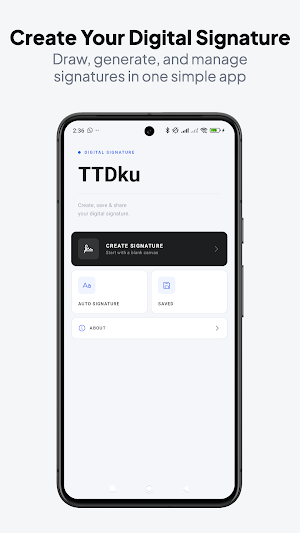
TTDku is a clean and fast digital signature app designed for anyone who needs a professional signature directly on their phone—without unnecessary complexity.
Whether you are signing documents, building a personal brand, or simply want a polished e-signature ready to use, TTDku makes the process simple and efficient.
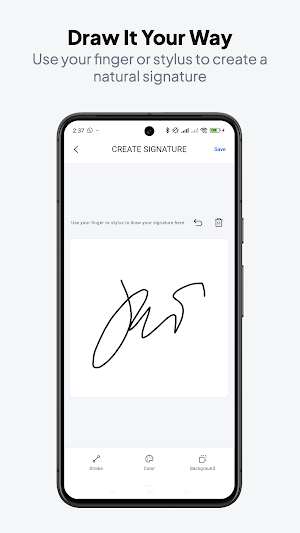
DRAW YOUR SIGNATURE
Create a natural handwritten signature using your finger or stylus. You have full control over stroke width and ink color, allowing you to achieve a result that feels authentic and personal.
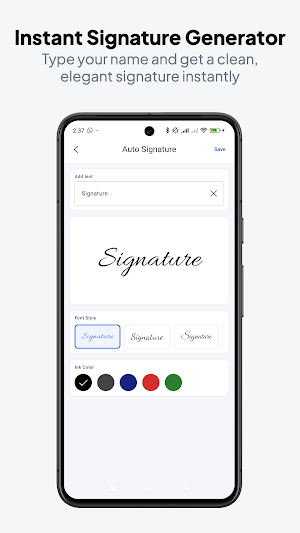
AUTO SIGNATURE GENERATOR
Prefer not to draw? Type your name and instantly generate a clean, elegant cursive signature. It is a quick way to get a professional look in seconds.
SIGN PDF DOCUMENTS
Import any PDF file, place your signature onto any page, adjust position & size with touch gestures, and export high-quality signed PDFs effortlessly.
CUSTOMIZE YOUR STYLE
- Free ink colors: black, dark gray, navy blue, red, green
- Premium ink colors: gold, rose gold, silver, electric blue, violet, coral, orange, and more
- Option to use a solid background or export with full transparency
SAVE AND SHARE
- Export signatures as high-quality PNG files
- Use transparent backgrounds for document overlays
- Share or open your signature instantly with a single tap
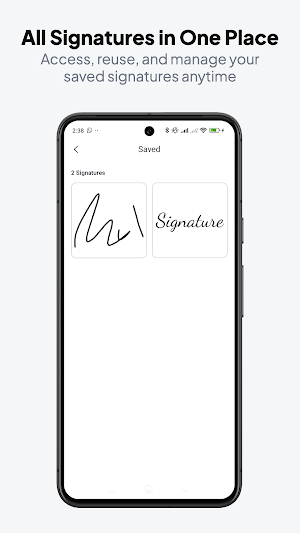
SIGNATURE COLLECTION
- Keep all your signatures organized in one place
- Access and reuse any saved signature anytime
WHY TTDKU?
- Minimal and distraction-free interface
- No account or login required
- Fully offline functionality
- Lightweight and responsive performance
- Supports both finger and stylus input
PERFECT FOR
- Signing PDFs and documents
- Email signature images
- Social media and personal branding
- Personal watermarks
- Business cards and letterheads
- Freelancers, students, and professionals
Download TTDku now and create a clean, professional digital signature in seconds.
Whether you are signing documents, building a personal brand, or simply want a polished e-signature ready to use, TTDku makes the process simple and efficient.
DRAW YOUR SIGNATURE
Create a natural handwritten signature using your finger or stylus. You have full control over stroke width and ink color, allowing you to achieve a result that feels authentic and personal.
AUTO SIGNATURE GENERATOR
Prefer not to draw? Type your name and instantly generate a clean, elegant cursive signature. It is a quick way to get a professional look in seconds.
SIGN PDF DOCUMENTS
Import any PDF file, place your signature onto any page, adjust position & size with touch gestures, and export high-quality signed PDFs effortlessly.
CUSTOMIZE YOUR STYLE
- Free ink colors: black, dark gray, navy blue, red, green
- Premium ink colors: gold, rose gold, silver, electric blue, violet, coral, orange, and more
- Option to use a solid background or export with full transparency
SAVE AND SHARE
- Export signatures as high-quality PNG files
- Use transparent backgrounds for document overlays
- Share or open your signature instantly with a single tap
SIGNATURE COLLECTION
- Keep all your signatures organized in one place
- Access and reuse any saved signature anytime
WHY TTDKU?
- Minimal and distraction-free interface
- No account or login required
- Fully offline functionality
- Lightweight and responsive performance
- Supports both finger and stylus input
PERFECT FOR
- Signing PDFs and documents
- Email signature images
- Social media and personal branding
- Personal watermarks
- Business cards and letterheads
- Freelancers, students, and professionals
Download TTDku now and create a clean, professional digital signature in seconds.
What’s new
Version 2.1.0 · Updated September 23, 2026
- Move easily between creating, saving, and using your signature in a PDF. - Choose Save or Share separately when making an auto signature. - Pick colors more easily on small screens and with screen readers. - See which PDF page will be signed before export.
User reviews

Good

Terbaik
Alternatives to TTDku - Signature Maker
Looking for apps like TTDku - Signature Maker? Here are 5 similar Android apps on Google Play. All of them are free to download.
-
InviteStudio: Invitation Maker
-
Sprite Splitter: PNG Tools
-
Stamp Maker: Digital Seal
-
CurhatAI - AI Venting Friend
-
Kalender Jawa 2026 & Hijriah
| App | Rating | Price | Installs | Last updated | Compare |
|---|---|---|---|---|---|
| TTDku - Signature Maker | – | Free | 1,000+ | Sep 23, 2026 | |
| InviteStudio: Invitation Maker | – | Free | 1+ | – | Compare |
| Sprite Splitter: PNG Tools | – | Free | 100+ | Sep 23, 2026 | Compare |
| Stamp Maker: Digital Seal | – | Free | 1,000+ | – | Compare |
| CurhatAI - AI Venting Friend | – | Free | 5,000+ | – | Compare |
| Kalender Jawa 2026 & Hijriah | – | Free | 1,000+ | – | Compare |