
VEOfreei 3.1 AI Video Maker
Photography Contains ads
Create cinematic videos with smart AI tools, beat sync, and precision editing.
- Downloads
- 10K+
- on Google Play
- Price
- Free
- No in-app purchases
- Updated
- Jul 22
- 2026 · v1.0.8
Screenshots
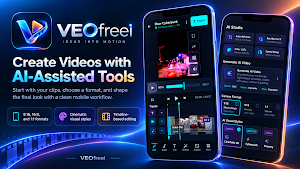
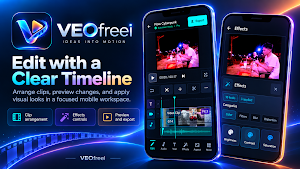
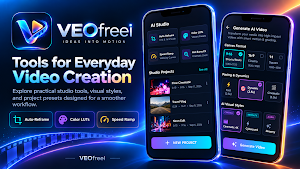
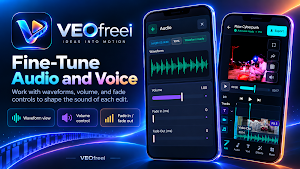

About VEOfreei 3.1 AI Video Maker
Turn your everyday video clips into captivating stories with VEOfreei AI Video Maker! Whether you're crafting quick vertical videos for TikTok, Instagram Reels, and YouTube Shorts, or editing a cinematic travel vlog in 4K, VEOfreei AI gives you the creative tools you need — right on your device.
🎬 SMART AI-ASSISTED VIDEO CREATION
Bring your raw clips together with intelligent scene planning and pacing:
• Smart Scene Generator: Automatically sequence your favorite moments with smooth rhythm and natural transitions.
• Creative Preset Styles: Instantly apply distinct aesthetic moods like Cyberpunk Neon, 35mm Vintage Film, Modern Cinema, Aura Glow, Vibrant Vlog, and Noir Monochrome.
• Interactive Story Assistant: Plan your video storyboard with built-in concept prompts and pacing suggestions.
🎵 BEAT SYNC & AUDIO HARMONY
Keep your audience hooked with sound that matches your visual pacing:
• Music Beat Detection: Easily place marker cuts to the tempo of your background music.
• Speed Ramping & Retiming: Add energy to action scenes with smooth speed curves, slow motion, and fast dynamic cuts.
• Audio Normalizer: Balance dialogue and background music smoothly with standard LUFS volume targets.
✂️ PRECISION TIMELINE EDITING
Enjoy a professional multi-track timeline built specifically for touchscreens:
• Clean Multi-Track Layout: Trim, split, duplicate, and reorder video and audio tracks with frame-accurate precision.
• Ken Burns & Zoom FX: Add cinematic camera motion to photos and still frames.
• Rich Transitions & Overlays: Choose from dozens of modern transitions, light leaks, and graphic accents.
• Color Grading & LUTs: Enhance exposure, saturation, and contrast with vibrant creative look-up tables.
📐 READY FOR EVERY SOCIAL PLATFORM
Create once, share anywhere without awkward black bars:
• 9:16 Vertical: Perfect for Instagram Reels, YouTube Shorts, and TikTok.
• 16:9 Widescreen: Ideal for cinematic YouTube videos and landscape displays.
• 1:1 Square & 4:5 Portrait: Tailored for social feed posts and carousels.
🔒 PRIVACY-FIRST & ON-DEVICE RENDERING
Your footage belongs to you:
• Local Processing: Video rendering, timeline playback, and color adjustments run locally on your device hardware.
• No Unwanted Cloud Uploads: Your private media stays on your phone unless you explicitly choose to share it.
• High-Resolution Export: Render crisp, high-bitrate MP4 videos up to 4K Ultra HD with smooth 60fps support (device capability dependent).
Ready to bring your ideas into motion? Download VEOfreei AI Video Maker today and start creating videos that stand out!
🎬 SMART AI-ASSISTED VIDEO CREATION
Bring your raw clips together with intelligent scene planning and pacing:
• Smart Scene Generator: Automatically sequence your favorite moments with smooth rhythm and natural transitions.
• Creative Preset Styles: Instantly apply distinct aesthetic moods like Cyberpunk Neon, 35mm Vintage Film, Modern Cinema, Aura Glow, Vibrant Vlog, and Noir Monochrome.
• Interactive Story Assistant: Plan your video storyboard with built-in concept prompts and pacing suggestions.
🎵 BEAT SYNC & AUDIO HARMONY
Keep your audience hooked with sound that matches your visual pacing:
• Music Beat Detection: Easily place marker cuts to the tempo of your background music.
• Speed Ramping & Retiming: Add energy to action scenes with smooth speed curves, slow motion, and fast dynamic cuts.
• Audio Normalizer: Balance dialogue and background music smoothly with standard LUFS volume targets.
✂️ PRECISION TIMELINE EDITING
Enjoy a professional multi-track timeline built specifically for touchscreens:
• Clean Multi-Track Layout: Trim, split, duplicate, and reorder video and audio tracks with frame-accurate precision.
• Ken Burns & Zoom FX: Add cinematic camera motion to photos and still frames.
• Rich Transitions & Overlays: Choose from dozens of modern transitions, light leaks, and graphic accents.
• Color Grading & LUTs: Enhance exposure, saturation, and contrast with vibrant creative look-up tables.
📐 READY FOR EVERY SOCIAL PLATFORM
Create once, share anywhere without awkward black bars:
• 9:16 Vertical: Perfect for Instagram Reels, YouTube Shorts, and TikTok.
• 16:9 Widescreen: Ideal for cinematic YouTube videos and landscape displays.
• 1:1 Square & 4:5 Portrait: Tailored for social feed posts and carousels.
🔒 PRIVACY-FIRST & ON-DEVICE RENDERING
Your footage belongs to you:
• Local Processing: Video rendering, timeline playback, and color adjustments run locally on your device hardware.
• No Unwanted Cloud Uploads: Your private media stays on your phone unless you explicitly choose to share it.
• High-Resolution Export: Render crisp, high-bitrate MP4 videos up to 4K Ultra HD with smooth 60fps support (device capability dependent).
Ready to bring your ideas into motion? Download VEOfreei AI Video Maker today and start creating videos that stand out!
User reviews

good stability
Alternatives to VEOfreei 3.1 AI Video Maker
Looking for apps like VEOfreei 3.1 AI Video Maker? Here are 6 similar Android apps on Google Play. All of them are free to download.
-
FLOW AI Labs : Video Generator
-
Get Instant Diamonds FF Quiz
-
Video AI Generator
-
Video Audio Enhancer Offline
-
Student AllToolkit Offline
-
Videlio Loop
| App | Rating | Price | Installs | Last updated | Compare |
|---|---|---|---|---|---|
| VEOfreei 3.1 AI Video Maker | – | Free | 10,000+ | Jul 22, 2026 | |
| FLOW AI Labs : Video Generator | – | Free | 1,000+ | – | Compare |
| Get Instant Diamonds FF Quiz | – | Free | 100+ | Jul 28, 2026 | Compare |
| Video AI Generator | – | Free | 100+ | Jul 22, 2026 | Compare |
| Video Audio Enhancer Offline | – | Free | 5,000+ | Jul 30, 2026 | Compare |
| Student AllToolkit Offline | – | Free | 10+ | Feb 21, 2026 | Compare |
| Videlio Loop | – | Free | 50+ | Jul 22, 2026 | Compare |