

Overlay Monitor CPU/Battery
Lufesu Inc. Tools In-app purchases Contains ads
Monitor CPU and battery in real time with a floating on-screen overlay.
- Rating
- 4.8
- 121 ratings
- Downloads
- 8.9K+
- on Google Play
- Price
- Free
- In-app purchases
- Updated
- Sep 17
- 2026 · v0.7.0
Screenshots
About Overlay Monitor CPU/Battery
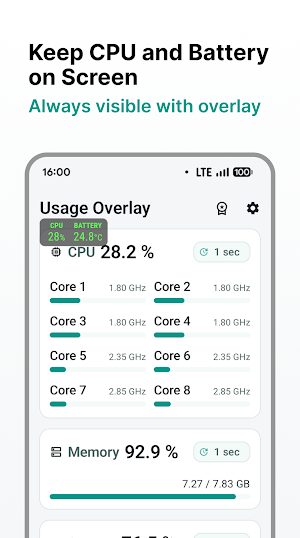
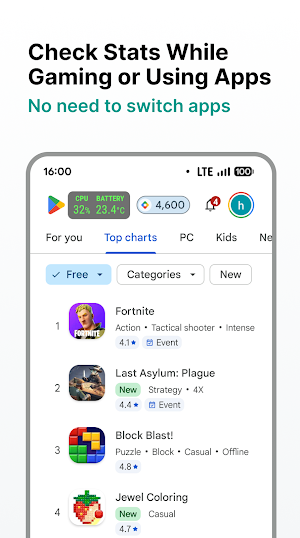
See CPU usage, memory usage, storage usage, and battery information in real time while using games and other apps.
Usage Overlay is a floating monitor that keeps important system info visible on screen. You can check device status without leaving the current app, making it useful for gaming, performance checks, charging checks, and daily device monitoring.
Features
• Floating system monitor overlay over games and apps
• Estimated CPU usage based on current and maximum CPU frequency
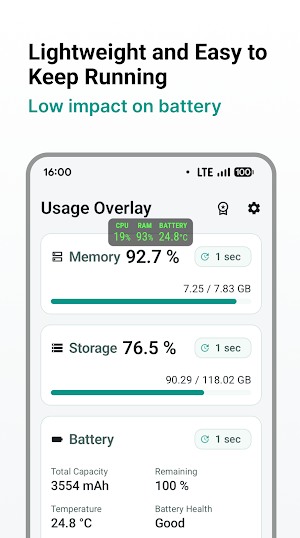
• Memory usage percentage
• Internal storage usage percentage
• Battery details including total capacity, remaining capacity, temperature, battery health, current, voltage, charging and discharging power, and charge or drain rate
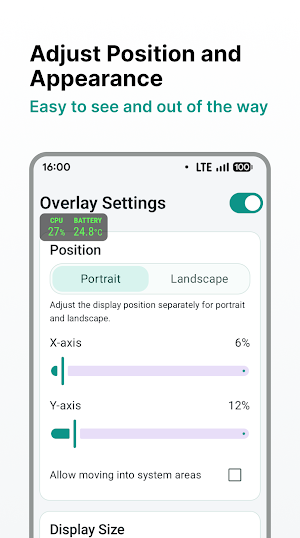
• Adjustable overlay position and size
• Select the items you want to display
• Auto start support
Made for real-time monitoring
Usage Overlay helps you keep the information you need visible at all times. Place the overlay where it is easiest to read, resize it for your screen, and show only the data you care about.
Pro version
• Update interval settings
• Custom overlay colors
• Ad removal
Pro is a one-time purchase. No subscription.
Notes
• Internal storage is supported. External storage is not currently supported.
• Available values may vary depending on device and Android version.
• Overlay permission is required.
If you want a simple and reliable floating CPU monitor, system monitor overlay, or battery overlay, Usage Overlay makes real-time device information easy to see.
Usage Overlay is a floating monitor that keeps important system info visible on screen. You can check device status without leaving the current app, making it useful for gaming, performance checks, charging checks, and daily device monitoring.
Features
• Floating system monitor overlay over games and apps
• Estimated CPU usage based on current and maximum CPU frequency
• Memory usage percentage
• Internal storage usage percentage
• Battery details including total capacity, remaining capacity, temperature, battery health, current, voltage, charging and discharging power, and charge or drain rate
• Adjustable overlay position and size
• Select the items you want to display
• Auto start support
Made for real-time monitoring
Usage Overlay helps you keep the information you need visible at all times. Place the overlay where it is easiest to read, resize it for your screen, and show only the data you care about.
Pro version
• Update interval settings
• Custom overlay colors
• Ad removal
Pro is a one-time purchase. No subscription.
Notes
• Internal storage is supported. External storage is not currently supported.
• Available values may vary depending on device and Android version.
• Overlay permission is required.
If you want a simple and reliable floating CPU monitor, system monitor overlay, or battery overlay, Usage Overlay makes real-time device information easy to see.
What’s new
Version 0.7.0 · Updated September 17, 2026
Ver 0.7.0 - Improved stability of the overlay service - Added a setting to display the temperature with decimal places - Added a setting to display the overlay only in fullscreen mode - Other minor bug fixes If you like this app, please rate it and show your support.
User reviews

I wish it had cpu temp monitor too

faith in humanity restored 🌥️✞

helpful

great app. shows everything I want always on top. please keep it compatible with latest os as time goes on.

best as per my customization I like it soo much

useable for checking the phone performance
Alternatives to Overlay Monitor CPU/Battery
Looking for apps like Overlay Monitor CPU/Battery? Here are 6 similar Android apps on Google Play. The highest rated is App Usage - Manage/Track Usage (4.4/5), and all 6 are free to download.
-
Trend Micro ID Protection 4.3
-
Building Tools 4.0
-
Fortect Mobile Security 4.2
-
Quick Settings app 3.8
-
Storage Analyzer & Disk Usage 4.2
-
App Usage - Manage/Track Usage 4.4
| App | Rating | Price | Installs | Last updated | Compare |
|---|---|---|---|---|---|
| Overlay Monitor CPU/Battery | 4.8 / 5 | Free | 5,000+ | Sep 17, 2026 | |
| Trend Micro ID Protection | 4.3 / 5 | Free | 50,000+ | Oct 22, 2026 | Compare |
| Building Tools | 4.0 / 5 | Free | 10,000+ | – | Compare |
| Fortect Mobile Security | 4.2 / 5 | Free | 10,000+ | Aug 17, 2026 | Compare |
| Quick Settings app | 3.8 / 5 | Free | 5,000,000+ | – | Compare |
| Storage Analyzer & Disk Usage | 4.2 / 5 | Free | 10,000,000+ | Oct 23, 2026 | Compare |
| App Usage - Manage/Track Usage | 4.4 / 5 | Free | 1,000,000+ | Oct 5, 2026 | Compare |
Similar apps on Google Play
- Trend Micro ID Protection
- Building Tools
- Fortect Mobile Security
- Quick Settings app
- Storage Analyzer & Disk Usage
- App Usage - Manage/Track Usage
- Cold Shower
- GlassWire Data Usage Monitor
- 2Do - To do List & Reminders
- F-Secure Mobile Security
- G-CPU:Monitor CPU, RAM, Widget
- Sentry Pro for Tesla
- MultiTimer: Multiple timers
- AIO Launcher
- Builds for TFT - LoLChess
- Android System WebView Dev
- Moto Widget
- Bitdefender Antivirus
- CPU Monitor - temperature
- DevCheck Device & System Info
- MobiDrive Cloud Storage & Sync
- Accessibility Scanner
- AppDash: App Manager & Backup
- Avira Security Antivirus & VPN