

Lucky Timer
Vertekalon Tools
Lucky Timer - neon work & rest focus timer with custom intervals.
- Price
- Free
- No in-app purchases
- Updated
- Aug 12
- 2026 · v2.0
Screenshots

About Lucky Timer
⏱️ Lucky Timer: Neon Interval Focus Matrix 🌌
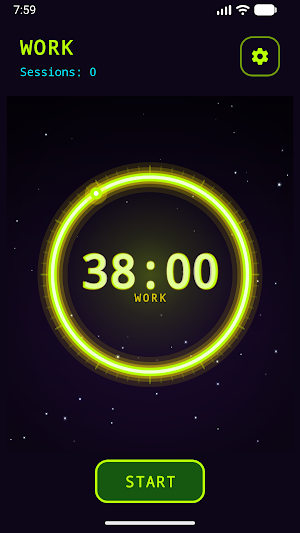
Lucky Timer operates as a structured interval timer, temporal focus simulator, and productivity management utility engineered specifically for quick, touch-friendly interactive sessions directly on your mobile device viewport. Lucky Timer challenges you to optimize your concentration blocks, study routines, and rest recovery periods on a clean digital canvas: open the application, engage Start, and observe the glowing progress ring as minutes and seconds count down towards target phase completion. 🚀
🕹️ HOW THE WORK & REST MATRIX OPERATES
Initializing an active timing session inside Lucky Timer structures your attention across defined interval blocks:
Work Mode Focus — Concentrate dedicated focus energy for your chosen work duration. Work mode features contrast lime and yellow neon visual accents across the interface canvas. 📐
Rest Mode Recovery — Upon work phase completion, Lucky Timer transitions into rest mode, shifting color themes to electric cyan so you can recover before the next stretch of concentration. ⏳
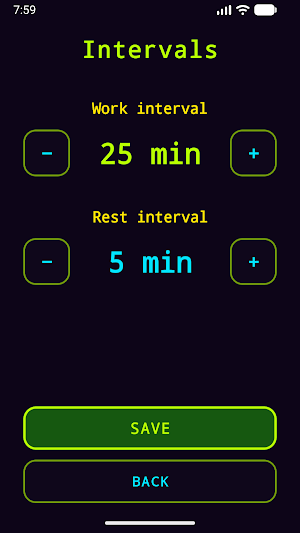
Automated Defaults & Customization — Pre-configured baseline defaults initialize at 25 minutes for work and 5 minutes for rest. Adjust both parameters easily inside Settings to fit your workflow needs. 📊
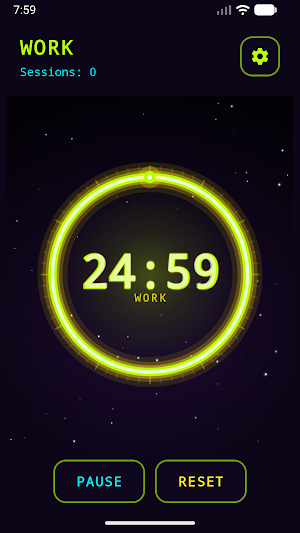
Glanceable MM:SS Display — A prominent digital readout sits centered inside an animated glowing progress ring set against a soft starry background canvas. ⚡
📈 SETTINGS CONFIGURATION & SESSION CONTROLS
Lucky Timer provides flexible timing parameters alongside direct, touch-friendly controls for one-thumb portrait execution:
Work Interval [1–120 Mins]⟷Rest Interval [1–120 Mins]⟷Session Counter
Tactile Timer Controls — Utilize Start to begin, Pause to freeze countdown digits, Resume to continue active timing, and Reset to restore the current interval to its full duration. 🛡️
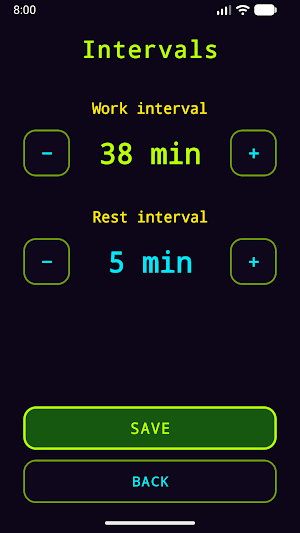
Custom Minute Adjustments — Access Settings to adjust work and rest parameters using simple plus and minus touch controls, configurable from 1 to 120 minutes in one-minute increments. Tap Save to commit your choices. 📋
Session Tracking — The real-time HUD mode label explicitly indicates whether you are in WORK or REST, while an automated session counter tracks total completed work intervals. 📈
Monitor your focus parameters, balance your work-rest intervals, track your session counts, and maintain your routine on the neon timing matrix. 🌟🌌⏱️✨
Lucky Timer operates as a structured interval timer, temporal focus simulator, and productivity management utility engineered specifically for quick, touch-friendly interactive sessions directly on your mobile device viewport. Lucky Timer challenges you to optimize your concentration blocks, study routines, and rest recovery periods on a clean digital canvas: open the application, engage Start, and observe the glowing progress ring as minutes and seconds count down towards target phase completion. 🚀
🕹️ HOW THE WORK & REST MATRIX OPERATES
Initializing an active timing session inside Lucky Timer structures your attention across defined interval blocks:
Work Mode Focus — Concentrate dedicated focus energy for your chosen work duration. Work mode features contrast lime and yellow neon visual accents across the interface canvas. 📐
Rest Mode Recovery — Upon work phase completion, Lucky Timer transitions into rest mode, shifting color themes to electric cyan so you can recover before the next stretch of concentration. ⏳
Automated Defaults & Customization — Pre-configured baseline defaults initialize at 25 minutes for work and 5 minutes for rest. Adjust both parameters easily inside Settings to fit your workflow needs. 📊
Glanceable MM:SS Display — A prominent digital readout sits centered inside an animated glowing progress ring set against a soft starry background canvas. ⚡
📈 SETTINGS CONFIGURATION & SESSION CONTROLS
Lucky Timer provides flexible timing parameters alongside direct, touch-friendly controls for one-thumb portrait execution:
Work Interval [1–120 Mins]⟷Rest Interval [1–120 Mins]⟷Session Counter
Tactile Timer Controls — Utilize Start to begin, Pause to freeze countdown digits, Resume to continue active timing, and Reset to restore the current interval to its full duration. 🛡️
Custom Minute Adjustments — Access Settings to adjust work and rest parameters using simple plus and minus touch controls, configurable from 1 to 120 minutes in one-minute increments. Tap Save to commit your choices. 📋
Session Tracking — The real-time HUD mode label explicitly indicates whether you are in WORK or REST, while an automated session counter tracks total completed work intervals. 📈
Monitor your focus parameters, balance your work-rest intervals, track your session counts, and maintain your routine on the neon timing matrix. 🌟🌌⏱️✨
Alternatives to Lucky Timer
Looking for apps like Lucky Timer? Here are 6 similar Android apps on Google Play. All of them are free to download.






| App | Rating | Price | Installs | Last updated | Compare |
|---|---|---|---|---|---|
| Lucky Timer | – | Free | 0+ | Aug 12, 2026 | |
| Play Memory | – | Free | 0+ | Aug 13, 2026 | Compare |
| Win Pellet | – | Free | 0+ | Aug 12, 2026 | Compare |
| Fastbet | – | Free | 0+ | Aug 12, 2026 | Compare |
| Duelz Casino | – | Free | 0+ | Aug 11, 2026 | Compare |
| FDJ Casino | – | Free | 0+ | Aug 11, 2026 | Compare |
| Fair Go Casino | – | Free | 0+ | Aug 11, 2026 | Compare |
Compare Lucky Timer with the top alternatives: ratings, updates, ASO score and keyword gaps →