
Loop: Remote for Apple TV
Solma Grow Tools In-app purchases
Control your Apple TV from Android. Use your phone as an Apple TV remote
- Rating
- 4.3
- 280 ratings
- Downloads
- 10.9K+
- on Google Play
- Price
- Free
- In-app purchases
- Updated
- Jul 27
- 2026 · v1.0.2
Screenshots


About Loop: Remote for Apple TV
Turn your Android device into the ultimate remote control for Apple TV.
Tired of losing your physical Apple remote or struggling with clunky on-screen typing? Loop - Apple TV Remote brings a seamless, elegant, and highly responsive Apple TV remote experience right to your smartphone. Whether you want to navigate your favorite streaming services, track what's playing, or type complex passwords, Loop simplifies your entire home entertainment ecosystem.
Key Features:
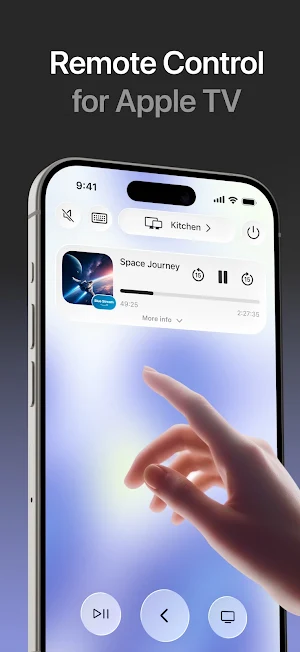
Seamless Remote Control & Navigation: Use fluid gestures and an intuitive button layout to glide effortlessly through menus, pause your movies, and control your Apple TV in real time.
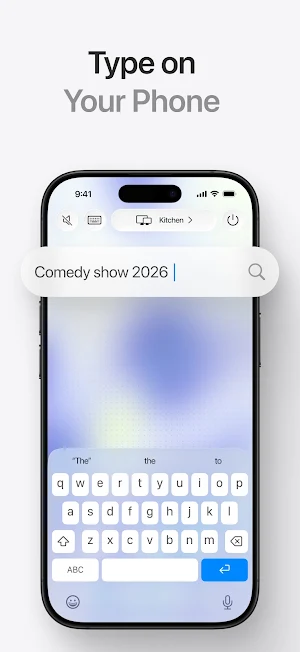
Smart Phone Keyboard Input: No more hunting for letters on the TV screen. Pop open your Android phone's keyboard to instantly type search queries, logins, titles, and Wi-Fi passwords.
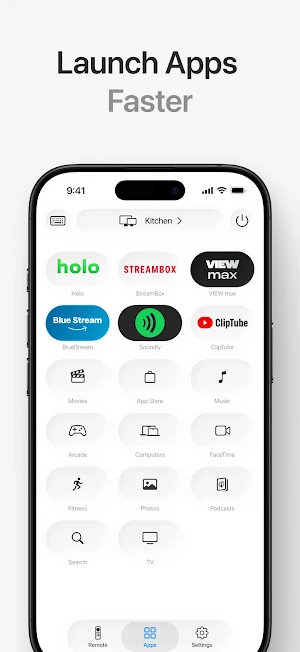
Instant App Launcher: Skip the endless scrolling on the default home screen. View your installed streaming apps right inside the Apple TV remote interface and launch them with a single tap.
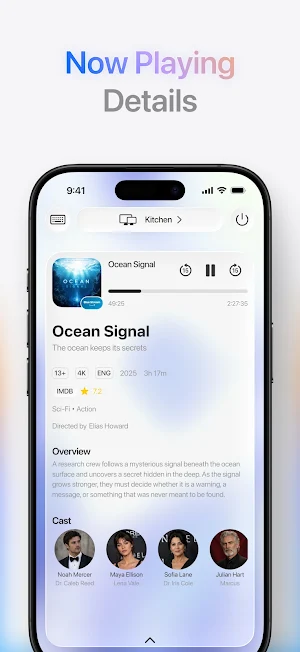
Live "Now Playing" Details: Stay informed. View beautiful, real-time media details, track progress bars, and manage playback controls directly from your device screen.
Multiple Device Connection: Perfect for multi-room smart homes. Easily discover, switch between, and manage multiple Apple TV devices over your local Wi-Fi network.
Custom Styling & Themes: Choose your style! Personalize your remote controller interface with a selection of stunning premium design themes to match your personal aesthetic.
Why Choose Loop TV Remote?
Designed with a focus on speed, utility, and design, Loop - your remote for Apple TV - connects instantly via your local network. It is the perfect daily replacement for your standard Apple remote, offering features that standard hardware simply cannot match.
How to Use: Connect your Android phone and your Apple TV to the same local Wi-Fi network. Open Loop TV Remote and let it instantly discover your device. Tap to pair, and enjoy complete control!
Disclaimer: Loop TV Remote is an independent application and is not affiliated with, endorsed by, or associated with Apple Inc.
Privacy Policy: https://www.looptvremote.com/privacy
Terms of Service: https://www.looptvremote.com/terms
Tired of losing your physical Apple remote or struggling with clunky on-screen typing? Loop - Apple TV Remote brings a seamless, elegant, and highly responsive Apple TV remote experience right to your smartphone. Whether you want to navigate your favorite streaming services, track what's playing, or type complex passwords, Loop simplifies your entire home entertainment ecosystem.
Key Features:
Seamless Remote Control & Navigation: Use fluid gestures and an intuitive button layout to glide effortlessly through menus, pause your movies, and control your Apple TV in real time.
Smart Phone Keyboard Input: No more hunting for letters on the TV screen. Pop open your Android phone's keyboard to instantly type search queries, logins, titles, and Wi-Fi passwords.
Instant App Launcher: Skip the endless scrolling on the default home screen. View your installed streaming apps right inside the Apple TV remote interface and launch them with a single tap.
Live "Now Playing" Details: Stay informed. View beautiful, real-time media details, track progress bars, and manage playback controls directly from your device screen.
Multiple Device Connection: Perfect for multi-room smart homes. Easily discover, switch between, and manage multiple Apple TV devices over your local Wi-Fi network.
Custom Styling & Themes: Choose your style! Personalize your remote controller interface with a selection of stunning premium design themes to match your personal aesthetic.
Why Choose Loop TV Remote?
Designed with a focus on speed, utility, and design, Loop - your remote for Apple TV - connects instantly via your local network. It is the perfect daily replacement for your standard Apple remote, offering features that standard hardware simply cannot match.
How to Use: Connect your Android phone and your Apple TV to the same local Wi-Fi network. Open Loop TV Remote and let it instantly discover your device. Tap to pair, and enjoy complete control!
Disclaimer: Loop TV Remote is an independent application and is not affiliated with, endorsed by, or associated with Apple Inc.
Privacy Policy: https://www.looptvremote.com/privacy
Terms of Service: https://www.looptvremote.com/terms
What’s new
Version 1.0.2 · Updated July 27, 2026
Improvements and bug fixes
User reviews

good
Alternatives to Loop: Remote for Apple TV
Looking for apps like Loop: Remote for Apple TV? Here are 6 similar Android apps on Google Play. The highest rated is BLEUSALT (4.7/5), and 5 of the 6 are free to download.
-
BLEUSALT 4.7
-
Castro Premium - system info 4.7
-
Jostle 3.3
-
Avigilon Unity Video 4.6
-
RepairSolutionsPRO 3.8
-
iRISCO 2.6
| App | Rating | Price | Installs | Last updated | Compare |
|---|---|---|---|---|---|
| Loop: Remote for Apple TV | 4.3 / 5 | Free | 10,000+ | Jul 27, 2026 | |
| BLEUSALT | 4.7 / 5 | Free | 10,000+ | Oct 22, 2026 | Compare |
| Castro Premium - system info | 4.7 / 5 | 2.99 USD | 10,000+ | – | Compare |
| Jostle | 3.3 / 5 | Free | 50,000+ | Mar 24, 2026 | Compare |
| Avigilon Unity Video | 4.6 / 5 | Free | 10,000+ | Apr 28, 2026 | Compare |
| RepairSolutionsPRO | 3.8 / 5 | Free | 50,000+ | Aug 18, 2026 | Compare |
| iRISCO | 2.6 / 5 | Free | 500,000+ | May 10, 2026 | Compare |