

WakeCat: Wake on Lan & WoW
Tools
Wake up your PC remotely via Wake-on-LAN (WoL) and Wake-on-WAN. Status & Widgets
- Downloads
- 115+
- on Google Play
- Price
- Free
- No in-app purchases
- Updated
- Oct 7
- 2026 · v1.1.0
Screenshots
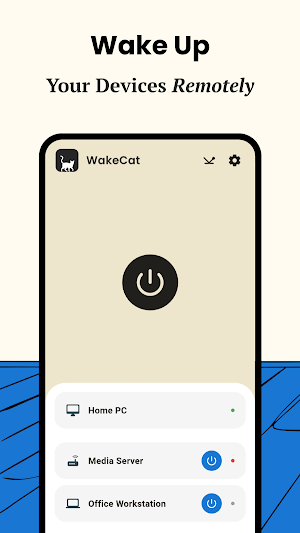
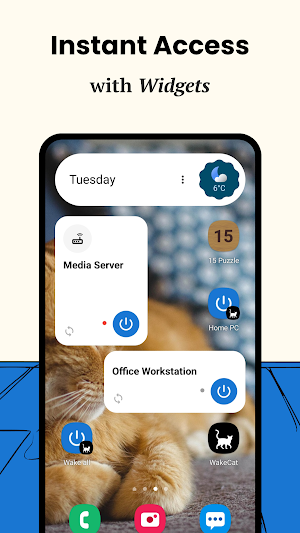
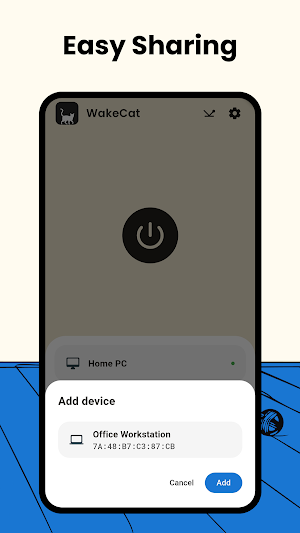
About WakeCat: Wake on Lan & WoW
Forgot to turn on your PC? Need urgent remote access, but your computer is in sleep mode? WakeCat is here to help. This lightweight and intuitive app allows you to wake up your devices remotely via Local Area Network (Wake-on-LAN) or the Internet (Wake-on-WAN).
Why WakeCat?
1. Versatility: Supports local wake-up and Wake-on-WAN via domain names or IP addresses.
2. Real-time Monitoring: Check your computer's status instantly using Ping or TCPing.
3. SecureON Support: For enhanced security.
4. Widgets: Wake your devices directly from your home screen without even opening the app.
5. Custom DNS Support: Flexible network configuration.
⚠️
For WakeCat to function, your computer must be properly configured. Please note:
Wake-on-LAN is usually disabled by default in BIOS/UEFI settings. Check your manufacturer’s website for instructions. Here are guides for the most popular motherboard brands:
ASUS: https://bit.ly/4burKI1
MSI: https://bit.ly/4rYsJG5
Gigabyte: https://bit.ly/4s24l6P
For waking up over the internet (WoW), you will need to set up UDP port forwarding (typically port 9) on your router.
Wake your devices with ease and zero hassle!
------
Handcrafted Software: This app was written manually—no AI agents used, no bloated code, and no trackers.
Why WakeCat?
1. Versatility: Supports local wake-up and Wake-on-WAN via domain names or IP addresses.
2. Real-time Monitoring: Check your computer's status instantly using Ping or TCPing.
3. SecureON Support: For enhanced security.
4. Widgets: Wake your devices directly from your home screen without even opening the app.
5. Custom DNS Support: Flexible network configuration.
⚠️
For WakeCat to function, your computer must be properly configured. Please note:
Wake-on-LAN is usually disabled by default in BIOS/UEFI settings. Check your manufacturer’s website for instructions. Here are guides for the most popular motherboard brands:
ASUS: https://bit.ly/4burKI1
MSI: https://bit.ly/4rYsJG5
Gigabyte: https://bit.ly/4s24l6P
For waking up over the internet (WoW), you will need to set up UDP port forwarding (typically port 9) on your router.
Wake your devices with ease and zero hassle!
------
Handcrafted Software: This app was written manually—no AI agents used, no bloated code, and no trackers.
Alternatives to WakeCat: Wake on Lan & WoW
Looking for apps like WakeCat: Wake on Lan & WoW? Here are 6 similar Android apps on Google Play. All of them are free to download.
-
Chesser: Chess with Friends
-
Fiber Game
-
Resonance: Speaker Cleaner
-
15 Puzzle: Classic Game
-
Barometer - air pressure
-
Tic-Tac-Toe: Xs & Os
| App | Rating | Price | Installs | Last updated | Compare |
|---|---|---|---|---|---|
| WakeCat: Wake on Lan & WoW | – | Free | 100+ | Oct 7, 2026 | |
| Chesser: Chess with Friends | – | Free | 10+ | Oct 9, 2026 | Compare |
| Fiber Game | – | Free | 10+ | May 2, 2026 | Compare |
| Resonance: Speaker Cleaner | – | Free | 50+ | Feb 2, 2026 | Compare |
| 15 Puzzle: Classic Game | – | Free | 50+ | – | Compare |
| Barometer - air pressure | – | Free | 10+ | May 22, 2021 | Compare |
| Tic-Tac-Toe: Xs & Os | – | Free | 10+ | – | Compare |