
GIF Maker, Video To GIF
LDDeveloper Photography In-app purchases Contains ads
Powerful GIF Maker & GIF Editor. Convert video to GIF in seconds!
- Rating
- 4.2
- 384 ratings
- Downloads
- 103K+
- on Google Play
- Price
- Free
- In-app purchases
- Updated
- Sep 17
- 2026 · v1.5.8
Screenshots
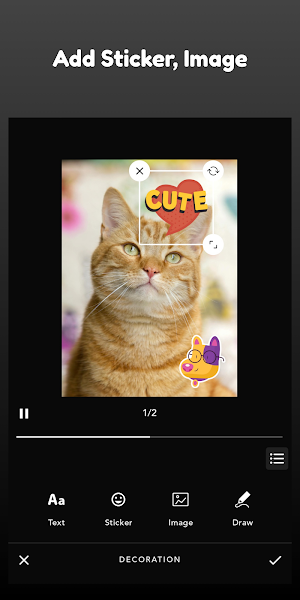
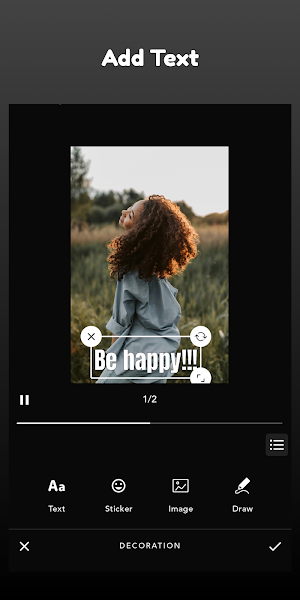
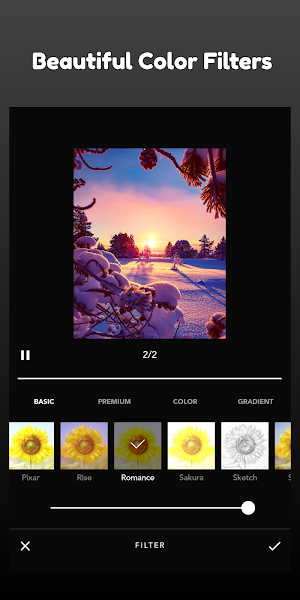


About GIF Maker, Video To GIF
GIF Maker – Simple & Powerful GIF Editor
GIF Maker is a simple and powerful GIF Editor that makes it easy to create high-quality GIFs. You can quickly turn your favorite moments into animations using the Video to GIF feature, or create GIFs from multiple photos and screen recordings.
The app also lets you convert GIF to Video or GIF to Images, and compress GIF files when you need a smaller size to share.
Whether you want to make a reaction GIF, capture a funny clip, or highlight a short tutorial, GIF Maker gives you full control while keeping everything easy to use.
✨ Create GIFs Your Way
• Video to GIF – Choose any video and convert it into a smooth, looping GIF. Perfect for highlights, reactions, or memorable moments.
• Advanced Video to GIF Options – Trim your video first, adjust playback speed, apply filters, and more — all before turning it into a GIF.
• Photo to GIF – Select multiple images and create animation sequences.
• Screen Recording to GIF – Turn your screen actions into useful and shareable GIF tutorials.
• GIF to Video / GIF to Image – Convert back when you want video format or still frames.
🎨 Complete GIF Editing Toolkit
Fine-tune every detail with easy controls:
• Trim / Cut – Keep only the part you want before or after converting Video to GIF.
• Frame Management – Add, remove, duplicate, or reorder frames.
• Crop & Resize – Fit your GIF to any ratio or size.
• Playback Speed – Make animations slower or faster.
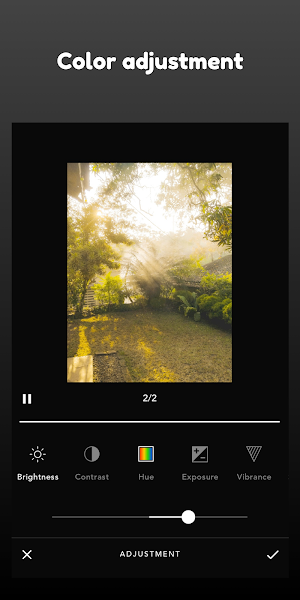
• Color Adjustment – Brightness, contrast, warmth, saturation.
• Color Filters – Create mood and style instantly.
• Text, Stickers & Image Overlays – Add captions, emojis, memes, and decorations.
• Rotate & Flip – Fix or transform orientation.
• Reverse – Make your GIF play backward for fun effects.
• GIF Compression – Reduce file size while keeping visual quality.
💾 Flexible Export & Sharing
Export your final result as:
• GIF – For easy sharing and reactions.
• MP4 Video – When you need full compatibility.
Choose high resolution for quality or compress to share faster.
Great for posting on social networks, chats, and communities.
🎯 Easy for Beginners, Powerful for Creators
GIF Maker is designed to be smooth and simple to use. The workflow is straightforward and fast, making the Video to GIF process quick even for long videos. You can create a basic GIF in seconds or take your time to customize everything — you decide.
GIF Maker is a simple and powerful GIF Editor that makes it easy to create high-quality GIFs. You can quickly turn your favorite moments into animations using the Video to GIF feature, or create GIFs from multiple photos and screen recordings.
The app also lets you convert GIF to Video or GIF to Images, and compress GIF files when you need a smaller size to share.
Whether you want to make a reaction GIF, capture a funny clip, or highlight a short tutorial, GIF Maker gives you full control while keeping everything easy to use.
✨ Create GIFs Your Way
• Video to GIF – Choose any video and convert it into a smooth, looping GIF. Perfect for highlights, reactions, or memorable moments.
• Advanced Video to GIF Options – Trim your video first, adjust playback speed, apply filters, and more — all before turning it into a GIF.
• Photo to GIF – Select multiple images and create animation sequences.
• Screen Recording to GIF – Turn your screen actions into useful and shareable GIF tutorials.
• GIF to Video / GIF to Image – Convert back when you want video format or still frames.
🎨 Complete GIF Editing Toolkit
Fine-tune every detail with easy controls:
• Trim / Cut – Keep only the part you want before or after converting Video to GIF.
• Frame Management – Add, remove, duplicate, or reorder frames.
• Crop & Resize – Fit your GIF to any ratio or size.
• Playback Speed – Make animations slower or faster.
• Color Adjustment – Brightness, contrast, warmth, saturation.
• Color Filters – Create mood and style instantly.
• Text, Stickers & Image Overlays – Add captions, emojis, memes, and decorations.
• Rotate & Flip – Fix or transform orientation.
• Reverse – Make your GIF play backward for fun effects.
• GIF Compression – Reduce file size while keeping visual quality.
💾 Flexible Export & Sharing
Export your final result as:
• GIF – For easy sharing and reactions.
• MP4 Video – When you need full compatibility.
Choose high resolution for quality or compress to share faster.
Great for posting on social networks, chats, and communities.
🎯 Easy for Beginners, Powerful for Creators
GIF Maker is designed to be smooth and simple to use. The workflow is straightforward and fast, making the Video to GIF process quick even for long videos. You can create a basic GIF in seconds or take your time to customize everything — you decide.
What’s new
Version 1.5.8 · Updated September 17, 2026
GIF store support
User reviews

the app does a great job, selected alot of frame then i have nice gif,thank you

straighforward gif maker app that let ne convert a video to gif, worked perfectly
Great app!

It's the best GIF Maker app on Play Store. Highly recommended!

yess love it,quickly turn special moments into animated gifs
Alternatives to GIF Maker, Video To GIF
Looking for apps like GIF Maker, Video To GIF? Here are 6 similar Android apps on Google Play. The highest rated is PicMonkey Photo Editor (4.3/5), and 4 of the 6 are free to download.
-
Image Converter: PNG.JPG.HEIC
-
PicMonkey Photo Editor 4.3
-
Firsties: Family Photo Sharing 4.1
-
PixelFlow: Intro Video maker 4.2
-
WOMBO Elections: AI Memes 4.0
-
SocioPost
| App | Rating | Price | Installs | Last updated | Compare |
|---|---|---|---|---|---|
| GIF Maker, Video To GIF | 4.2 / 5 | Free | 100,000+ | Sep 17, 2026 | |
| Image Converter: PNG.JPG.HEIC | – | – | 1,000+ | Oct 15, 2026 | Compare |
| PicMonkey Photo Editor | 4.3 / 5 | Free | 1,000,000+ | Oct 28, 2026 | Compare |
| Firsties: Family Photo Sharing | 4.1 / 5 | Free | 10,000+ | Oct 8, 2026 | Compare |
| PixelFlow: Intro Video maker | 4.2 / 5 | Free | 5,000,000+ | Jan 5, 2026 | Compare |
| WOMBO Elections: AI Memes | 4.1 / 5 | Free | 1,000,000+ | Dec 3, 2024 | Compare |
| SocioPost | – | – | 1,000+ | Aug 30, 2026 | Compare |
Similar apps on Google Play
- Image Converter: PNG.JPG.HEIC
- PicMonkey Photo Editor
- Firsties: Family Photo Sharing
- PixelFlow: Intro Video maker
- WOMBO Elections: AI Memes
- SocioPost
- Vivi PhotoBook
- Promeo - Story & Reels Maker
- Video Downloader Manager VidWe
- Veffex: Video effects, filters
- Fliki - AI Video Editor
- Eklipse.gg: Instant Highlights
- Smart Video Crop - Video Cut
- Swapify - Face Swap Video
- FaceCard AI
- Video Converter Pro
- BeatSync: Photo & Music Videos
- The Ivy Lodge
- SelfieCity
- KaCha: AI Video Generator
- Aesthetic Purple Wallpapers
- Oji: AI Avatar Photo Generator
- CupCut VPN
- GIPHY: GIFs, Stickers & Clips
- Dot Conner: Webtective
- Splice - Video Editor & Maker
- Videoleap: AI Video Editor
- Zoomerang - Ai Video Maker
- Boosted Ad Maker by Lightricks
- Focus Video - Video Compressor
- MOVA - AI Hug Video & Filter
- SoraVeo: AI Video Generator
- Glitch Photo Editor & Glitch V
- Apowersoft Background Eraser
- Captions Lite
- Greeting card
- AI Photo Generator - Fotorama
- eZy Watermark Photos Pro
- AI Video Maker - Renderforest
- Blinxy
- Daily Dad Jokes!
- Partify: All Things Birthday
- D-ID: AI Video Generator
- Swapix: AI Restore-Batch Swap
- YouCam Video: AI Video Editor
- MIX by Camera360
- LightCut -AI Auto Video Editor