
Tap Counter - Tap & Timer
%EB%B8%8C%EB%A1%9C%EC%8B%9C%EC%8A%A4%ED%84%B0 Tools In-app purchases Contains ads
Count numbers with taps and run countdown timers. Simple counter with auto-save
- Downloads
- 280+
- on Google Play
- Price
- Free
- In-app purchases
- Updated
- Sep 6
- 2026 · v1.0.7
Screenshots
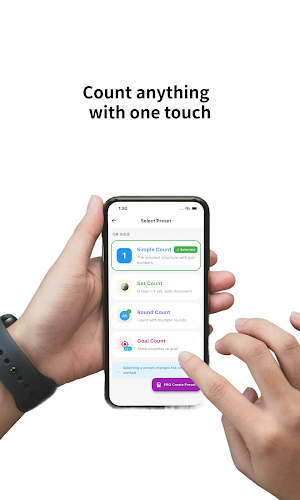
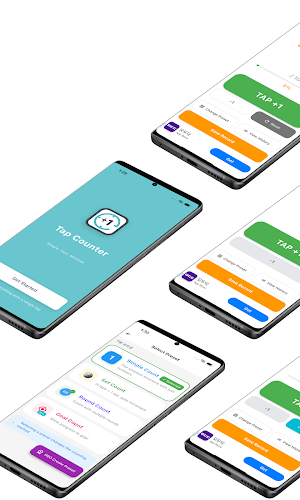
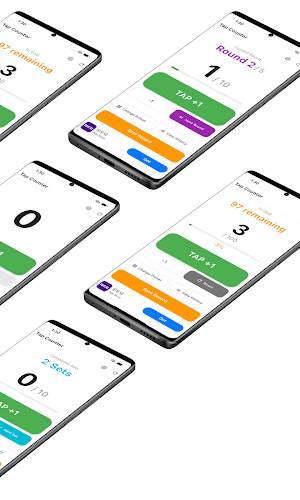


About Tap Counter - Tap & Timer
Tap Counter - The Easiest Counter & Timer App
Everything you need for counting in one place! Tap Counter is an intuitive counter and timer app that anyone can use easily.
Key Features
Tap Counter
- Tap the screen to increment numbers
- Clear large number display for easy reading
- Perfect for workout reps, visitor counts, inventory management
- Unlimited counting supported
Countdown Timer
- Freely set hours, minutes, and seconds
- Accurate timer for time management
- Great for cooking, exercise, study, meditation
- Real-time countdown display
Auto-Save History
- Automatically saves all counts and timer records
- Detailed recording of start and end times
- Review and analyze past records anytime
- History organized by date
Multilingual Support
- Perfect support for Korean and English
- Automatic switching based on system language
Simple Design
- UI focused on core features without clutter
- Intuitive button layout for quick use
- Clean white theme
- Interface anyone can understand
Recommended For
People who want to count reps during workouts
- Count push-ups, sit-ups, and other exercises
- Save records per set to track progress
People who need timers for study or work
- Improve focus with Pomodoro Technique
- Practice time management for exams
People who need precise timing while cooking
- Pasta boiling time, oven timers, etc.
- Manage multiple dishes simultaneously
People counting visitors at stores or events
- Manage entrance numbers
- Inventory counting
People who meditate or do breathing exercises
- Count breaths
- Meditation time timer
How to Use
1. Counter Mode
Press the Tap button on main screen to increment
Use refresh button at top right to reset
Records are saved automatically
2. Countdown Mode
Press COUNTDOWN button to set time
Enter hours, minutes, seconds and start
Press PAUSE button to stop during countdown
Automatically saved to history when completed
3. View History
Press History button at bottom to view all records
Counter and timer records organized chronologically
Detailed start/end time for each record
Why Choose Tap Counter?
Completely Free: All features provided for free
Light and Fast: Quick execution without unnecessary features
Offline Use: All features work without internet connection
Data Storage: All records safely stored even after closing app
Intuitive UI: Use immediately without instructions
Regular Updates: Continuous improvements and feature additions
Privacy Protection
Tap Counter does not collect any personal information. All data is stored only on your device and never transmitted externally.
Developer's Note
Tap Counter was developed with the philosophy that simplicity is the best feature. Instead of complex functions, we included only the truly necessary core features so anyone can use it easily.
When exercising, studying, cooking, working - we aim to be a tool you can pull out and use whenever and wherever you need it.
Download now and start counting smarter!
Everything you need for counting in one place! Tap Counter is an intuitive counter and timer app that anyone can use easily.
Key Features
Tap Counter
- Tap the screen to increment numbers
- Clear large number display for easy reading
- Perfect for workout reps, visitor counts, inventory management
- Unlimited counting supported
Countdown Timer
- Freely set hours, minutes, and seconds
- Accurate timer for time management
- Great for cooking, exercise, study, meditation
- Real-time countdown display
Auto-Save History
- Automatically saves all counts and timer records
- Detailed recording of start and end times
- Review and analyze past records anytime
- History organized by date
Multilingual Support
- Perfect support for Korean and English
- Automatic switching based on system language
Simple Design
- UI focused on core features without clutter
- Intuitive button layout for quick use
- Clean white theme
- Interface anyone can understand
Recommended For
People who want to count reps during workouts
- Count push-ups, sit-ups, and other exercises
- Save records per set to track progress
People who need timers for study or work
- Improve focus with Pomodoro Technique
- Practice time management for exams
People who need precise timing while cooking
- Pasta boiling time, oven timers, etc.
- Manage multiple dishes simultaneously
People counting visitors at stores or events
- Manage entrance numbers
- Inventory counting
People who meditate or do breathing exercises
- Count breaths
- Meditation time timer
How to Use
1. Counter Mode
Press the Tap button on main screen to increment
Use refresh button at top right to reset
Records are saved automatically
2. Countdown Mode
Press COUNTDOWN button to set time
Enter hours, minutes, seconds and start
Press PAUSE button to stop during countdown
Automatically saved to history when completed
3. View History
Press History button at bottom to view all records
Counter and timer records organized chronologically
Detailed start/end time for each record
Why Choose Tap Counter?
Completely Free: All features provided for free
Light and Fast: Quick execution without unnecessary features
Offline Use: All features work without internet connection
Data Storage: All records safely stored even after closing app
Intuitive UI: Use immediately without instructions
Regular Updates: Continuous improvements and feature additions
Privacy Protection
Tap Counter does not collect any personal information. All data is stored only on your device and never transmitted externally.
Developer's Note
Tap Counter was developed with the philosophy that simplicity is the best feature. Instead of complex functions, we included only the truly necessary core features so anyone can use it easily.
When exercising, studying, cooking, working - we aim to be a tool you can pull out and use whenever and wherever you need it.
Download now and start counting smarter!
What’s new
Version 1.0.7 · Updated September 6, 2026
We fixed bugs and improved usability!
Alternatives to Tap Counter - Tap & Timer
Looking for apps like Tap Counter - Tap & Timer? Here are 6 similar Android apps on Google Play. All of them are free to download.
-
Pill Reminder - Medication
-
Focus Interval-Pomodoro Timer
-
Plant Water Reminder
-
Neck Relief - Stretch Reminder
-
Stand Up Reminder - stretch
-
Sound Meter-Simple Noise Meter
| App | Rating | Price | Installs | Last updated | Compare |
|---|---|---|---|---|---|
| Tap Counter - Tap & Timer | – | Free | 100+ | Sep 6, 2026 | |
| Pill Reminder - Medication | – | Free | 10+ | May 7, 2026 | Compare |
| Focus Interval-Pomodoro Timer | – | Free | 10+ | Apr 15, 2026 | Compare |
| Plant Water Reminder | – | Free | 50+ | May 19, 2026 | Compare |
| Neck Relief - Stretch Reminder | – | Free | 10+ | Apr 3, 2026 | Compare |
| Stand Up Reminder - stretch | – | Free | 50+ | Apr 1, 2026 | Compare |
| Sound Meter-Simple Noise Meter | – | Free | 50+ | Apr 10, 2026 | Compare |
Similar apps on Google Play
- Pill Reminder - Medication
- Focus Interval-Pomodoro Timer
- Plant Water Reminder
- Neck Relief - Stretch Reminder
- Stand Up Reminder - stretch
- Sound Meter-Simple Noise Meter
- Water Reminder – Drink Tracker
- 태그셔틀 - 인스타그램 해시태그 모음 & 복사기
- Kaomoji-Emoticons & ASCII Art
- Ramen Timer-Buldak&Shin Ramen
- BalancePick-Would You Rather?
- ChromaKey Screen
- Fake Call Escape-Incoming Call
- Calmoa – 간편한 그룹 일정 관리
- Tiply-Easiest Tip calculator
- Named – Digital Business Card
- Qnote - Easy QR Maker