
Image to PDF – Photo to PDF
Productivity Contains ads
Convert Images to PDF instantly. JPG, PNG, HEIC to PDF. Fast & Offline
- Price
- Free
- No in-app purchases
- Updated
- Aug 17
- 2026 · v1.0.0
Screenshots

About Image to PDF – Photo to PDF
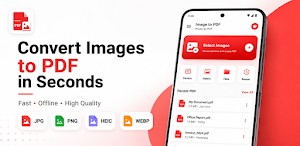
Image to PDF – Photo to PDF is a fast, lightweight, and easy-to-use PDF converter that lets you convert images into high-quality PDF documents directly on your device.
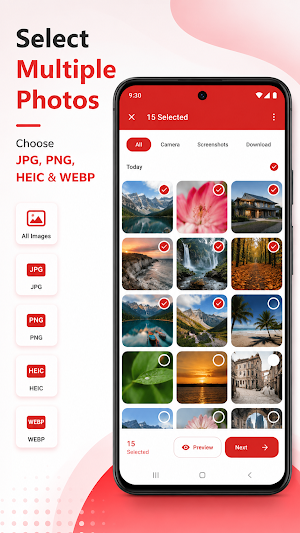
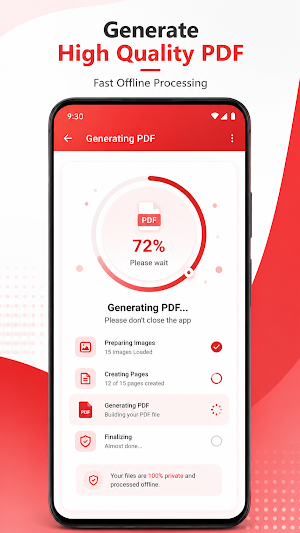
Turn your JPG, PNG, HEIC, WEBP, and other image formats into professional PDF files in just a few taps. Everything works completely offline, keeping your photos private and secure.
Whether you're creating documents, scanning receipts, saving notes, sharing homework, organizing invoices, or combining multiple photos into one PDF, Image to PDF makes the process quick and simple.
★★★★★ Features ★★★★★
📄 Image to PDF Converter
Convert multiple images into a single PDF document.
🖼️ JPG to PDF
Create high-quality PDFs from JPG images.
🌄 PNG to PDF
Convert PNG files while maintaining image quality.
📱 HEIC to PDF
Supports HEIC images captured on modern smartphones.
📂 WEBP to PDF
Convert WEBP images into PDF files instantly.
📚 Multiple Images
Combine unlimited images into one PDF.
↕️ Drag & Drop
Reorder pages before generating your PDF.
✂️ Crop Images
Crop unwanted areas before converting.
🔄 Rotate Images
Rotate photos to the correct orientation.
📐 Multiple Paper Sizes
Choose from:
• A4
• Letter
• Legal
📑 Page Orientation
• Portrait
• Landscape
📏 Adjustable Margins
Customize page margins to fit your document.
🗜️ Image Compression
Reduce PDF size while keeping excellent quality.
📤 Share PDF
Share generated PDFs via email, messaging apps, cloud storage, and more.
📂 Save PDF
Store your PDF directly on your device.
📄 Open PDF
Open generated PDF files instantly.
🌙 Dark Mode
Comfortable viewing in day or night.
⚡ Fast Performance
Optimized for speed and low memory usage.
🔒 Privacy First
Your images never leave your device.
Everything is processed locally without uploading your files.
🌐 Works Offline
No internet connection required.
★★★★★ Perfect For ★★★★★
• School assignments
• Business documents
• Office work
• Receipts
• Bills
• Invoices
• Contracts
• Notes
• Study materials
• Travel documents
• ID copies
• Certificates
• Reports
• Forms
★★★★★ Why Choose Image to PDF? ★★★★★
✓ Simple and clean interface
✓ Modern Material Design
✓ High-quality PDF output
✓ Lightweight application
✓ Fast PDF generation
✓ Offline image processing
✓ No account required
✓ Easy to use
✓ Professional results
Image to PDF – Photo to PDF is your all-in-one offline PDF creator for converting images into professional PDF documents anytime, anywhere.
Download now and create beautiful PDF files from your photos in seconds
Turn your JPG, PNG, HEIC, WEBP, and other image formats into professional PDF files in just a few taps. Everything works completely offline, keeping your photos private and secure.
Whether you're creating documents, scanning receipts, saving notes, sharing homework, organizing invoices, or combining multiple photos into one PDF, Image to PDF makes the process quick and simple.
★★★★★ Features ★★★★★
📄 Image to PDF Converter
Convert multiple images into a single PDF document.
🖼️ JPG to PDF
Create high-quality PDFs from JPG images.
🌄 PNG to PDF
Convert PNG files while maintaining image quality.
📱 HEIC to PDF
Supports HEIC images captured on modern smartphones.
📂 WEBP to PDF
Convert WEBP images into PDF files instantly.
📚 Multiple Images
Combine unlimited images into one PDF.
↕️ Drag & Drop
Reorder pages before generating your PDF.
✂️ Crop Images
Crop unwanted areas before converting.
🔄 Rotate Images
Rotate photos to the correct orientation.
📐 Multiple Paper Sizes
Choose from:
• A4
• Letter
• Legal
📑 Page Orientation
• Portrait
• Landscape
📏 Adjustable Margins
Customize page margins to fit your document.
🗜️ Image Compression
Reduce PDF size while keeping excellent quality.
📤 Share PDF
Share generated PDFs via email, messaging apps, cloud storage, and more.
📂 Save PDF
Store your PDF directly on your device.
📄 Open PDF
Open generated PDF files instantly.
🌙 Dark Mode
Comfortable viewing in day or night.
⚡ Fast Performance
Optimized for speed and low memory usage.
🔒 Privacy First
Your images never leave your device.
Everything is processed locally without uploading your files.
🌐 Works Offline
No internet connection required.
★★★★★ Perfect For ★★★★★
• School assignments
• Business documents
• Office work
• Receipts
• Bills
• Invoices
• Contracts
• Notes
• Study materials
• Travel documents
• ID copies
• Certificates
• Reports
• Forms
★★★★★ Why Choose Image to PDF? ★★★★★
✓ Simple and clean interface
✓ Modern Material Design
✓ High-quality PDF output
✓ Lightweight application
✓ Fast PDF generation
✓ Offline image processing
✓ No account required
✓ Easy to use
✓ Professional results
Image to PDF – Photo to PDF is your all-in-one offline PDF creator for converting images into professional PDF documents anytime, anywhere.
Download now and create beautiful PDF files from your photos in seconds
Alternatives to Image to PDF – Photo to PDF
Looking for apps like Image to PDF – Photo to PDF? Here are 6 similar Android apps on Google Play. All of them are free to download.
-
Easy PDF Sign
-
Photo Compressor & Resizer
-
Kasir Laundry Offline
-
Food Cost & Profit Calculator
-
Easy PDF Scanner - Scan PDF
-
Steel & Metal Calculator Pro
| App | Rating | Price | Installs | Last updated | Compare |
|---|---|---|---|---|---|
| Image to PDF – Photo to PDF | – | Free | 0+ | Aug 17, 2026 | |
| Easy PDF Sign | – | Free | 1+ | Sep 10, 2026 | Compare |
| Photo Compressor & Resizer | – | Free | 10+ | Aug 18, 2026 | Compare |
| Kasir Laundry Offline | – | Free | 10+ | Aug 18, 2026 | Compare |
| Food Cost & Profit Calculator | – | Free | 100+ | Oct 17, 2026 | Compare |
| Easy PDF Scanner - Scan PDF | – | Free | 5+ | Aug 17, 2026 | Compare |
| Steel & Metal Calculator Pro | – | Free | 10+ | Aug 17, 2026 | Compare |