
Document AI: Word DOCX Editor
Ecosocial Utility Productivity Contains ads
Edit Word .docx files with an AI copilot. Resume, invoice & letter templates.
- Downloads
- 5+
- on Google Play
- Price
- Free
- No in-app purchases
- Updated
- Sep 3
- 2026 · v2.0
Screenshots


About Document AI: Word DOCX Editor
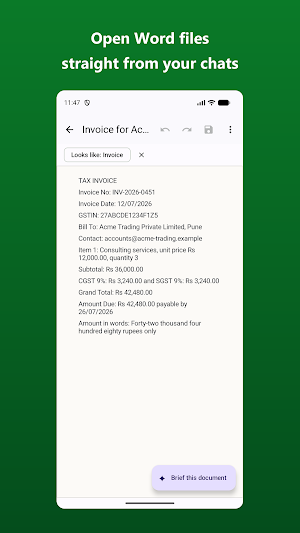
Open a Word document straight from a chat or an email, and know what's in it before you even scroll. Document AI is a fast, private .docx editor with an AI copilot — tap ✦ and the document explains itself.
EDIT REAL WORD DOCUMENTS
• Open and edit .docx files — headings, bold and colors, bulleted and numbered lists, tables and images all stay where they belong.
• Everything you don't deliberately change is preserved exactly as it was — including the parts the editor doesn't show, like headers, footnotes and comments.
• Pinch to zoom in and out. Text reflows to fit your screen, so a big document stays readable without scrolling sideways.
• Reads legacy .doc files and converts them to an editable .docx copy. Also edits .txt and Markdown (.md) files.
• Export or share any document as a clean PDF.
✦ YOUR DOCUMENT, EXPLAINED
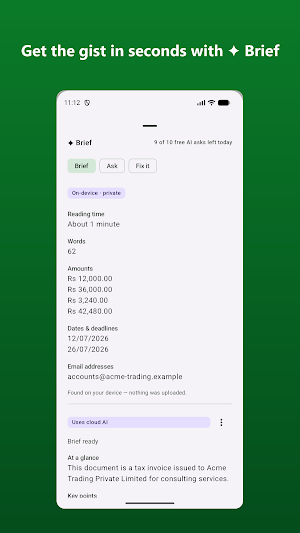
• ✦ Brief — key points, action items, dates and amounts, in seconds.
• ✦ Ask — question your document and get answers with citations that jump to the right paragraph.
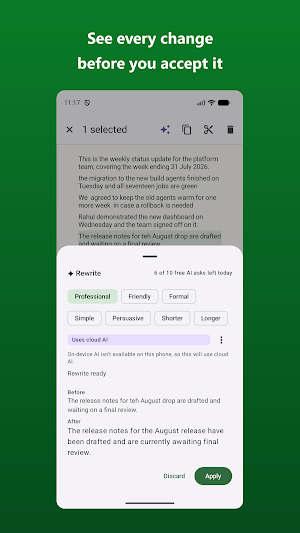
• ✦ Rewrite — pick a tone, see a before/after comparison, and apply only what you approve.
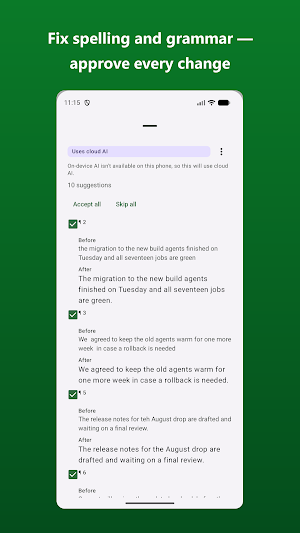
• ✦ Fix it — spelling and grammar corrections as a checklist, never a silent replace.
• ✦ Describe it — describe the document you need in one sentence and start from a real draft.
TEMPLATES FOR REAL LIFE
Resume and CV maker, marriage biodata, GST invoice, leave application, resignation letter, job offer and experience letters, rent agreement, cover letter, meeting notes and more — start from a template and make it yours.
SCAN A PRINTED PAGE
Point your camera at a printed page and it becomes text you can edit. Crop to the page first, so only what you choose is read — not the desk around it. The photo is read on your phone and never leaves it.
PRIVATE BY DESIGN
• No account, no sign-up.
• Your files stay on your device, opened through Android's own file picker. We run no servers and never see your documents.
• Document text is sent to Google's Gemini service only when you tap a ✦ action, after you've agreed once — and every AI answer says whether the cloud was used.
• Every AI answer can be reported with one tap.
FREE TO USE
A free AI allowance every day, with the option to watch an ad for more. No subscription.
Microsoft Word is a trademark of Microsoft Corporation. This app is not affiliated with or endorsed by Microsoft.
EDIT REAL WORD DOCUMENTS
• Open and edit .docx files — headings, bold and colors, bulleted and numbered lists, tables and images all stay where they belong.
• Everything you don't deliberately change is preserved exactly as it was — including the parts the editor doesn't show, like headers, footnotes and comments.
• Pinch to zoom in and out. Text reflows to fit your screen, so a big document stays readable without scrolling sideways.
• Reads legacy .doc files and converts them to an editable .docx copy. Also edits .txt and Markdown (.md) files.
• Export or share any document as a clean PDF.
✦ YOUR DOCUMENT, EXPLAINED
• ✦ Brief — key points, action items, dates and amounts, in seconds.
• ✦ Ask — question your document and get answers with citations that jump to the right paragraph.
• ✦ Rewrite — pick a tone, see a before/after comparison, and apply only what you approve.
• ✦ Fix it — spelling and grammar corrections as a checklist, never a silent replace.
• ✦ Describe it — describe the document you need in one sentence and start from a real draft.
TEMPLATES FOR REAL LIFE
Resume and CV maker, marriage biodata, GST invoice, leave application, resignation letter, job offer and experience letters, rent agreement, cover letter, meeting notes and more — start from a template and make it yours.
SCAN A PRINTED PAGE
Point your camera at a printed page and it becomes text you can edit. Crop to the page first, so only what you choose is read — not the desk around it. The photo is read on your phone and never leaves it.
PRIVATE BY DESIGN
• No account, no sign-up.
• Your files stay on your device, opened through Android's own file picker. We run no servers and never see your documents.
• Document text is sent to Google's Gemini service only when you tap a ✦ action, after you've agreed once — and every AI answer says whether the cloud was used.
• Every AI answer can be reported with one tap.
FREE TO USE
A free AI allowance every day, with the option to watch an ad for more. No subscription.
Microsoft Word is a trademark of Microsoft Corporation. This app is not affiliated with or endorsed by Microsoft.
What’s new
Version 2.0 · Updated September 3, 2026
First release: edit Word .docx files with an AI copilot, plus resume, invoice and letter templates.
Alternatives to Document AI: Word DOCX Editor
Looking for apps like Document AI: Word DOCX Editor? Here are 6 similar Android apps on Google Play. The highest rated is PDF Scanner Plus - Doc Scanner (4.6/5), and all 6 are free to download.
-
WPS Office Lite 4.2
-
pdfFiller Edit, fill, sign PDF 3.9
-
PDF Scanner Plus - Doc Scanner 4.6
-
Easy Invoice & Quotation Maker 3.9
-
Polaris Office: Edit&View, PDF 3.5
-
Zoho Sheet: Spreadsheet App 4.0
| App | Rating | Price | Installs | Last updated | Compare |
|---|---|---|---|---|---|
| Document AI: Word DOCX Editor | – | Free | 5+ | Sep 3, 2026 | |
| WPS Office Lite | 4.2 / 5 | Free | 50,000,000+ | Oct 12, 2026 | Compare |
| pdfFiller Edit, fill, sign PDF | 3.9 / 5 | Free | 5,000,000+ | Oct 22, 2026 | Compare |
| PDF Scanner Plus - Doc Scanner | 4.6 / 5 | Free | 1,000,000+ | Oct 12, 2026 | Compare |
| Easy Invoice & Quotation Maker | 3.9 / 5 | Free | 100,000+ | Feb 5, 2026 | Compare |
| Polaris Office: Edit&View, PDF | 3.5 / 5 | Free | 50,000,000+ | – | Compare |
| Zoho Sheet: Spreadsheet App | 4.0 / 5 | Free | 1,000,000+ | Oct 20, 2026 | Compare |
Similar apps on Google Play
- WPS Office Lite
- pdfFiller Edit, fill, sign PDF
- PDF Scanner Plus - Doc Scanner
- Easy Invoice & Quotation Maker
- Polaris Office: Edit&View, PDF
- Zoho Sheet: Spreadsheet App
- UPDF - AI-Powered PDF Editor
- Mobi PDF・Editor・Scanner・Reader
- KoboCollect
- Falcon PDF - Editor & Tools
- OfficeSuite Pro + PDF
- PDF Reader & Editor: Xodo
- Foxit PDF Editor
- PDFelement-PDF Editor & Reader
- Invoice Maker - Simple Invoice
- Invoice Generator - Zoho
- PDF Merge: Scan, Sign & Edit
- Regula Document Reader
- Quotation Maker
- ProBooks: Invoice Maker
- CSV File Viewer - Smart CSV
- Resume Builder - CV Engineer
- ServiceNow Agent
- FastField: Field Service Forms
- Genius Scan - PDF Scanner
- FAX Desk: Send Fax from Phone
- Microsoft 365 Admin
- ONLYOFFICE Documents