
GeoPilot GPS Maps & Navigation
Maps & Navigation In-app purchases Contains ads
Plan routes, follow driving directions and discover nearby places.
- Downloads
- 10+
- on Google Play
- Price
- Free
- In-app purchases
- Updated
- Jul 21
- 2026 · v0.1.0
Screenshots


About GeoPilot GPS Maps & Navigation
GPS Maps and Navigation: Find Your Way with Confidence
Make everyday journeys easier with GPS Maps and Navigation, a practical travel companion for driving, walking, exploring new places, and planning trips. Whether you are heading to work, meeting friends, visiting a new city, or searching for something nearby, the app helps you understand where you are and how to reach your destination.
🚗 Plan Driving and Walking Routes
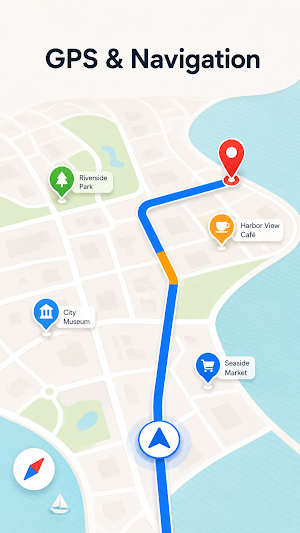
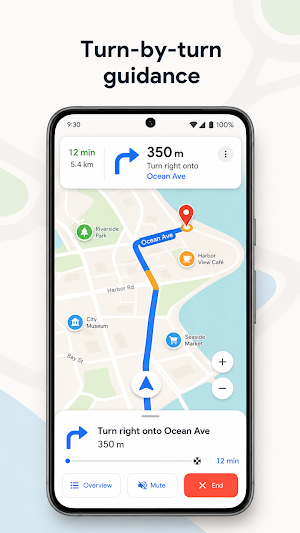
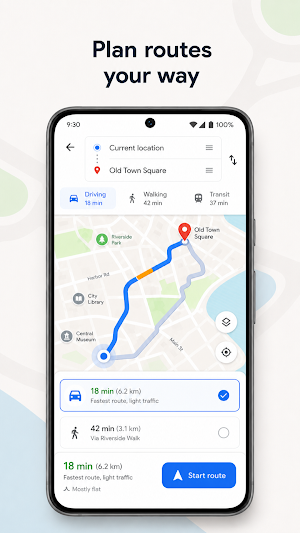
Enter your destination and use the route planner to prepare your journey. Review clear directions before leaving, compare available routes, and follow driving directions as you travel. The gps route finder connects your current position with the place you want to visit, while the gps navigation map direction keeps the selected route easy to see.
With gps maps navigation, you can plan familiar commutes or explore roads you have never travelled before. Clean navigation maps reduce unnecessary visual clutter, helping you focus on the route, upcoming turns, and important journey details.
📍 Discover Useful Places Nearby
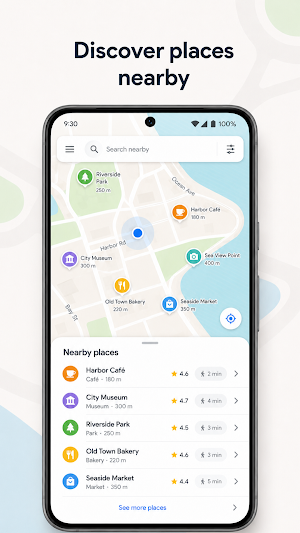
Browse maps to find cafes, restaurants, shops, parks, landmarks, and other points of interest around you. Map navigation and directions make it easier to check where a place is located and plan how to reach it. Use gps navigation when exploring a new neighborhood or looking for a convenient stop during your journey.
⭐ Save Your Important Locations
Keep meaningful places ready for future trips. Save your favorite cafe, a regular meeting point, a holiday location, or another place you would like to find again. Open your saved location, check the directions, and let the route planner prepare the journey when you are ready to go.
🤝 Share Your Whereabouts
Coordinate more easily with family and friends by sharing your whereabouts with people you trust. Choose a meeting point on the maps, review the available navigation options, and use driving directions or walking routes to move toward the destination.
🌙 Clear Design for Day and Night
The interface is designed to feel calm, modern, and readable while travelling. Dark mode provides a more comfortable map view during evening trips, while the regular theme keeps roads, routes, water, and places clearly separated during the day.
GPS Maps and Navigation combines gps tools, navigation maps, nearby discovery, saved places, location sharing, and a useful route planner in one convenient Android app.
Open the app, choose where you want to go, and enjoy a clearer way to navigate.
Make everyday journeys easier with GPS Maps and Navigation, a practical travel companion for driving, walking, exploring new places, and planning trips. Whether you are heading to work, meeting friends, visiting a new city, or searching for something nearby, the app helps you understand where you are and how to reach your destination.
🚗 Plan Driving and Walking Routes
Enter your destination and use the route planner to prepare your journey. Review clear directions before leaving, compare available routes, and follow driving directions as you travel. The gps route finder connects your current position with the place you want to visit, while the gps navigation map direction keeps the selected route easy to see.
With gps maps navigation, you can plan familiar commutes or explore roads you have never travelled before. Clean navigation maps reduce unnecessary visual clutter, helping you focus on the route, upcoming turns, and important journey details.
📍 Discover Useful Places Nearby
Browse maps to find cafes, restaurants, shops, parks, landmarks, and other points of interest around you. Map navigation and directions make it easier to check where a place is located and plan how to reach it. Use gps navigation when exploring a new neighborhood or looking for a convenient stop during your journey.
⭐ Save Your Important Locations
Keep meaningful places ready for future trips. Save your favorite cafe, a regular meeting point, a holiday location, or another place you would like to find again. Open your saved location, check the directions, and let the route planner prepare the journey when you are ready to go.
🤝 Share Your Whereabouts
Coordinate more easily with family and friends by sharing your whereabouts with people you trust. Choose a meeting point on the maps, review the available navigation options, and use driving directions or walking routes to move toward the destination.
🌙 Clear Design for Day and Night
The interface is designed to feel calm, modern, and readable while travelling. Dark mode provides a more comfortable map view during evening trips, while the regular theme keeps roads, routes, water, and places clearly separated during the day.
GPS Maps and Navigation combines gps tools, navigation maps, nearby discovery, saved places, location sharing, and a useful route planner in one convenient Android app.
Open the app, choose where you want to go, and enjoy a clearer way to navigate.
What’s new
Version 0.1.0 · Updated July 21, 2026
Hello!
Alternatives to GeoPilot GPS Maps & Navigation
Looking for apps like GeoPilot GPS Maps & Navigation? Here are 6 similar Android apps on Google Play. The highest rated is Email - All Email Login (4.4/5), and all 6 are free to download.
-
Antivirus - Mobile Security
-
iStyle Launcher and Themes
-
Email - All Email Login 4.4
-
QR Code Scanner & Generator
-
PDF Reader - Document Reader
-
AI Calculator - Math Solver
| App | Rating | Price | Installs | Last updated | Compare |
|---|---|---|---|---|---|
| GeoPilot GPS Maps & Navigation | – | Free | 10+ | Jul 21, 2026 | |
| Antivirus - Mobile Security | – | Free | 10,000+ | – | Compare |
| iStyle Launcher and Themes | – | Free | 5,000+ | Sep 14, 2026 | Compare |
| Email - All Email Login | 4.4 / 5 | Free | 1,000,000+ | Oct 15, 2026 | Compare |
| QR Code Scanner & Generator | – | Free | 1,000+ | Oct 5, 2026 | Compare |
| PDF Reader - Document Reader | – | Free | 10,000+ | Aug 12, 2026 | Compare |
| AI Calculator - Math Solver | – | Free | 5,000+ | Aug 3, 2026 | Compare |