

Freezio Figure Skating 3D app for training jumps.
Sports
Study figure skating jump technique with Freezio Figure Skating 3D guide
- Rating
- 4.5
- 98 ratings
- Downloads
- 10K+
- on Google Play
- Price
- Free
- No in-app purchases
- Updated
- Oct 26
- 2020 · v1.49
Screenshots



About Freezio Figure Skating 3D app for training jumps.
Freezio offers you more ways to fall in love with figure skating. It is a FREE application designed to help both young or adult skaters, parents and coaches understand the standards set for jumps in figure skating using high definition 3D models. Freezio is here to help you regardless of your experience. The 3D and AI technologies are brought together in Freezio to unleash your full potential. Our application shows up as a personal assistant with figure skating elements to help you organize, study, improve your training and get better on the ice rink.
• 3D models
Tailored 3D technology helps you study figure skating jumps and perfect your ice-skating moves. Skeleton view displays the anatomy of body movements, allowing you to understand the biomechanics of a figure skating jump.
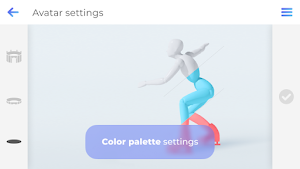
• 3 types of avatars
Freezio gives you a personalized tutorial. The avatar settings allow you to tailor 3D models as close to your body anatomy as possible. This option will breathe new life in your ice-skating training. Trajectory tracking display shows arms and skates trails. Freezio brings you to the forefront of the most innovative and fun ways to train on ice. You can personalize the colour of the trajectory trails and make your training session brighter. The understanding proper trajectory of a figure skating jump will improve your performance during the training sessions.
• Rotation in different axes
2D training tutorials or videos lack this option. While studying a jump it is better to see it from different angles. Rotate, stop or zoom at any point of the jump to discover all the hidden details of any figure skating element. Freezio helps you improve your GOE by showing you every figure skating jump in detail.
• Speed settings
You are here to get better at figure skating. Avoid missing key moments, adapt video playback speed, slow down the animation or scroll through the video frame by frame. Perfect your ice skating moves as you study the jump element by pausing or rewinding at any moment. Freezio’s enables you to move through the animation both backwards and forwards at any speed and angle. This is different from classic video rewind where all details of the element get lost because your only option is to repeatedly watch the move going forward.
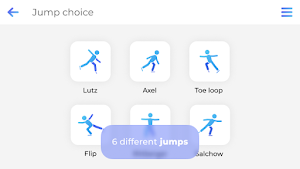
• Many different jumps
Axel, Flip, Loop, Lutz, Salchow and Toe Loop your way around the ice-skating rink. Animated tutorials of many different ISU approved jumps will help you jump to the top of the world skating ranks! Choose from both edge jumps and toe jumps to come up with your skating routine.
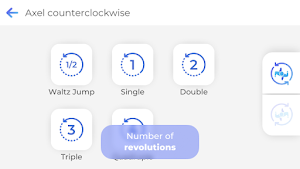
• Number of revolutions
Choose the number of revolutions and study any figure skating jump at your own pace. Freezio is packed with options for both beginners and professional athletes. Freezio helps coaches to manage students’ progress with personalized feedback.
• Background and camera settings
Choose and adapt three different backgrounds depending on your preference: plain ice, ice rink or ice palace. The default camera setting follows the animated model, but you can adapt this to see the figure skating jump from the perspective of the coach, judge or audience.
• Sketch mode
Allows you to draw and annotate on the screenshots. Stop the animation at any point in time, rotate it in the angle needed, zoom in or out and then take a screenshot. Write your notes, measure angles, share on social media, send to a friend, a student or a coach via messenger.
Note:
Participating in figure skating has risks. Freezio is a training manual. While all elements of the jumps were made with recommendations of the highly qualified coaches, they are NOT replacing professional instruction or trainer! Improper use of Freezio may result in bodily harm! Freezio is not responsible for injuries resulting from (direct or indirect) use of this app. Pay attention to the surroundings and your skating skills level to avoid harming yourself or others.
Found a bug? Report it and help make Freezio better!
E-mail: [email protected]
• 3D models
Tailored 3D technology helps you study figure skating jumps and perfect your ice-skating moves. Skeleton view displays the anatomy of body movements, allowing you to understand the biomechanics of a figure skating jump.
• 3 types of avatars
Freezio gives you a personalized tutorial. The avatar settings allow you to tailor 3D models as close to your body anatomy as possible. This option will breathe new life in your ice-skating training. Trajectory tracking display shows arms and skates trails. Freezio brings you to the forefront of the most innovative and fun ways to train on ice. You can personalize the colour of the trajectory trails and make your training session brighter. The understanding proper trajectory of a figure skating jump will improve your performance during the training sessions.
• Rotation in different axes
2D training tutorials or videos lack this option. While studying a jump it is better to see it from different angles. Rotate, stop or zoom at any point of the jump to discover all the hidden details of any figure skating element. Freezio helps you improve your GOE by showing you every figure skating jump in detail.
• Speed settings
You are here to get better at figure skating. Avoid missing key moments, adapt video playback speed, slow down the animation or scroll through the video frame by frame. Perfect your ice skating moves as you study the jump element by pausing or rewinding at any moment. Freezio’s enables you to move through the animation both backwards and forwards at any speed and angle. This is different from classic video rewind where all details of the element get lost because your only option is to repeatedly watch the move going forward.
• Many different jumps
Axel, Flip, Loop, Lutz, Salchow and Toe Loop your way around the ice-skating rink. Animated tutorials of many different ISU approved jumps will help you jump to the top of the world skating ranks! Choose from both edge jumps and toe jumps to come up with your skating routine.
• Number of revolutions
Choose the number of revolutions and study any figure skating jump at your own pace. Freezio is packed with options for both beginners and professional athletes. Freezio helps coaches to manage students’ progress with personalized feedback.
• Background and camera settings
Choose and adapt three different backgrounds depending on your preference: plain ice, ice rink or ice palace. The default camera setting follows the animated model, but you can adapt this to see the figure skating jump from the perspective of the coach, judge or audience.
• Sketch mode
Allows you to draw and annotate on the screenshots. Stop the animation at any point in time, rotate it in the angle needed, zoom in or out and then take a screenshot. Write your notes, measure angles, share on social media, send to a friend, a student or a coach via messenger.
Note:
Participating in figure skating has risks. Freezio is a training manual. While all elements of the jumps were made with recommendations of the highly qualified coaches, they are NOT replacing professional instruction or trainer! Improper use of Freezio may result in bodily harm! Freezio is not responsible for injuries resulting from (direct or indirect) use of this app. Pay attention to the surroundings and your skating skills level to avoid harming yourself or others.
Found a bug? Report it and help make Freezio better!
E-mail: [email protected]
What’s new
Version 1.49 · Updated October 26, 2020
* We added an option of saving a screenshot on your device. * We fixed the bug of icons colour change in jumps selection section. * We fixed the bug of avatar control after the colour scheme change. * We fixed the bug which appeared when sharing on Xiaomi devices.
User reviews

Amazing for figure skaters

AWESOME APP!!! This helped me a lot!

Awesome!! I feel like this app helped me with ice skating bc at first I struggled and then I saw this app and I was SISTER SHOOK :3

This app is great! It has helped me a ton with my double jumps. I like it because it goes all the way up to quadruple jumps. It also does lefty and righty versions.

Best app!!!

I love it because I do ice skating
Frequently asked questions
What is Freezio Figure Skating 3D app?
Freezio Figure Skating 3D app is a FREE application designed to help skaters, parents, and coaches understand the standards set for jumps in figure skating using high definition 3D models.
Who can use Freezio Figure Skating 3D app?
Freezio Figure Skating 3D app is designed to help both young and adult skaters, parents, and coaches, regardless of their experience level.
What are the features of Freezio Figure Skating 3D app?
The features of Freezio Figure Skating 3D app include tailored 3D models for studying figure skating jumps, personalized avatars, rotation in different axes, speed settings, tutorials for different jumps, options to choose the number of revolutions, background and camera settings, and sketch mode.
How can Freezio Figure Skating 3D app help improve skating performance?
Freezio Figure Skating 3D app helps improve skating performance by providing visual aids, personalized tutorials, and the ability to study jumps from different angles. It also allows users to adjust the speed of video playback, pause or rewind animations, and draw and annotate on screenshots for better understanding and analysis.
Is Freezio Figure Skating 3D app a replacement for professional instruction or a trainer?
No, Freezio Figure Skating 3D app is not a replacement for professional instruction or a trainer. While it provides valuable training resources, it is important to receive proper instruction and guidance from qualified coaches.
Are there any risks involved in using Freezio Figure Skating 3D app?
Yes, participating in figure skating has risks. Freezio Figure Skating 3D app is a training manual, but improper use may result in bodily harm. Users should always pay attention to their surroundings and their own skating skills level to avoid harming themselves or others.
How can I report a bug in Freezio Figure Skating 3D app?
To report a bug in Freezio Figure Skating 3D app, you can send an email to [email protected]. Your feedback will help make the app better.
Alternatives to Freezio Figure Skating 3D app for training jumps.
Looking for apps like Freezio Figure Skating 3D app for training jumps.? Here are 6 similar Android apps on Google Play. The highest rated is Gotta Yoga (4.6/5), and all 6 are free to download.
-
Ballet Workout Dance & Stretch 2.9
-
INSIGHT KIDNEY
-
Equisense Inside 4.3
-
Equilab: Horse & Riding App 4.5
-
Ridely - Improve your riding 4.3
-
Gotta Yoga 4.6
| App | Rating | Price | Installs | Last updated | Compare |
|---|---|---|---|---|---|
| Freezio Figure Skating 3D app for training jumps. | 4.5 / 5 | Free | 10,000+ | Oct 26, 2020 | |
| Ballet Workout Dance & Stretch | 2.9 / 5 | Free | 10,000+ | Sep 30, 2020 | Compare |
| INSIGHT KIDNEY | – | Free | 50,000+ | Apr 7, 2026 | Compare |
| Equisense Inside | 4.3 / 5 | Free | 100,000+ | Jul 28, 2026 | Compare |
| Equilab: Horse & Riding App | 4.5 / 5 | Free | 500,000+ | Oct 17, 2026 | Compare |
| Ridely - Improve your riding | 4.3 / 5 | Free | 100,000+ | Aug 17, 2026 | Compare |
| Gotta Yoga | 4.6 / 5 | Free | 100,000+ | – | Compare |