
Photo Collage & Pic Grid Maker
iStack Photography Contains ads
Make photo grids & collages with filters, stickers, text & custom frames.
- Downloads
- 488+
- on Google Play
- Price
- Free
- No in-app purchases
- Updated
- Apr 1
- 2026 · v1.0.0
Screenshots
About Photo Collage & Pic Grid Maker
Turn your photos into stunning collages in seconds — pick a layout, drop in your pictures, and customize everything from borders to filters with no limits.
📐 COLLAGE LAYOUTS & PHOTO GRID
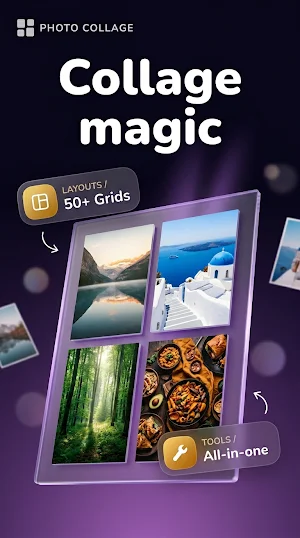
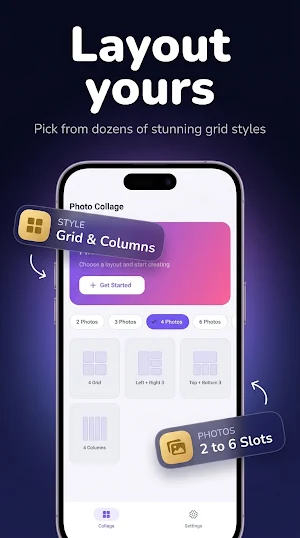
Build beautiful photo grid collages with 500+ layout templates. Choose from 2-photo, 4-photo, 6-photo, and 9-photo grid arrangements. Browse the layout picker and tap any collage template to start instantly — perfect for birthday collages, anniversary memories, graduation photos, or everyday moments.
🖼️ FRAMES & BORDER EDITOR
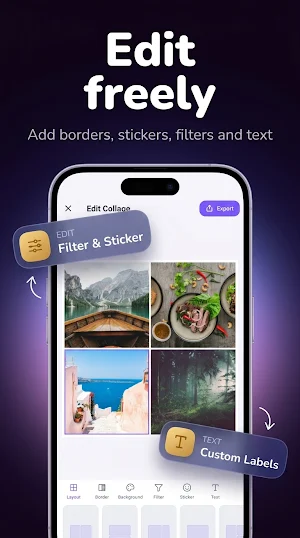
Customize your collage frame with full border controls — adjust frame width, corner radius, and frame color. From thin minimal borders to bold colored frames, every photo grid collage looks unique and personal.
🎨 BACKGROUNDS & COLORS
Set any solid color or custom pattern as your collage background. Mix your background with your photos to create cohesive, professional-looking picture collages every time.
✨ PHOTO FILTERS & EFFECTS
Apply photo filters to your entire collage or individual photos. Choose from brightness, contrast, saturation, and sepia presets to make every photo look its best before it goes into your grid.
🎭 STICKERS & DECORATION
Add fun, draggable sticker elements directly onto your collage. Layer stickers over photos, resize, and reposition freely — great for birthday collage pics, memory collages, and creative social media posts.
✍️ ADD TEXT TO YOUR COLLAGE
Write anything on your collage with the built-in text editor. Choose fonts, pick text colors, and drag text wherever you want. Add captions, quotes, dates, and names to create personal photo grids with text.
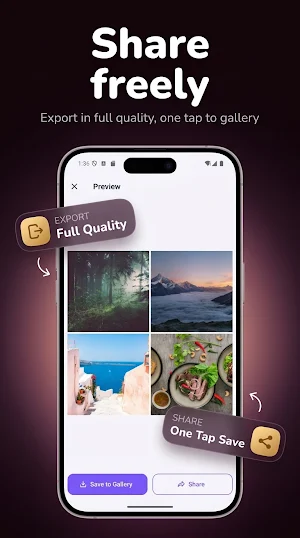
📤 HIGH-RESOLUTION EXPORT & SHARE
Save your finished collage in high resolution with format and quality options. Share directly to social media and messaging apps — no watermark, no quality loss.
HOW IT WORKS
1. Select photos from your gallery
2. Pick your collage layout or photo grid template
3. Adjust borders, backgrounds, filters, stickers, and text
4. Export and share your picture collage
Perfect for creating collages for social media posts, preserving family memories, or making creative photo grids for any occasion. Download and start making beautiful photo collages today.
📐 COLLAGE LAYOUTS & PHOTO GRID
Build beautiful photo grid collages with 500+ layout templates. Choose from 2-photo, 4-photo, 6-photo, and 9-photo grid arrangements. Browse the layout picker and tap any collage template to start instantly — perfect for birthday collages, anniversary memories, graduation photos, or everyday moments.
🖼️ FRAMES & BORDER EDITOR
Customize your collage frame with full border controls — adjust frame width, corner radius, and frame color. From thin minimal borders to bold colored frames, every photo grid collage looks unique and personal.
🎨 BACKGROUNDS & COLORS
Set any solid color or custom pattern as your collage background. Mix your background with your photos to create cohesive, professional-looking picture collages every time.
✨ PHOTO FILTERS & EFFECTS
Apply photo filters to your entire collage or individual photos. Choose from brightness, contrast, saturation, and sepia presets to make every photo look its best before it goes into your grid.
🎭 STICKERS & DECORATION
Add fun, draggable sticker elements directly onto your collage. Layer stickers over photos, resize, and reposition freely — great for birthday collage pics, memory collages, and creative social media posts.
✍️ ADD TEXT TO YOUR COLLAGE
Write anything on your collage with the built-in text editor. Choose fonts, pick text colors, and drag text wherever you want. Add captions, quotes, dates, and names to create personal photo grids with text.
📤 HIGH-RESOLUTION EXPORT & SHARE
Save your finished collage in high resolution with format and quality options. Share directly to social media and messaging apps — no watermark, no quality loss.
HOW IT WORKS
1. Select photos from your gallery
2. Pick your collage layout or photo grid template
3. Adjust borders, backgrounds, filters, stickers, and text
4. Export and share your picture collage
Perfect for creating collages for social media posts, preserving family memories, or making creative photo grids for any occasion. Download and start making beautiful photo collages today.
What’s new
Version 1.0.0 · Updated April 1, 2026
First Release
Alternatives to Photo Collage & Pic Grid Maker
Looking for apps like Photo Collage & Pic Grid Maker? Here are 6 similar Android apps on Google Play. All of them are free to download.
-
AR Measure: Tape Measure Tool
-
Home Design 3D: Floor Plan
-
Hearing Amplifier: Sound Boost
-
Mirror: Phone Mirror & Light
-
Live Earth Map: Satellite GPS
-
Funky Smiles: Live Wallpaper
| App | Rating | Price | Installs | Last updated | Compare |
|---|---|---|---|---|---|
| Photo Collage & Pic Grid Maker | – | Free | 100+ | Apr 1, 2026 | |
| AR Measure: Tape Measure Tool | – | Free | 500+ | Apr 4, 2026 | Compare |
| Home Design 3D: Floor Plan | – | Free | 100+ | Mar 26, 2026 | Compare |
| Hearing Amplifier: Sound Boost | – | Free | 100+ | Mar 28, 2026 | Compare |
| Mirror: Phone Mirror & Light | – | Free | 100+ | Mar 24, 2026 | Compare |
| Live Earth Map: Satellite GPS | – | Free | 100+ | Mar 21, 2026 | Compare |
| Funky Smiles: Live Wallpaper | – | Free | 100+ | Apr 1, 2026 | Compare |
Similar apps on Google Play
- AR Measure: Tape Measure Tool
- Home Design 3D: Floor Plan
- Hearing Amplifier: Sound Boost
- Mirror: Phone Mirror & Light
- Live Earth Map: Satellite GPS
- Funky Smiles: Live Wallpaper
- Photo Vault – Calculator Lock
- Sweet Camera: Beauty Cam
- Speed Test: Download & Upload
- Home Workout: No Equipment Gym
- Birthday Cards: Maker & Wishes
- Guitar Tuner: Chromatic Pitch
- Watch Faces — Minimal Wear OS
- Speaker Cleaner – Water Eject
- Time Warp Scan: Warp Camera
- Kawaii Aesthetic Wallpaper HD
- Step Counter - Pedometer
- Neon Clock Live Wallpaper
- Wedding Invitation: Card Maker
- Sticker Maker: Photo & Emoji
- LED Banner – Text Scroller
- GPS Speedometer & Trip Tracker
- Cut Paste Photo Editor: Eraser
- Color Picker & Detector
- Edge Lighting – Live Wallpaper
- Screen Mirroring – TV Miracast
- Font Generator: Stylish Text
- NFC Card Reader: EMV & Wallet
- GPS Photo with Location Stamp
- Signature Maker: Sign PDF
- PDF Scanner: Image to PDF, OCR
- Compass: GPS Direction Finder
- Translate: Voice & Camera Scan
- Document Reader – Word & Docs
- Office Reader: PDF & Documents
- Голос Команды для Алису