
Cut Paste Photo Editor: Eraser
iStack Photography Contains ads
Cut and paste photos, remove background & combine images — made simple.
- Downloads
- 1.3K+
- on Google Play
- Price
- Free
- No in-app purchases
- Updated
- Mar 26
- 2026 · v1.0.0
Screenshots

About Cut Paste Photo Editor: Eraser
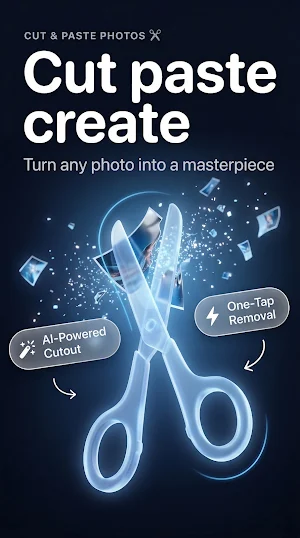
Stop cutting your creativity short. Cut Paste Photo Editor is the fastest way to cut any object from a photo and paste it into another — with pixel-level precision that makes your edits look real.
Whether you want to cut and paste photos for fun, remove a background in seconds, or build a professional-looking composition from scratch, this app gives you complete control from the first tap.
✂️ Cut anything, paste it anywhere
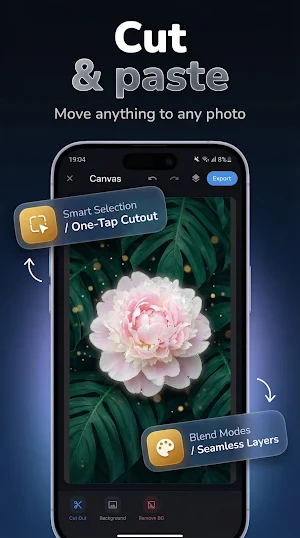
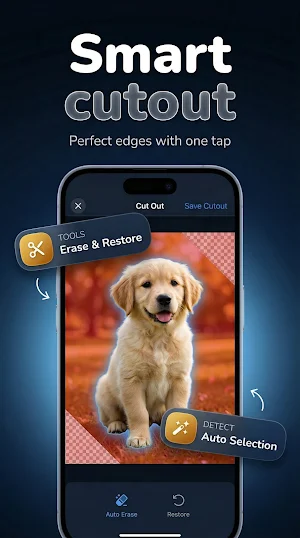
Select any subject with AI-powered auto-detection or use the manual brush for precision cuts. Cut out pictures, people, objects, pets, products — anything. Then paste your cutout photo into any background or layer it over another image instantly. Copy paste photos between compositions without quality loss.
🖼️ Remove background instantly
The built-in background eraser strips backgrounds automatically using ML segmentation — or manually erase exactly what you want to remove. Clean transparent backgrounds in seconds. Perfect for product photos, profile pictures, and creative designs.
🎨 Layer editor & compositing
Combine photos and create multi-layer compositions with full transform control — move, scale, and rotate each layer independently. Edit 2 photos together, blend images, and merge elements from different photos into one seamless result. Pic overlay and pic merge tools let you stack and adjust layers with precision.
🎛️ Photo editing tools built in
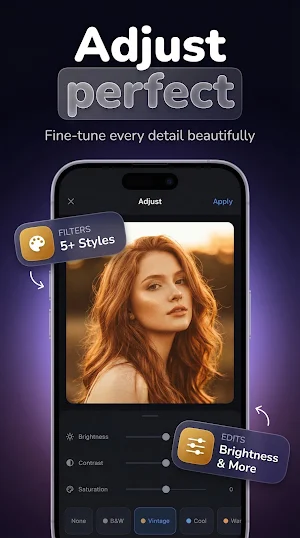
Fine-tune every composition with filters, brightness, contrast, and saturation controls. The cut paste photo editor gives you everything in one app — no switching between tools, no quality loss from exports.
💾 Save and resume anytime
Your projects save automatically. Cut out pictures, build your composition, save it, come back later, and keep editing — no re-importing required. Export at full quality in your preferred format and share instantly.
Perfect for:
• Cut and paste photo editing for social media
• Background eraser for product and profile photos
• Photo face cut and paste — move subjects between photos
• Combine photos and merge multiple images
• Image combiner for creative photo compositions
• Copy paste photo workflows for creative projects
• Cropping, trimming, and cut split adjustments
Download Cut Paste Photo Editor and start creating photos that look exactly the way you imagined them.
Whether you want to cut and paste photos for fun, remove a background in seconds, or build a professional-looking composition from scratch, this app gives you complete control from the first tap.
✂️ Cut anything, paste it anywhere
Select any subject with AI-powered auto-detection or use the manual brush for precision cuts. Cut out pictures, people, objects, pets, products — anything. Then paste your cutout photo into any background or layer it over another image instantly. Copy paste photos between compositions without quality loss.
🖼️ Remove background instantly
The built-in background eraser strips backgrounds automatically using ML segmentation — or manually erase exactly what you want to remove. Clean transparent backgrounds in seconds. Perfect for product photos, profile pictures, and creative designs.
🎨 Layer editor & compositing
Combine photos and create multi-layer compositions with full transform control — move, scale, and rotate each layer independently. Edit 2 photos together, blend images, and merge elements from different photos into one seamless result. Pic overlay and pic merge tools let you stack and adjust layers with precision.
🎛️ Photo editing tools built in
Fine-tune every composition with filters, brightness, contrast, and saturation controls. The cut paste photo editor gives you everything in one app — no switching between tools, no quality loss from exports.
💾 Save and resume anytime
Your projects save automatically. Cut out pictures, build your composition, save it, come back later, and keep editing — no re-importing required. Export at full quality in your preferred format and share instantly.
Perfect for:
• Cut and paste photo editing for social media
• Background eraser for product and profile photos
• Photo face cut and paste — move subjects between photos
• Combine photos and merge multiple images
• Image combiner for creative photo compositions
• Copy paste photo workflows for creative projects
• Cropping, trimming, and cut split adjustments
Download Cut Paste Photo Editor and start creating photos that look exactly the way you imagined them.
What’s new
Version 1.0.0 · Updated March 26, 2026
First release
Alternatives to Cut Paste Photo Editor: Eraser
Looking for apps like Cut Paste Photo Editor: Eraser? Here are 6 similar Android apps on Google Play. All of them are free to download.
-
AR Measure: Tape Measure Tool
-
Home Design 3D: Floor Plan
-
Hearing Amplifier: Sound Boost
-
Mirror: Phone Mirror & Light
-
Funky Smiles: Live Wallpaper
-
Photo Collage & Pic Grid Maker
| App | Rating | Price | Installs | Last updated | Compare |
|---|---|---|---|---|---|
| Cut Paste Photo Editor: Eraser | – | Free | 1,000+ | Mar 26, 2026 | |
| AR Measure: Tape Measure Tool | – | Free | 500+ | – | Compare |
| Home Design 3D: Floor Plan | – | Free | 100+ | Mar 26, 2026 | Compare |
| Hearing Amplifier: Sound Boost | – | Free | 100+ | Mar 28, 2026 | Compare |
| Mirror: Phone Mirror & Light | – | Free | 100+ | Mar 24, 2026 | Compare |
| Funky Smiles: Live Wallpaper | – | Free | 100+ | Apr 1, 2026 | Compare |
| Photo Collage & Pic Grid Maker | – | Free | 500+ | Apr 1, 2026 | Compare |
Similar apps on Google Play
- AR Measure: Tape Measure Tool
- Home Design 3D: Floor Plan
- Hearing Amplifier: Sound Boost
- Mirror: Phone Mirror & Light
- Funky Smiles: Live Wallpaper
- Photo Collage & Pic Grid Maker
- Photo Vault – Calculator Lock
- Sweet Camera: Beauty Cam
- Speed Test: Download & Upload
- Home Workout: No Equipment Gym
- Birthday Cards: Maker & Wishes
- Guitar Tuner: Chromatic Pitch
- Watch Faces — Minimal Wear OS
- Speaker Cleaner – Water Eject
- Time Warp Scan: Warp Camera
- Kawaii Aesthetic Wallpaper HD
- Step Counter - Pedometer
- Neon Clock Live Wallpaper
- Wedding Invitation: Card Maker
- Sticker Maker: Photo & Emoji
- LED Banner – Text Scroller
- GPS Speedometer & Trip Tracker
- Color Picker & Detector
- Edge Lighting – Live Wallpaper
- Screen Mirroring – TV Miracast
- Font Generator: Stylish Text
- NFC Card Reader: EMV & Wallet
- GPS Photo with Location Stamp
- Live Earth Map: Satellite GPS
- Signature Maker: Sign PDF
- PDF Scanner: Image to PDF, OCR
- Compass: GPS Direction Finder
- Translate: Voice & Camera Scan
- Document Reader – Word & Docs
- Office Reader: PDF & Documents
- Голос Команды для Алису