

Intent Launcher: Stay Focused
Productivity
Minimalist launcher. Hide distracting apps behind a PIN. Stay focused.
- Downloads
- 54+
- on Google Play
- Price
- Free
- No in-app purchases
- Updated
- Aug 21
- 2026 · v1.1
Screenshots

About Intent Launcher: Stay Focused
Intent Launcher is a minimalist Android launcher built around a simple idea: your phone should help you use it with intention, not pull you into it by default.
ESSENTIAL APPS, ONE DOUBLE-TAP AWAY
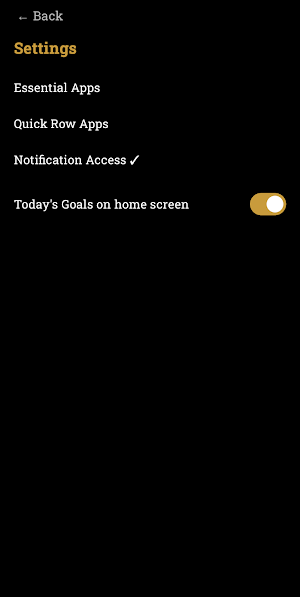
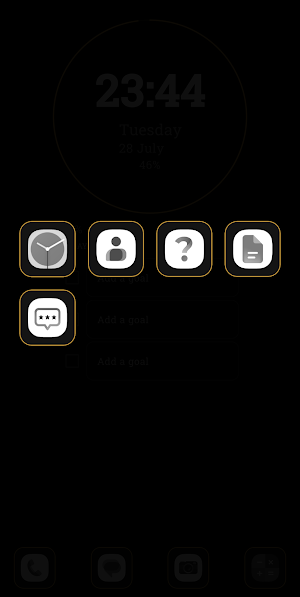
Choose a small set of essential apps in Settings. Double-tap anywhere on your home screen to bring them up instantly — grayscale icons, thin gold borders, no clutter.
EVERYTHING ELSE, ONE SWIPE AWAY
Swipe left to see every other app on your phone, with a search bar and a "Frequently used" section so you're never far from what you need.
HIDE DISTRACTING APPS BEHIND A PIN
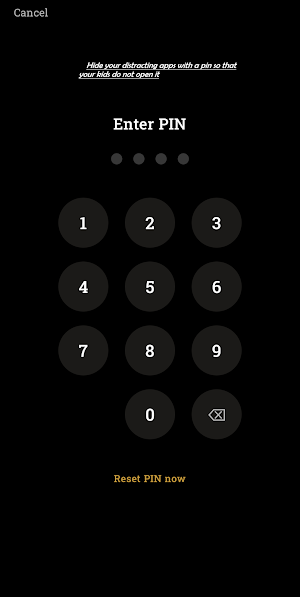
Mark specific apps as distracting, and they disappear from your main app list entirely — only reachable through a double-swipe-left and a PIN you set. Perfect if you want to keep certain apps out of easy reach for yourself, or hidden from your kids. Forgot your PIN? Resetting it takes a deliberate 15-minute wait, so a moment of impulse can't undo it.
A QUICK ROW, YOUR WAY
Pick any apps you use constantly — Phone, Messages, whatever you like — for a always-visible row at the bottom of your home screen. Swipe up on the row itself to reveal a second row of picks, up to 10 total.
TODAY'S GOALS, RIGHT ON YOUR HOME SCREEN
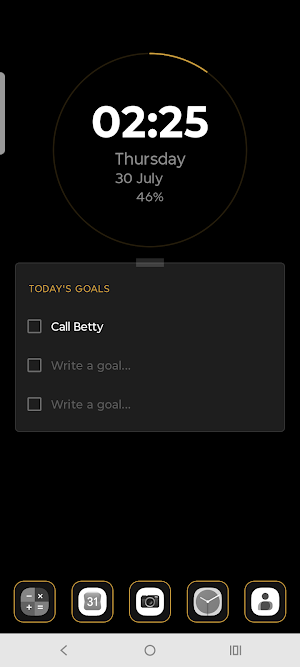
Set up to three goals for the day. Strike them off as you finish. Anything left unchecked carries forward to tomorrow, so nothing quietly gets forgotten.
SEE YOUR DAY AT A GLANCE
A thin gold ring around the clock fills in as your day passes — a calm, visual read on how much of today is gone, instead of another number to glance at.
NOTIFICATION BADGES, IF YOU WANT THEM
Optionally grant notification access to see a simple unread-count badge on the apps in your quick row and essential grid — nothing more.
BUILT TO STAY OUT OF YOUR WAY
No ads. No unnecessary permissions. Your usage data and preferences stay on your device.
Intent Launcher isn't trying to be the flashiest launcher on your phone — it's trying to be the one that helps you put it down.
ESSENTIAL APPS, ONE DOUBLE-TAP AWAY
Choose a small set of essential apps in Settings. Double-tap anywhere on your home screen to bring them up instantly — grayscale icons, thin gold borders, no clutter.
EVERYTHING ELSE, ONE SWIPE AWAY
Swipe left to see every other app on your phone, with a search bar and a "Frequently used" section so you're never far from what you need.
HIDE DISTRACTING APPS BEHIND A PIN
Mark specific apps as distracting, and they disappear from your main app list entirely — only reachable through a double-swipe-left and a PIN you set. Perfect if you want to keep certain apps out of easy reach for yourself, or hidden from your kids. Forgot your PIN? Resetting it takes a deliberate 15-minute wait, so a moment of impulse can't undo it.
A QUICK ROW, YOUR WAY
Pick any apps you use constantly — Phone, Messages, whatever you like — for a always-visible row at the bottom of your home screen. Swipe up on the row itself to reveal a second row of picks, up to 10 total.
TODAY'S GOALS, RIGHT ON YOUR HOME SCREEN
Set up to three goals for the day. Strike them off as you finish. Anything left unchecked carries forward to tomorrow, so nothing quietly gets forgotten.
SEE YOUR DAY AT A GLANCE
A thin gold ring around the clock fills in as your day passes — a calm, visual read on how much of today is gone, instead of another number to glance at.
NOTIFICATION BADGES, IF YOU WANT THEM
Optionally grant notification access to see a simple unread-count badge on the apps in your quick row and essential grid — nothing more.
BUILT TO STAY OUT OF YOUR WAY
No ads. No unnecessary permissions. Your usage data and preferences stay on your device.
Intent Launcher isn't trying to be the flashiest launcher on your phone — it's trying to be the one that helps you put it down.
What’s new
Version 1.1 · Updated August 21, 2026
Exciting options unveiled ,now you change wall papers and now it looks more colourful !
Alternatives to Intent Launcher: Stay Focused
Looking for apps like Intent Launcher: Stay Focused? Here are 3 similar Android apps on Google Play. All of them are free to download.


| App | Rating | Price | Installs | Last updated | Compare |
|---|---|---|---|---|---|
| Intent Launcher: Stay Focused | – | Free | 50+ | Aug 21, 2026 | |
| Daampatyam | – | Free | 1+ | Aug 21, 2026 | Compare |
| Svadisht | – | Free | 1+ | Jul 27, 2026 | Compare |
| Festival Pop Adventure | – | Free | 1+ | Jul 15, 2026 | Compare |