

Stopwatch Timer
Javier Salmona Tools In-app purchases Contains ads
Very easy to use stopwatch and timer
- Rating
- 4.5
- 248K ratings
- Downloads
- 24.8M+
- on Google Play
- Price
- Free
- In-app purchases
- Updated
- Sep 13
- 2026 · v3.3.18
Screenshots


About Stopwatch Timer
Hybrid Stopwatch and Timer is a simple, easy and accurate app for android that will help you to measure the time of any situation, like sports, cooking, games, education, etc.
Stopwatch (Chronometer) mode:
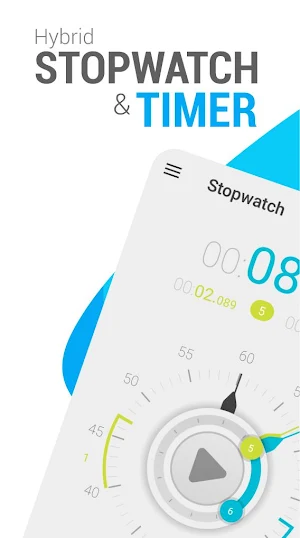
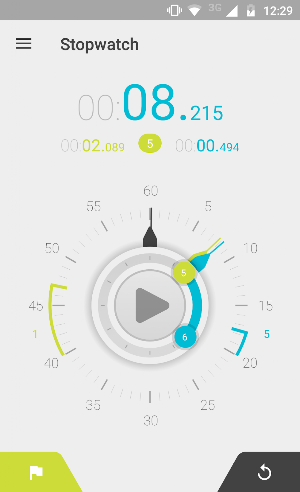
Start and stop the stopwatch pressing the button on the center of the screen, you can see the elapsed time on the top digital display and on the analog view like and old school stopwatch. To record a lap press the left button, a lap hand will be added to the analog view, and to reset press the right button. The buttons are placed to only use one hand.
Laps List:
You can access the lap list with the dropdown menu on the top or just sliding your finger to the left. On this lap list you can choose to see the lap time or total time. Lap List can be saved to the sd card, shared to social media or be emailed.
Timer (Countdown) mode:
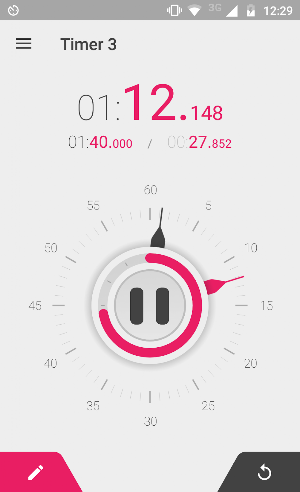
Set the timer fast and easy, dragging the second and minute hands, or use the classic input method pressing the left button. To reset press the right button, one tap will restore the last used time, long press will reset the timer to 0.
You can customize the alarm that goes off when the time is up, choose vibration, personalize sound, and alarm duration from 2 seconds to 30 minutes.
This mode has a circular arc that helps to visualize the remaining time.
Timer (Countdown) presets:
Access the Timer presets with the dropdown top menu, or slide your finger to the left. Here you can create and edit your most used timers.
The Stopwatch and Timer can also be controlled with the volume UP and DOWN keys, this option is available on the preferences screen.
Design:
The design was made to make you feel that you are holding a real stopwatch and timer on your hands, with beautiful themes and animations.
There are 12 themes to choose, with clean Holo android designs and classic retro.
FEATURES RESUME:
- Stopwatch (Chronometer) and Timer (Countdown) modes.
- Digital and Analog feedback.
- Infinite laps count.
- Send laps trough email.
- Stopwatch and Timer runs in background.
- Color themes.
- Supports multiple screens.
- Customizable Alarm duration for timer.
- Supports custom ringtones.
- Multiple audio outputs (Ringtone, Media, Alarm).
- Timer presets.
- Control Stopwatch and Timer with volume keys.
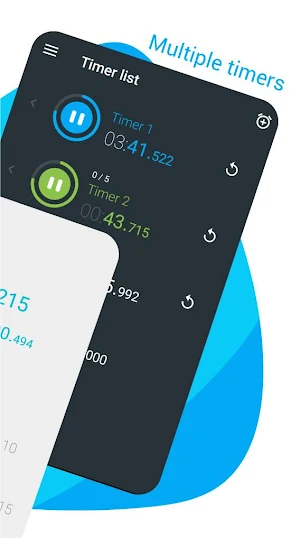
-Multiple timers at the same time.
-----------------------------------------------
if you find any bugs, or get a Force Close please email me at [email protected] with android version, app version and device.
Suggestions are welcome too ;)
Thank you!
Stopwatch (Chronometer) mode:
Start and stop the stopwatch pressing the button on the center of the screen, you can see the elapsed time on the top digital display and on the analog view like and old school stopwatch. To record a lap press the left button, a lap hand will be added to the analog view, and to reset press the right button. The buttons are placed to only use one hand.
Laps List:
You can access the lap list with the dropdown menu on the top or just sliding your finger to the left. On this lap list you can choose to see the lap time or total time. Lap List can be saved to the sd card, shared to social media or be emailed.
Timer (Countdown) mode:
Set the timer fast and easy, dragging the second and minute hands, or use the classic input method pressing the left button. To reset press the right button, one tap will restore the last used time, long press will reset the timer to 0.
You can customize the alarm that goes off when the time is up, choose vibration, personalize sound, and alarm duration from 2 seconds to 30 minutes.
This mode has a circular arc that helps to visualize the remaining time.
Timer (Countdown) presets:
Access the Timer presets with the dropdown top menu, or slide your finger to the left. Here you can create and edit your most used timers.
The Stopwatch and Timer can also be controlled with the volume UP and DOWN keys, this option is available on the preferences screen.
Design:
The design was made to make you feel that you are holding a real stopwatch and timer on your hands, with beautiful themes and animations.
There are 12 themes to choose, with clean Holo android designs and classic retro.
FEATURES RESUME:
- Stopwatch (Chronometer) and Timer (Countdown) modes.
- Digital and Analog feedback.
- Infinite laps count.
- Send laps trough email.
- Stopwatch and Timer runs in background.
- Color themes.
- Supports multiple screens.
- Customizable Alarm duration for timer.
- Supports custom ringtones.
- Multiple audio outputs (Ringtone, Media, Alarm).
- Timer presets.
- Control Stopwatch and Timer with volume keys.
-Multiple timers at the same time.
-----------------------------------------------
if you find any bugs, or get a Force Close please email me at [email protected] with android version, app version and device.
Suggestions are welcome too ;)
Thank you!
What’s new
Version 3.3.18 · Updated September 13, 2026
New stopwatch history SDK updates
User reviews

Aswome amazing

Ok

Works just as expected!

Very nice

Good

Trying it out
Frequently asked questions
What is Hybrid Stopwatch and Timer?
Hybrid Stopwatch and Timer is a simple, easy, and accurate app for android that allows you to measure the time of any situation, such as sports, cooking, games, and education.
How do I use the Stopwatch mode?
To use the Stopwatch mode, you can start and stop the stopwatch by pressing the button on the center of the screen. The elapsed time will be displayed on the top digital display and on the analog view. To record a lap, press the left button, and to reset the stopwatch, press the right button. The buttons are placed for one-handed use.
How do I access the Lap List?
You can access the Lap List by using the dropdown menu on the top or by sliding your finger to the left. In the Lap List, you can choose to see the lap time or total time. The Lap List can be saved to the SD card, shared on social media, or emailed.
How do I use the Timer mode?
To use the Timer mode, you can set the timer by dragging the second and minute hands or by using the classic input method. Pressing the left button will reset the timer, and a tap will restore the last used time. Long-pressing the left button will reset the timer to 0.
What customization options are available for the alarm?
You can customize the alarm that goes off when the time is up. You can choose vibration, personalize the sound, and set the alarm duration from 2 seconds to 30 minutes.
How do I access the Timer presets?
You can access the Timer presets by using the dropdown top menu or by sliding your finger to the left. In the Timer presets, you can create and edit your most used timers.
Can I control the Stopwatch and Timer with volume keys?
Yes, the Stopwatch and Timer can be controlled with the volume UP and DOWN keys. This option is available on the preferences screen.
How many themes are available for the app?
There are 12 themes to choose from, including clean Holo android designs and classic retro themes.
Alternatives to Stopwatch Timer
Looking for apps like Stopwatch Timer? Here are 6 similar Android apps on Google Play. The highest rated is Interval Timer Machine (4.6/5), and all 6 are free to download.
-
Stopwatch Timer Original 4.1
-
Interval Timer Machine 4.6
-
The Clock: Alarm Clock & Timer 4.5
-
Giant Stopwatch 4.3
-
Interval Timer 4.5
-
Large Countdown Timer 4.6
| App | Rating | Price | Installs | Last updated | Compare |
|---|---|---|---|---|---|
| Stopwatch Timer | 4.5 / 5 | Free | 10,000,000+ | Sep 13, 2026 | |
| Stopwatch Timer Original | 4.1 / 5 | Free | 1,000,000+ | Jul 23, 2019 | Compare |
| Interval Timer Machine | 4.6 / 5 | Free | 50,000+ | Jun 4, 2026 | Compare |
| The Clock: Alarm Clock & Timer | 4.5 / 5 | Free | 1,000,000+ | Aug 24, 2026 | Compare |
| Giant Stopwatch | 4.3 / 5 | Free | 5,000,000+ | Oct 3, 2026 | Compare |
| Interval Timer | 4.5 / 5 | Free | 50,000+ | – | Compare |
| Large Countdown Timer | 4.6 / 5 | Free | 1,000,000+ | Oct 18, 2026 | Compare |
Compare Stopwatch Timer with the top alternatives: ratings, updates, ASO score and keyword gaps →