

Alerte Plus
Htic-Net Tools
Private reporting and support application.
- Downloads
- 36+
- on Google Play
- Price
- Free
- No in-app purchases
- Updated
- Sep 10
- 2026 · v1.0.5
Screenshots


About Alerte Plus
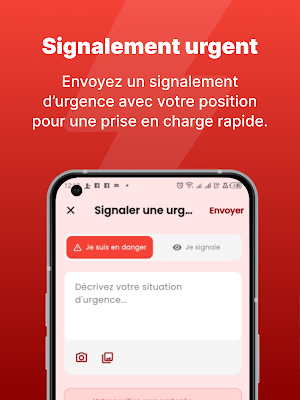
Alert Plus is an alert and reporting app that allows you to quickly notify emergency services, share your location, and track the progress of your alert.
SEND AN ALERT
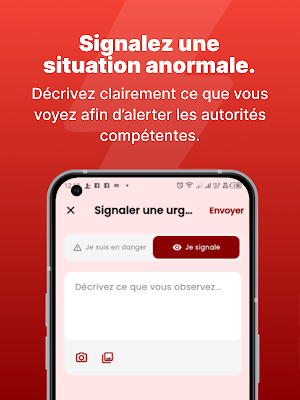
• Report a situation by indicating whether you are a victim or a witness.
• Add a description, photo, video, document, or voice message.
• Trigger an immediate SOS by pressing and holding the alert button for 5 seconds.
• Send your alert anonymously if you wish.
LOCATION SHARING DURING THE ALERT
• Your location is attached to the alert so that emergency services know where to respond.
• If you report being in danger, Alert Plus continues to share your location with emergency services during the response, even when the app is closed or not in use, so that emergency services can find you even if you are moving or being transported.
• A persistent notification indicates that location sharing is active. It automatically stops as soon as the alert is resolved or canceled, and at the latest after 2 hours.
• This feature relies on your explicit permission and remains optional: if you decline, your alert will still be sent, without a location.
COMMUNICATE WITH EMERGENCY SERVICES
• Chat directly with emergency services via messaging and attach photos, videos, documents, or voice messages.
• Write using your real name or anonymously, as you prefer.
EMERGENCY NUMBERS
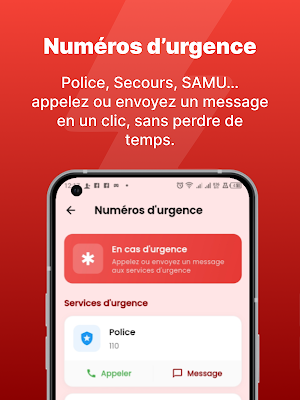
• Consult the directory of emergency numbers and call them with a single tap from the app.
INFORMATION AND ALERTS DISTRIBUTED
• Receive news and alerts from emergency services in your news feed.
• Be notified of any updates to your alerts and any new messages.
PROFILE
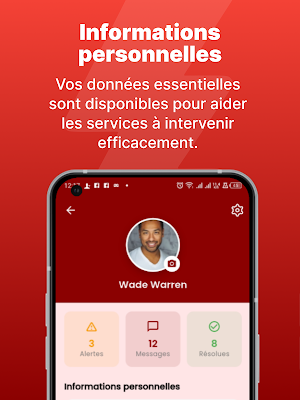
• Provide your name, blood type, and any medical conditions (allergies, diabetes, epilepsy, etc.). This information is optional and is made available to the services handling your alert to tailor your response.
• Modify or delete this information, and delete your account, at any time from the app.
SUPPORT
• Contact support from the app and track the progress of your requests.
PERMISSIONS USED
• Location: Locate your alert and track your movement during the response, including in the background (see above).
• Camera, microphone, and files: Attach photos, videos, voice messages, and documents to an alert or conversation.
• Phone: Call a number from the emergency directory.
• Notifications: Keep you informed about the status of your alerts and messages.
IMPORTANT
Alert Plus complements standard emergency channels; it does not replace them. In case of immediate danger, if there is no network coverage or if you do not get a response, directly dial the official emergency numbers for your country or locality.
SEND AN ALERT
• Report a situation by indicating whether you are a victim or a witness.
• Add a description, photo, video, document, or voice message.
• Trigger an immediate SOS by pressing and holding the alert button for 5 seconds.
• Send your alert anonymously if you wish.
LOCATION SHARING DURING THE ALERT
• Your location is attached to the alert so that emergency services know where to respond.
• If you report being in danger, Alert Plus continues to share your location with emergency services during the response, even when the app is closed or not in use, so that emergency services can find you even if you are moving or being transported.
• A persistent notification indicates that location sharing is active. It automatically stops as soon as the alert is resolved or canceled, and at the latest after 2 hours.
• This feature relies on your explicit permission and remains optional: if you decline, your alert will still be sent, without a location.
COMMUNICATE WITH EMERGENCY SERVICES
• Chat directly with emergency services via messaging and attach photos, videos, documents, or voice messages.
• Write using your real name or anonymously, as you prefer.
EMERGENCY NUMBERS
• Consult the directory of emergency numbers and call them with a single tap from the app.
INFORMATION AND ALERTS DISTRIBUTED
• Receive news and alerts from emergency services in your news feed.
• Be notified of any updates to your alerts and any new messages.
PROFILE
• Provide your name, blood type, and any medical conditions (allergies, diabetes, epilepsy, etc.). This information is optional and is made available to the services handling your alert to tailor your response.
• Modify or delete this information, and delete your account, at any time from the app.
SUPPORT
• Contact support from the app and track the progress of your requests.
PERMISSIONS USED
• Location: Locate your alert and track your movement during the response, including in the background (see above).
• Camera, microphone, and files: Attach photos, videos, voice messages, and documents to an alert or conversation.
• Phone: Call a number from the emergency directory.
• Notifications: Keep you informed about the status of your alerts and messages.
IMPORTANT
Alert Plus complements standard emergency channels; it does not replace them. In case of immediate danger, if there is no network coverage or if you do not get a response, directly dial the official emergency numbers for your country or locality.
What’s new
Version 1.0.5 · Updated September 10, 2026
Amélioration et correctifs
Alternatives to Alerte Plus
Looking for apps like Alerte Plus? Here are 6 similar Android apps on Google Play. All of them are free to download.






| App | Rating | Price | Installs | Last updated | Compare |
|---|---|---|---|---|---|
| Alerte Plus | – | Free | 10+ | Sep 10, 2026 | |
| SosHotesse | – | Free | 10+ | – | Compare |
| Intervenant | – | Free | 10+ | – | Compare |
| Al humma Imam | – | Free | 10+ | – | Compare |
| Cajou Plus | – | Free | 10+ | Jul 8, 2026 | Compare |
| VitLoger | – | Free | 10+ | – | Compare |
| Al Humma | – | Free | 50+ | Jan 20, 2026 | Compare |
Compare Alerte Plus with the top alternatives: ratings, updates, ASO score and keyword gaps →