
WiFi File Transfer: FTP Server
HiveCrawl Studio Tools
Turn your phone into a WiFi file server — share files via FTP or any browser
- Downloads
- 3.1K+
- on Google Play
- Price
- Free
- No in-app purchases
- Updated
- Sep 23
- 2026 · v1.0.14
Screenshots
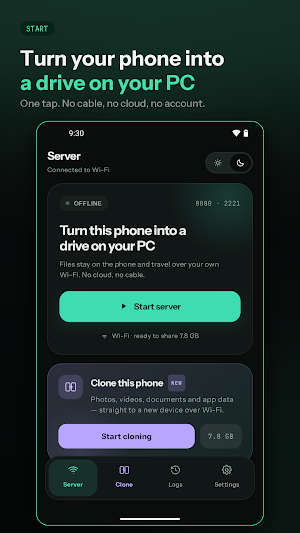
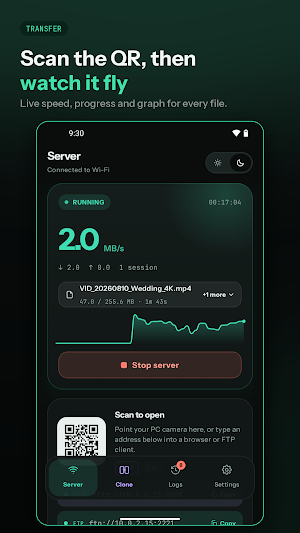
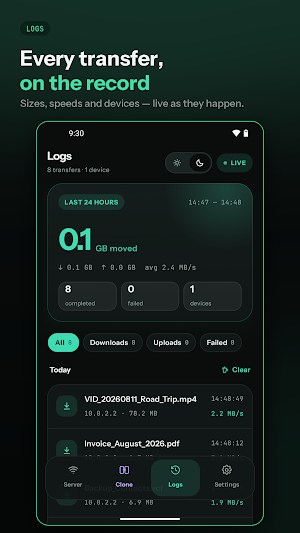


About WiFi File Transfer: FTP Server
Turn your Android phone or tablet into a powerful local file server — no cables, no cloud, no subscription required.
WiFi FTP Server lets you instantly share your device's storage with any PC, laptop, or other device on the same WiFi network. Connect using any FTP client like FileZilla or Windows Explorer, or simply open a browser URL — no software to install on the other device.
📡 FTP Server
Full FTP server runs directly on your phone
Connect from Windows Explorer, FileZilla, ES File Explorer, or any FTP client
Supports passive mode for reliable connections through routers
Optional FTPS (TLS/SSL) encryption for secure transfers
Set your own username and password
Optional anonymous access for quick sharing
Control read-only or full write access for connected clients
🌐 Browser Access
Access your files from any web browser — Chrome, Firefox, Edge, Safari
Clean, modern web interface with file icons and folder navigation
Download any file directly from the browser
Upload files by dragging and dropping or tapping to browse
No app installation needed on the PC side — just open the URL
⚡ Fast Transfers
Optimised for high-speed local network transfers
Transfer large files — videos, APKs, backups — in seconds
Progress bar shown during uploads in the browser
🔒 Privacy First
Everything stays on your local network — no cloud, no internet required
No data is collected, stored, or transmitted to any server
No account required, no sign-up, no ads
Password protection on both FTP and browser access
You choose exactly which folder is shared
🛠️ Easy to Use
One tap to start and stop the server
QR code to instantly share the server URL with other devices
Auto-start on boot option — server ready when your phone restarts
Transfer logs show every upload, download, and delete in real time
Works over WiFi, hotspot, and local ethernet
📋 How to Use
Open the app and tap Start
Your phone's IP address and port appear on screen
On your PC — open the FTP URL in FileZilla or Windows Explorer, or open the browser URL in Chrome
Browse, download, and upload files freely
Perfect for:
Transferring photos, videos, and large files between phone and PC
Sharing files with multiple devices at once without USB
Accessing your phone storage from a laptop while charging
Backing up files from your phone to a PC
Developers transferring APKs and build files wirelessly
Requires: Both devices must be on the same WiFi network.
WiFi FTP Server lets you instantly share your device's storage with any PC, laptop, or other device on the same WiFi network. Connect using any FTP client like FileZilla or Windows Explorer, or simply open a browser URL — no software to install on the other device.
📡 FTP Server
Full FTP server runs directly on your phone
Connect from Windows Explorer, FileZilla, ES File Explorer, or any FTP client
Supports passive mode for reliable connections through routers
Optional FTPS (TLS/SSL) encryption for secure transfers
Set your own username and password
Optional anonymous access for quick sharing
Control read-only or full write access for connected clients
🌐 Browser Access
Access your files from any web browser — Chrome, Firefox, Edge, Safari
Clean, modern web interface with file icons and folder navigation
Download any file directly from the browser
Upload files by dragging and dropping or tapping to browse
No app installation needed on the PC side — just open the URL
⚡ Fast Transfers
Optimised for high-speed local network transfers
Transfer large files — videos, APKs, backups — in seconds
Progress bar shown during uploads in the browser
🔒 Privacy First
Everything stays on your local network — no cloud, no internet required
No data is collected, stored, or transmitted to any server
No account required, no sign-up, no ads
Password protection on both FTP and browser access
You choose exactly which folder is shared
🛠️ Easy to Use
One tap to start and stop the server
QR code to instantly share the server URL with other devices
Auto-start on boot option — server ready when your phone restarts
Transfer logs show every upload, download, and delete in real time
Works over WiFi, hotspot, and local ethernet
📋 How to Use
Open the app and tap Start
Your phone's IP address and port appear on screen
On your PC — open the FTP URL in FileZilla or Windows Explorer, or open the browser URL in Chrome
Browse, download, and upload files freely
Perfect for:
Transferring photos, videos, and large files between phone and PC
Sharing files with multiple devices at once without USB
Accessing your phone storage from a laptop while charging
Backing up files from your phone to a PC
Developers transferring APKs and build files wirelessly
Requires: Both devices must be on the same WiFi network.
What’s new
Version 1.0.14 · Updated September 23, 2026
• Android 10: you can now pick any folder on your phone as the shared folder. Before, only the app's own folder was available. • Choosing a shared folder now checks it first. If the SD card was removed or the folder is read-only, you're told right away instead of uploads failing later.
User reviews

very easy to use thanks

Excellent..

This application is osm for mac user as it provides the feature of web based file sharing. also few thing you can add like Pagination for thousands of files Multiple File selection via mouse drag and thumbnail for videos

very useful app for data transfer ios to android mac and windows love it

Wifi transfer using browser is amazing awesome 👍😎 unbelievable 👑

The browser access feature is a game changer. Just opened the link on my laptop and could drag and drop files straight from my phone. Didn't need to install anything on the Macbook laptop.
Alternatives to WiFi File Transfer: FTP Server
Looking for apps like WiFi File Transfer: FTP Server? Here are 6 similar Android apps on Google Play. The highest rated is WeTransfer : File Transfer (4.8/5), and all 6 are free to download.
-
FX File Explorer 3.8
-
Autosync - File Sync & Backup 4.6
-
Fronius Solar.web 2.7
-
ASUS Router 4.3
-
WeTransfer : File Transfer 4.8
-
Sensi 4.4
| App | Rating | Price | Installs | Last updated | Compare |
|---|---|---|---|---|---|
| WiFi File Transfer: FTP Server | – | Free | 1,000+ | Sep 23, 2026 | |
| FX File Explorer | 3.8 / 5 | Free | 10,000,000+ | – | Compare |
| Autosync - File Sync & Backup | 4.6 / 5 | Free | 100,000+ | Oct 14, 2026 | Compare |
| Fronius Solar.web | 2.7 / 5 | Free | 1,000,000+ | Sep 30, 2026 | Compare |
| ASUS Router | 4.3 / 5 | Free | 5,000,000+ | Sep 23, 2026 | Compare |
| WeTransfer : File Transfer | 4.8 / 5 | Free | 10,000,000+ | Sep 25, 2026 | Compare |
| Sensi | 4.4 / 5 | Free | 1,000,000+ | Sep 14, 2026 | Compare |