

Contact Vault: Backup
Dongfu He Tools
Back up, export, restore, and review contacts locally. No upload or ads.
- Downloads
- 10+
- on Google Play
- Price
- Free
- No in-app purchases
- Updated
- Jul 11
- 2026 · v1.0.0
Screenshots
About Contact Vault: Backup
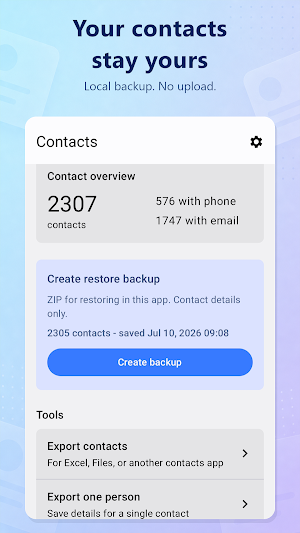
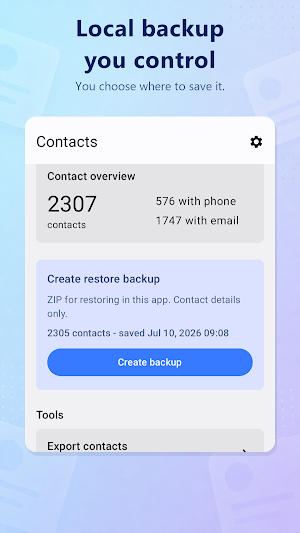
Keep control of your address book with Contact Vault, a local contact backup and export tool for Android. Your contacts stay on your device: there is no account, contact upload, advertising, analytics SDK, or internet permission.
Main features:
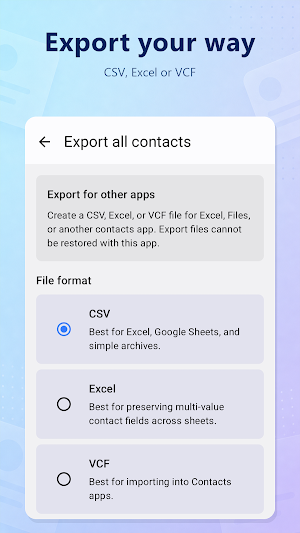
Export contacts to CSV, Excel, or VCF
Create a local ZIP backup that this app can restore
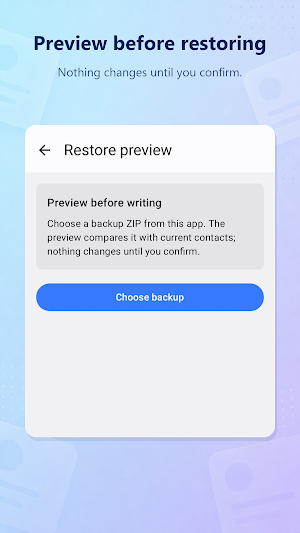
Preview new and possible existing contacts before restoring
Create a safety backup before contacts are added
Scan for possible duplicates without changing contacts
Export duplicate reports as CSV or Excel
Export one contact with the Android contact picker
You choose every input and output file with Android's system file picker. CSV, Excel, and VCF exports are for other apps and cannot be restored by Contact Vault. Version 1.0 ZIP backups are not encrypted and do not include contact photos or account identifiers, so keep them in a trusted location.
Contact access is requested only after you start a feature that needs it. Contact editing access is requested only after you review a restore preview and confirm the restore. Restore adds contacts; it does not automatically delete, overwrite, or merge existing contacts.
Main features:
Export contacts to CSV, Excel, or VCF
Create a local ZIP backup that this app can restore
Preview new and possible existing contacts before restoring
Create a safety backup before contacts are added
Scan for possible duplicates without changing contacts
Export duplicate reports as CSV or Excel
Export one contact with the Android contact picker
You choose every input and output file with Android's system file picker. CSV, Excel, and VCF exports are for other apps and cannot be restored by Contact Vault. Version 1.0 ZIP backups are not encrypted and do not include contact photos or account identifiers, so keep them in a trusted location.
Contact access is requested only after you start a feature that needs it. Contact editing access is requested only after you review a restore preview and confirm the restore. Restore adds contacts; it does not automatically delete, overwrite, or merge existing contacts.
Alternatives to Contact Vault: Backup
Looking for apps like Contact Vault: Backup? Here are 6 similar Android apps on Google Play. All of them are free to download.
-
DiceForge: RPG Dice
-
EchoNote: Speech to Text
-
ToneHarbor: Ringtones & Sounds
-
ExactPrint: Photo Print Size
-
PicTiny: Photo Compressor
-
HabitTap: Habit Tracker
| App | Rating | Price | Installs | Last updated | Compare |
|---|---|---|---|---|---|
| Contact Vault: Backup | – | Free | 10+ | Jul 11, 2026 | |
| DiceForge: RPG Dice | – | Free | 1+ | Sep 14, 2026 | Compare |
| EchoNote: Speech to Text | – | Free | 10+ | Sep 14, 2026 | Compare |
| ToneHarbor: Ringtones & Sounds | – | Free | 10+ | – | Compare |
| ExactPrint: Photo Print Size | – | Free | 1,000+ | Oct 25, 2026 | Compare |
| PicTiny: Photo Compressor | – | Free | 5+ | Jul 4, 2026 | Compare |
| HabitTap: Habit Tracker | – | Free | 10+ | – | Compare |
Similar apps on Google Play
- DiceForge: RPG Dice
- EchoNote: Speech to Text
- ToneHarbor: Ringtones & Sounds
- ExactPrint: Photo Print Size
- PicTiny: Photo Compressor
- HabitTap: Habit Tracker
- FastPal: Fasting Tracker
- DuoCam: Dual Format Camera
- Stillary: Photo Colors
- ToneFlux: Music Speed & Pitch
- ToneCraft: Audio Editor
- Ringtone downloader
- Habit Tracker
- Ringtone Maker Pro