

Nexora Device - System Info
Tools Contains ads
Check device specs, storage analysis, and network traffic in one clean app.
- Rating
- 4.8
- 171 ratings
- Downloads
- 34.3K+
- on Google Play
- Price
- Free
- No in-app purchases
- Updated
- Jul 28
- 2026 · v1.0.2
Screenshots


About Nexora Device - System Info
Nexora Device is an Android utility that brings device information, storage analysis, file categories, and network traffic into a single, clean interface—helping you understand your phone's current status and jump to the right system page when needed.
🏠 Home – Device Overview
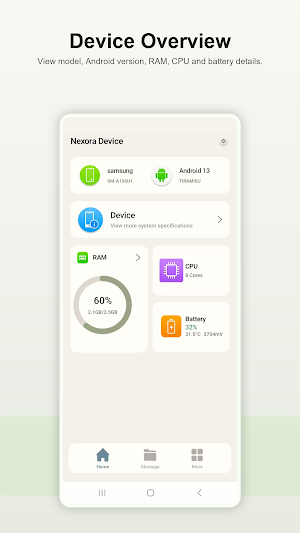
The home screen displays essential device info at a glance: brand, model, Android version, RAM usage, CPU core count, and battery status. Each area sits in its own card for quick scanning, and tapping "Device" opens a more detailed system specification list.
💾 Storage – Usage & File Categories
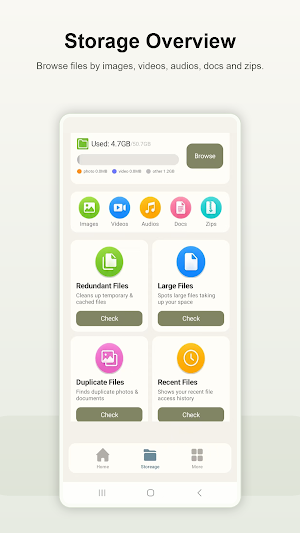
See used vs. total space at a glance, plus a Browse entry for quick navigation. Files are grouped into common categories—Images, Videos, Audios, Docs, and Zips. The same screen also lists Redundant Files, Large Files, Duplicate Files, and Recent Files for faster cleanup decisions.
📦 More – Display / APP / Network / Network Traffic
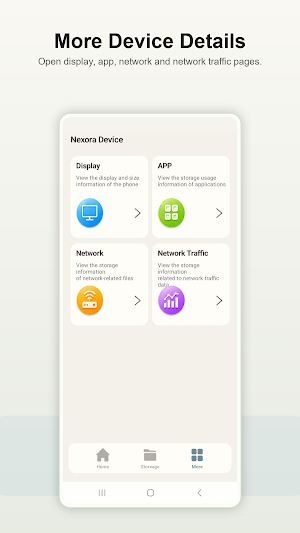
The More screen organizes four modules as individual cards:
Display – screen info and phone dimensions.
APP – per-app storage usage andthe permissions each installed app has requested, so you can review what your apps can access.
Network – network-related connection details.
Network Traffic – data usage broken down further (see below).
📶 Network Traffic
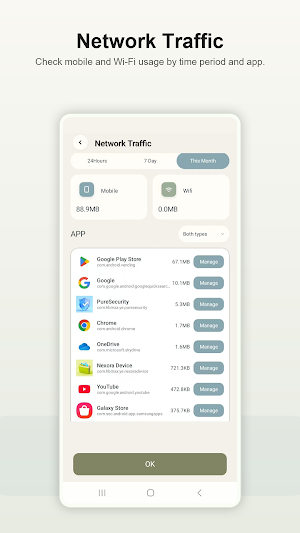
Switch between 24-Hour, 7-Day, and This Month views. Mobile and Wi-Fi usage are separated, followed by a ranked app list with traffic values (e.g., Google Play Store, Chrome, YouTube, Nexora Device) .
🧹 Redundant Files Cleanup
Items are grouped into APK, Log files, Empty folders, Temp files, Trash, Downloads, and Screenshots. Each shows file size and selection state, with a Delete button so you can review before acting.
Nexora Device is built for users who want a focused place to check phone status, storage, files, and traffic records.
🏠 Home – Device Overview
The home screen displays essential device info at a glance: brand, model, Android version, RAM usage, CPU core count, and battery status. Each area sits in its own card for quick scanning, and tapping "Device" opens a more detailed system specification list.
💾 Storage – Usage & File Categories
See used vs. total space at a glance, plus a Browse entry for quick navigation. Files are grouped into common categories—Images, Videos, Audios, Docs, and Zips. The same screen also lists Redundant Files, Large Files, Duplicate Files, and Recent Files for faster cleanup decisions.
📦 More – Display / APP / Network / Network Traffic
The More screen organizes four modules as individual cards:
Display – screen info and phone dimensions.
APP – per-app storage usage andthe permissions each installed app has requested, so you can review what your apps can access.
Network – network-related connection details.
Network Traffic – data usage broken down further (see below).
📶 Network Traffic
Switch between 24-Hour, 7-Day, and This Month views. Mobile and Wi-Fi usage are separated, followed by a ranked app list with traffic values (e.g., Google Play Store, Chrome, YouTube, Nexora Device) .
🧹 Redundant Files Cleanup
Items are grouped into APK, Log files, Empty folders, Temp files, Trash, Downloads, and Screenshots. Each shows file size and selection state, with a Delete button so you can review before acting.
Nexora Device is built for users who want a focused place to check phone status, storage, files, and traffic records.
User reviews

good
Alternatives to Nexora Device - System Info
Looking for apps like Nexora Device - System Info? Here are 6 similar Android apps on Google Play. The highest rated is Emporia Energy (4.7/5), and 5 of the 6 are free to download.
-
Cold Shower 4.5
-
Castro Premium - system info 4.7
-
Norton Cleaner – Junk removal 4.6
-
Emporia Energy 4.7
-
Zenze- Block Apps,Stay Focused 4.1
-
MeisterTask - Task Management 4.3
| App | Rating | Price | Installs | Last updated | Compare |
|---|---|---|---|---|---|
| Nexora Device - System Info | 4.8 / 5 | Free | 10,000+ | Jul 28, 2026 | |
| Cold Shower | 4.5 / 5 | Free | 1,000,000+ | Oct 20, 2025 | Compare |
| Castro Premium - system info | 4.7 / 5 | 2.99 USD | 10,000+ | Oct 12, 2026 | Compare |
| Norton Cleaner – Junk removal | 4.6 / 5 | Free | 5,000,000+ | May 20, 2026 | Compare |
| Emporia Energy | 4.7 / 5 | Free | 100,000+ | Oct 30, 2026 | Compare |
| Zenze- Block Apps,Stay Focused | 4.1 / 5 | Free | 100,000+ | Sep 9, 2026 | Compare |
| MeisterTask - Task Management | 4.3 / 5 | Free | 1,000,000+ | Aug 4, 2026 | Compare |